Make.com ClickUp Coda Task Management Automation

Automatically Sync ClickUp Tasks to Coda Docs

Every new ClickUp task instantly appears as a row in your Coda table - no manual copying required

Get This Workflow → Make.com · ClickUp · Free Template
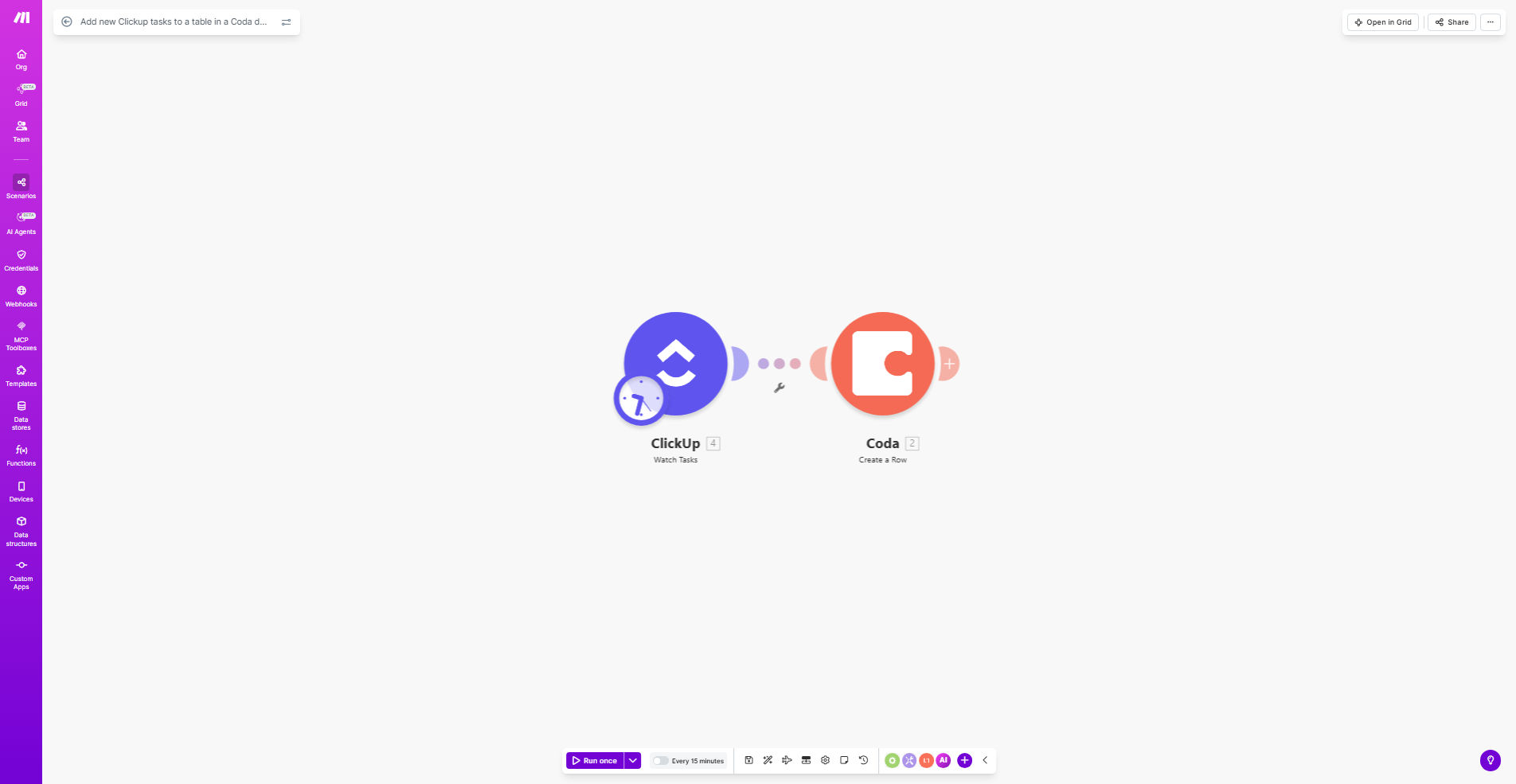
Make.com workflow diagram showing ClickUp to Coda integration

What This Workflow Does

This automation solves the common problem of maintaining duplicate task records across ClickUp (where work happens) and Coda (where documentation lives). Teams waste hours manually copying task details between platforms, risking outdated information and inconsistencies.

The workflow eliminates this friction by automatically detecting new tasks in ClickUp and adding them as rows in your specified Coda table. Task names, descriptions, assignees, due dates, and custom fields flow seamlessly between platforms, keeping your documentation perfectly synchronized with your actual work.

How It Works

1. Trigger: New ClickUp Task Detection

Make.com monitors your specified ClickUp list for newly created tasks. The moment a task appears, the workflow captures all its details including custom fields.

2. Data Transformation

The workflow maps ClickUp fields to your Coda table structure, converting task properties into the appropriate column formats. Dates become Coda date fields, assignees become person references, etc.

3. Coda Row Creation

Make.com authenticates with your Coda doc and adds the transformed task data as a new row in your designated table. The workflow handles API rate limits and retries failed attempts automatically.

Pro tip: Add a "Last Synced" column in Coda to track when each task was updated. This helps identify any sync issues at a glance.

Who This Is For

This workflow delivers the most value for:

  • Project managers who document processes in Coda but track execution in ClickUp
  • Remote teams needing real-time visibility into tasks without requiring ClickUp access
  • Consultants who share Coda docs with clients but manage work internally in ClickUp
  • Product teams maintaining living documentation that references active tasks

What You'll Need

  1. A ClickUp account with admin access to create API connections
  2. A Coda doc with a table ready to receive task data
  3. Make.com account (free tier works for basic setups)
  4. Clear mapping of which ClickUp fields should sync to which Coda columns

Quick Setup Guide

  1. Install the template from Make.com
  2. Connect your ClickUp account and select the list to monitor
  3. Connect your Coda account and select the target doc/table
  4. Map ClickUp fields to Coda columns in the workflow settings
  5. Test with sample tasks and verify the Coda output
  6. Activate the workflow for automatic syncing

Key Benefits

Eliminate duplicate data entry - Tasks appear in Coda automatically, saving 2-5 minutes per task that would otherwise be spent copying details.

Maintain documentation accuracy - Your Coda docs always reflect the current state of ClickUp tasks, preventing outdated references.

Improve stakeholder visibility - Clients and executives can view task progress in Coda without needing ClickUp access or training.

Enable powerful reporting - Combine task data with other Coda features like charts, timelines, and dashboards.

Scale processes effortlessly - As your team grows, the automation handles increasing task volume without additional effort.

Frequently Asked Questions

Common questions about ClickUp-Coda automation and integration

Syncing ClickUp tasks with Coda creates a centralized documentation system where task details automatically appear in your project documentation. This eliminates manual copying, reduces errors, and gives stakeholders real-time visibility into task progress without needing ClickUp access.

For example, a consulting firm can maintain client-facing documentation in Coda while managing actual deliverables in ClickUp. The sync ensures clients always see current task status while consultants work in their preferred tool.

You can sync task names, descriptions, assignees, due dates, statuses, priorities, custom fields, and comments. The workflow maps ClickUp fields to corresponding columns in your Coda table, maintaining data consistency across both platforms.

The exact fields available depend on your ClickUp setup. Most standard fields work out of the box, while some custom fields may require additional configuration in the workflow.

The sync happens instantly whenever a new task is created in ClickUp. Make.com detects the change immediately and pushes the task data to Coda within seconds, ensuring your documentation stays current.

For high-volume teams creating dozens of tasks per minute, the workflow automatically queues and processes syncs sequentially to avoid overloading either system.

Yes, you can configure the workflow to only sync tasks matching specific criteria like list, status, priority, or custom fields. This prevents cluttering your Coda doc with irrelevant tasks.

Common filters include syncing only tasks from a particular project, with specific tags, or assigned to certain team members. The workflow evaluates these conditions before each sync.

The workflow can be modified to backfill existing tasks during setup. You would run a one-time import of historical data before activating the real-time sync for new tasks.

This requires temporarily adjusting the workflow to process ClickUp's task history rather than just new triggers. We recommend testing with a small subset first to verify field mappings.

Make.com workflows have 99.9% uptime with error handling and retries built in. Failed syncs automatically retry and you receive notifications if manual intervention is needed.

In practice, most failures come from temporary API outages or rate limits rather than workflow errors. The system queues pending syncs during downtime and processes them when connectivity resumes.

Absolutely. GrowwStacks specializes in tailored ClickUp-Coda integrations that match your exact workflow requirements, including complex field mappings, conditional logic, and multi-directional syncs.

Our automation consultants will analyze your current processes and design a solution that:

  • Syncs only the relevant task subsets
  • Handles your custom field types
  • Includes error notifications and recovery
  • Integrates with your other tools

Need a Custom ClickUp-Coda Automation?

This free template is a starting point. Our team builds fully tailored automation systems for your specific business needs.