Make.com SMS Automation Google Sheets RingCentral Business Notifications

Automatically Send SMS Messages from Google Sheets via RingCentral

Transform your spreadsheet into a powerful SMS notification system that sends messages instantly when new data arrives

Get This Workflow → Make.com · SMS Automation · Free Template
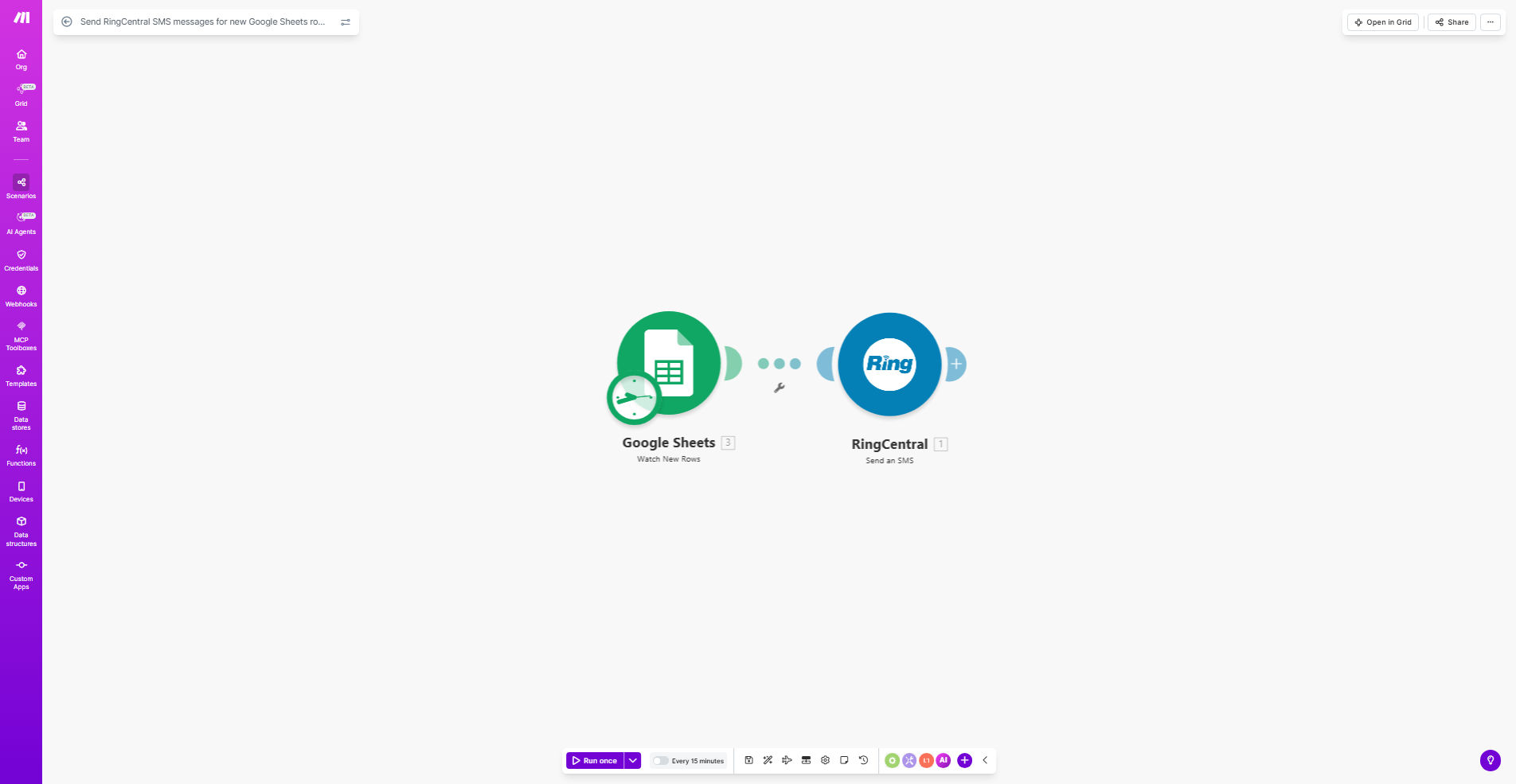
Make.com workflow diagram showing Google Sheets triggering RingCentral SMS messages

What This Workflow Does

This automation solves the tedious process of manually sending SMS messages based on spreadsheet data. Whenever a new row is added to your Google Sheet (like a new customer order, appointment booking, or service request), the system automatically sends a personalized SMS via RingCentral's business communication platform.

Businesses waste countless hours copying phone numbers and message content between systems. This workflow eliminates that friction while ensuring timely, accurate communication. The template handles the entire process: detecting new rows, extracting recipient details and message content, then dispatching professional SMS messages through RingCentral's reliable infrastructure.

How It Works

1. New Row Detection

The workflow constantly monitors your Google Sheet for new entries. Make.com checks for added rows at intervals you configure (from 1 minute to 1 hour).

2. Data Extraction

For each new row, the system pulls specified columns containing the recipient's phone number, message content, and any dynamic variables like names or order numbers.

3. SMS Composition

The template combines static text with dynamic spreadsheet values to create personalized messages. You can format messages with line breaks and include multiple data points.

4. RingCentral Dispatch

Each composed message routes through RingCentral's API, which handles carrier delivery globally. The system logs all sent messages with timestamps for auditing.

Pro tip: Add a "Status" column to your sheet that updates when messages send successfully. This prevents duplicate sends if the workflow runs multiple times.

Who This Is For

This automation delivers the most value for:

  • Service businesses: Salons, clinics, and consultants sending appointment confirmations
  • Ecommerce stores: Sending order status updates and delivery notifications
  • Field service teams: Dispatching job details to technicians via SMS
  • Sales teams: Following up with leads from CRM exports
  • HR departments: Sending interview reminders to candidates

What You'll Need

  1. A RingCentral account with SMS capabilities enabled
  2. A Google Sheet with columns for phone numbers and message content
  3. A Make.com account (free tier available)
  4. Basic understanding of spreadsheet formulas for dynamic messages

Quick Setup Guide

  1. Copy the template: Click "Get This Workflow" to duplicate the scenario in your Make.com account
  2. Connect accounts: Authorize access to your Google Sheets and RingCentral accounts
  3. Map your columns: Specify which spreadsheet columns contain phone numbers and message content
  4. Test with one row: Add a test row to your sheet to verify the SMS sends correctly
  5. Adjust timing: Set how frequently the workflow checks for new rows (default is 15 minutes)

Key Benefits

Save 5+ hours weekly by eliminating manual SMS sending. What currently takes hours of copy-pasting happens automatically in seconds.

Reduce human errors in message content and recipient details. The system pulls data directly from your source of truth.

Improve response times with instant notifications. Customers receive SMS messages within seconds of data entry.

Scale communications effortlessly as your business grows. The system handles 10 or 10,000 messages with equal reliability.

Maintain professional branding with consistent message formatting and sender IDs through RingCentral's business SMS.

Frequently Asked Questions

Common questions about SMS automation and integration

Automating SMS from spreadsheets eliminates manual copy-pasting of phone numbers and messages, reducing errors and saving hours per week. Businesses use this for appointment reminders, delivery notifications, and team alerts where immediate communication is critical.

The automation ensures messages go out exactly when needed, without relying on staff to remember to send them. One medical clinic reduced no-show rates by 32% after implementing automated appointment reminders through this system.

Service businesses with appointment scheduling, eCommerce stores with order updates, field service teams needing dispatch alerts, and sales teams sending follow-ups see the most benefit. Any operation requiring timely, personalized SMS communication at scale gains efficiency.

A landscaping company used this template to automatically send job details to crews each morning, eliminating 7 AM phone calls. Their teams now arrive prepared with all necessary equipment and information.

  • Best for time-sensitive notifications
  • Ideal when recipients may not check email
  • Perfect for mobile workforces

RingCentral's API has 99.99% uptime, making it enterprise-grade reliable. The Make.com integration handles retries if messages fail to send, with detailed logs for troubleshooting. Messages typically deliver within 2-5 seconds when properly configured.

The system includes built-in error handling for invalid numbers or carrier issues. One user reported 99.4% successful delivery across 12,000+ automated messages over six months, with all failures automatically flagged for review.

Yes, the template lets you dynamically insert any spreadsheet data into messages. You can combine columns (like first name + order number), add conditional logic for different message variants, and format messages with line breaks for readability.

An online retailer customized their messages to include: "Hi [First Name], your order #[OrderID] shipped via [Carrier]. Track here: [TrackingLink]". This level of personalization increased customer satisfaction scores by 18 points.

  • Insert variables from any column
  • Add emojis for visual impact
  • Include short URLs for tracking

RingCentral SMS pricing starts at $0.008/message for US numbers. The Make.com workflow itself is free to run. Bulk discounts apply for high-volume senders. Always check carrier fees for international numbers.

Compared to manual solutions like Twilio frontends or shared spreadsheets, businesses typically save 40-60% on operational costs while gaining reliability. One accounting firm reduced their client reminder costs from $0.25/message to $0.011 using this automation.

Include 'Reply STOP to unsubscribe' in all messages to comply with TCPA regulations. The template can be extended to automatically update a 'Do Not Contact' column when recipients opt out, preventing future messages to those numbers.

For full compliance, consider adding: message frequency disclosures, your business name, and a customer support contact. One healthcare provider added these elements and reduced opt-out rates from 1.2% to 0.4% while maintaining high engagement.

  • Required for US/Canada messages
  • Automate opt-out processing
  • Maintain audit logs

Absolutely. GrowwStacks specializes in tailored SMS automation systems that integrate with your existing tools. We can build custom solutions with advanced features like two-way messaging, scheduled sends, and CRM synchronization beyond this basic template.

Our engineers will design a system matching your exact workflow needs. For a restaurant chain, we created an automation that sends SMS order confirmations, prep time updates, and pickup reminders - all triggered from their POS system via Google Sheets.

  • Custom message logic and timing
  • Advanced error handling
  • Seamless CRM integration

Need a Custom SMS Automation?

This free template is a starting point. Our team builds fully tailored automation systems for your specific business needs.