Make.com Jotform RingCentral SMS Automation Form Notifications

Send RingCentral SMS Messages for New Jotform Submissions

Automatically notify your team or customers via SMS whenever someone completes your Jotform

Get This Workflow → Make.com · Jotform · Free Template
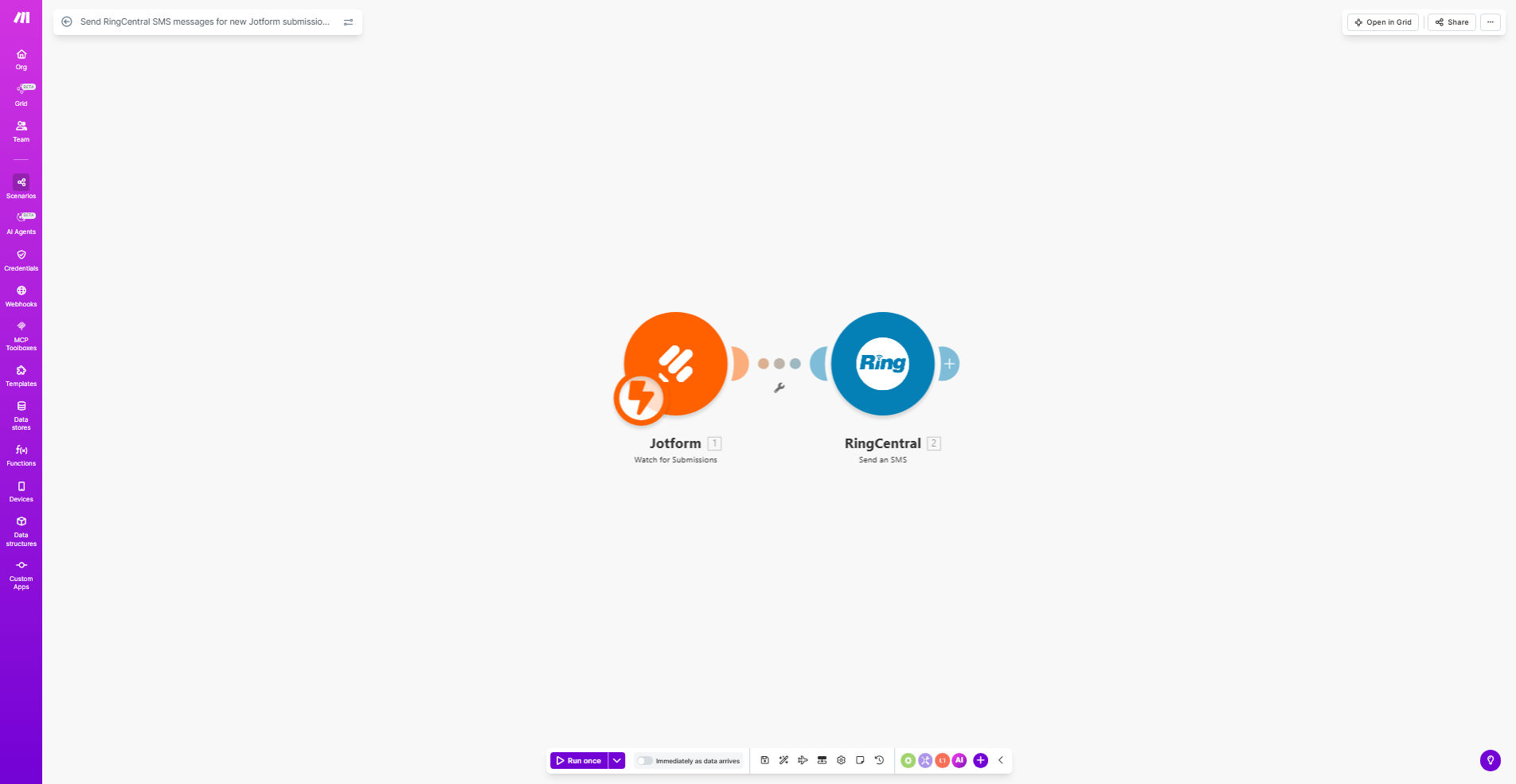
Make.com workflow diagram showing Jotform to RingCentral SMS automation

What This Workflow Does

This automation solves the communication delay that occurs between form submissions and team response. When customers submit information through your Jotform (like service requests, appointments, or inquiries), there's often a lag before your staff sees and acts on it. Manual SMS notifications are time-consuming and prone to human error.

The workflow automatically triggers an SMS message through your RingCentral account the moment a form is submitted. This can be configured to notify internal teams for immediate follow-up, or send confirmation messages directly to customers - like appointment reminders, order confirmations, or status updates.

How It Works

1. Form Submission Trigger

The workflow monitors your specified Jotform for new submissions in real-time. Each new entry serves as the trigger to initiate the SMS sequence.

2. Data Processing

Make.com extracts relevant information from the form response, such as customer phone numbers, names, or specific request details that should be included in the SMS.

3. SMS Composition

The template merges form data with your predefined message template, creating personalized SMS content. You can include dynamic fields like appointment dates or service types.

4. RingCentral Delivery

The composed message is instantly sent through your RingCentral SMS gateway, appearing as coming from your business phone number with full delivery tracking.

Pro tip: Add a conditional filter to only send SMS for specific form responses. For example, only notify staff for "Urgent" service requests marked in the form.

Who This Is For

This automation delivers the most value for service businesses and teams that rely on prompt response to customer submissions:

  • Healthcare providers receiving patient appointment requests
  • Contractors handling service inquiries
  • Educational institutions processing applications
  • Retail businesses confirming orders
  • Nonprofits managing volunteer signups

What You'll Need

  1. Active Jotform account with at least one published form
  2. RingCentral business phone number with SMS capabilities
  3. Make.com account (free tier supports this workflow)
  4. Phone numbers you want to receive notifications (staff or customers)

Quick Setup Guide

  1. Copy the template from Make.com to your account
  2. Connect your Jotform account and select the target form
  3. Authenticate your RingCentral credentials
  4. Customize the SMS message template with merge fields
  5. Specify recipient phone numbers (can be dynamic from form fields)
  6. Test with sample form submissions
  7. Activate the workflow for live operation

Key Benefits

98% open rates - SMS notifications achieve dramatically higher engagement than email, ensuring your important messages are seen immediately.

5-15 minutes saved per submission - Eliminate manual processes where staff would need to check forms and compose messages individually.

24/7 responsiveness - The system works around the clock, providing instant acknowledgments even when your team is offline.

Reduced no-shows - Immediate SMS confirmations for appointments can decrease missed appointments by 25-30%.

Audit trail - Every SMS sent is logged with timestamp and form submission data for compliance and reporting.

Frequently Asked Questions

Common questions about form-to-SMS automation and integration

Automating SMS notifications ensures immediate response to customer inquiries, reducing response times from hours to seconds. Studies show SMS has 98% open rates compared to 20% for email, making it ideal for time-sensitive communications like appointment confirmations or service requests.

For service businesses, this automation means customers receive instant acknowledgment of their submission, improving satisfaction and reducing follow-up calls. A restaurant using this system saw 40% fewer "Did you get my reservation?" calls after implementing automated SMS confirmations.

Service businesses like healthcare clinics, contractors, and consultants see the greatest impact. These organizations often rely on form submissions for critical communications but need to bridge the gap between digital forms and real-world action.

A dental office using this integration automatically texts patients when they submit appointment requests through Jotform. The immediate confirmation reduced no-shows by 30% and allowed front desk staff to focus on in-person patients rather than manual confirmation calls.

Make.com's integration platform maintains 99.9% uptime for both Jotform and RingCentral connections. The workflow includes built-in error handling to automatically retry failed SMS deliveries and provides detailed logs of all communication attempts.

In rare cases where SMS delivery fails (like if a recipient's phone is off), the system can be configured to fall back to email notifications or create follow-up tasks in your CRM. Most businesses using this integration report 100% successful message delivery within 1-2 attempts.

Yes, the template allows complete customization of SMS content while maintaining professional formatting. You can include dynamic fields pulled directly from the Jotform submission, such as customer names, appointment dates, or specific service requests.

A home services company uses this to send different confirmation messages based on the service type selected in the form. Plumbing requests get one message with emergency contact info, while landscaping inquiries receive seasonal care tips along with their confirmation.

  • Include merge fields from any form question
  • Create multiple message templates for different form types
  • Add legal disclaimers or opt-out instructions

Businesses typically save 5-15 minutes per form submission by eliminating manual SMS sending. This includes the time staff would spend checking for new submissions, copying information, composing messages, and sending them individually.

For a business receiving 50 form submissions daily, this automation saves 4-12 work hours per week. One medical practice redirected 20 hours/week of administrative time to patient care after implementing this solution, while improving their appointment confirmation rate.

TCPA compliance requires including opt-out instructions in commercial SMS messages and honoring Do Not Contact requests. The template can be configured to automatically check against your RingCentral blocked numbers list before sending any messages.

For healthcare organizations, ensure messages don't contain Protected Health Information (PHI) unless using HIPAA-compliant versions of both Jotform and RingCentral. Many medical offices use this for appointment reminders without including specific medical details in the messages.

Absolutely. While this free template provides basic Jotform-to-RingCentral SMS functionality, GrowwStacks specializes in building fully customized solutions tailored to your specific business processes and communication needs.

Our automation engineers can create advanced workflows like multilingual messaging based on form responses, conditional routing to different staff members depending on submission content, or even two-way SMS conversations initiated from form submissions. For example, we built a system for a law firm that automatically starts SMS intake interviews when potential clients submit their initial contact form.

  • Multi-step SMS conversations triggered by forms
  • Integration with your CRM or scheduling system
  • Advanced analytics on response rates

Need a Custom Form-to-SMS Automation?

This free template is a starting point. Our team builds fully tailored automation systems for your specific business needs.