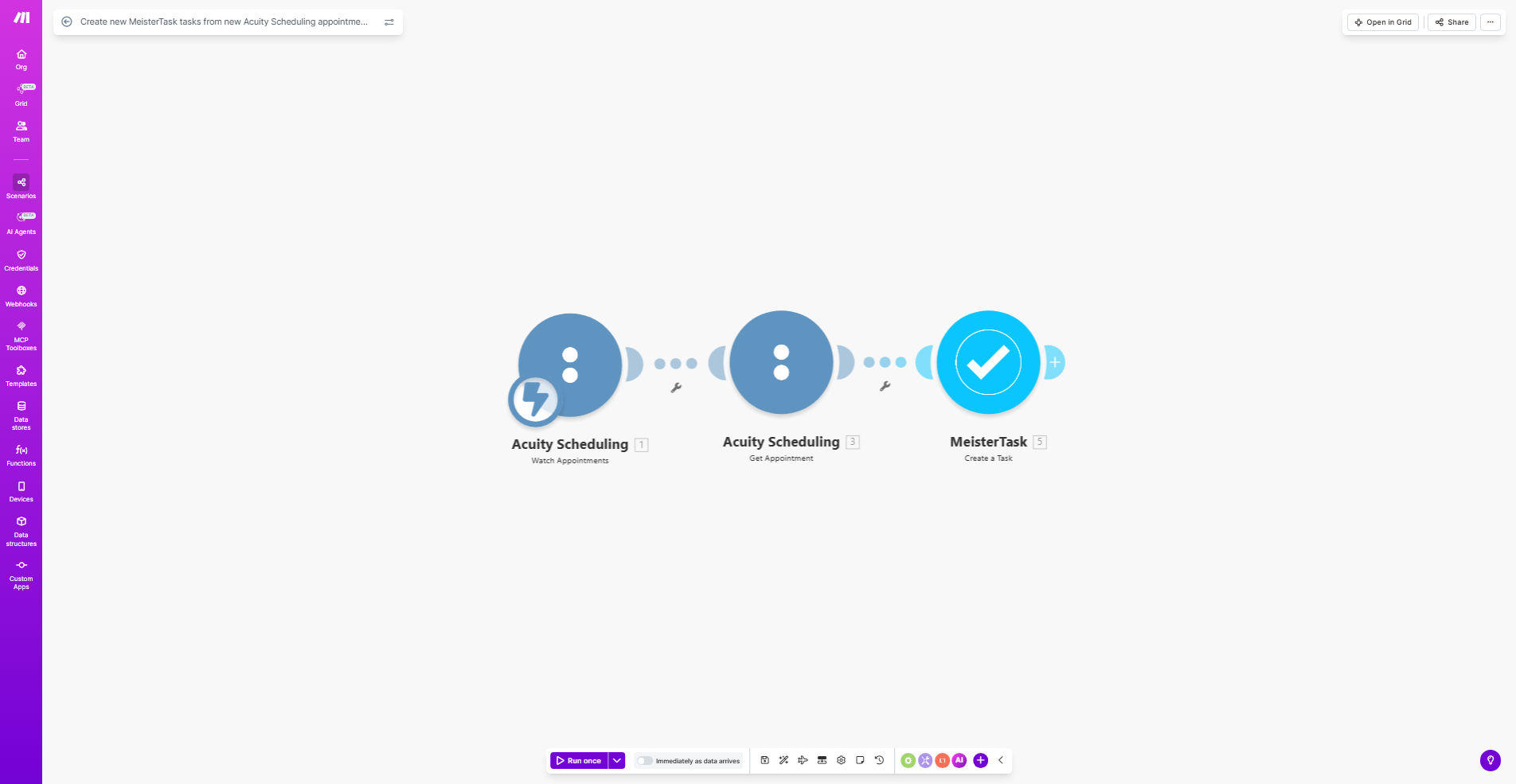
What This Workflow Does
This automation bridges the gap between client scheduling and task management. Whenever a new appointment is booked in Acuity Scheduling, the system automatically creates a corresponding task in MeisterTask with all relevant details.
Service professionals often waste time manually transferring appointment information into their task management systems. This workflow eliminates that repetitive work while ensuring no appointment-related tasks are forgotten. The automation captures client names, appointment types, dates/times, and any special notes - then creates properly categorized tasks in your MeisterTask projects.
How It Works
1. Trigger: New Acuity Scheduling Appointment
The workflow activates whenever a new appointment is created in your connected Acuity Scheduling account. Make.com monitors your calendar in real-time.
2. Data Extraction
The system pulls all relevant appointment details including client information, service type, date/time, duration, and any custom fields or notes.
3. Task Creation in MeisterTask
Using the collected data, the automation creates a new task in your specified MeisterTask project. You can configure how information maps to task fields like title, description, due date, and labels.
4. Optional Notifications
The workflow can optionally send Slack or email notifications to confirm the task was created or alert team members about new appointments.
Who This Is For
This automation is ideal for:
- Coaches and consultants who need to prepare materials for client sessions
- Therapists tracking follow-up tasks after appointments
- Service businesses managing team assignments based on bookings
- Educators scheduling tutoring sessions with associated lesson prep tasks
- Health practitioners tracking patient follow-ups and treatment plans
What You'll Need
- Active Acuity Scheduling account with appointments scheduled
- MeisterTask account with at least one project setup
- Make.com account (free plan sufficient for basic implementation)
- API access enabled for both Acuity and MeisterTask
Quick Setup Guide
- Clone the template in your Make.com account
- Connect your Acuity Scheduling account
- Connect your MeisterTask account
- Map appointment fields to desired MeisterTask task fields
- Specify which MeisterTask project should receive new tasks
- Test with a sample appointment to verify field mapping
- Activate the scenario to begin automatic task creation
Key Benefits
Save 2-5 hours weekly by eliminating manual task creation for every appointment. The automation handles this instantly.
Reduce missed follow-ups by ensuring every appointment automatically generates corresponding tasks in your workflow system.
Standardize task creation with consistent formatting and field mapping across all team members.
Improve client preparation by having tasks created immediately when appointments are booked, giving you more lead time.
Scale your operations without adding administrative overhead as your appointment volume grows.