Make.com Scheduling Automation ClickUp Integration Task Management

Create new ClickUp tasks from new Acuity Scheduling appointments

Automatically convert appointments into actionable tasks - eliminate manual data entry between systems

Get This Workflow Make.com · Scheduling · Free Template
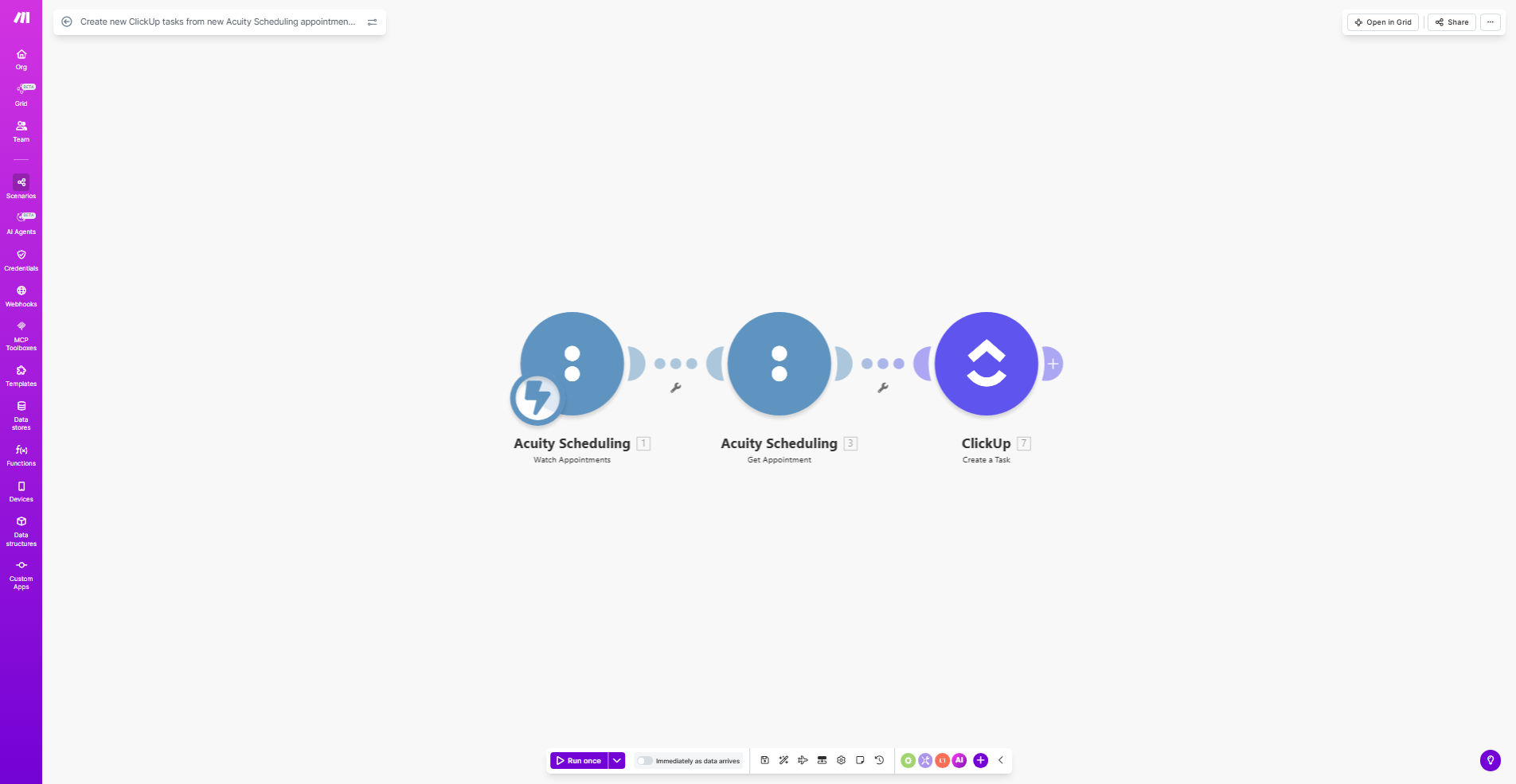
Make.com workflow diagram showing Acuity Scheduling connected to ClickUp

What This Workflow Does

This automation solves the common problem of disjointed scheduling and task management systems. When clients book appointments through Acuity Scheduling, service providers often need to manually create corresponding tasks in ClickUp for follow-up, preparation, or service delivery. This workflow eliminates that manual process.

Every time a new appointment is scheduled in Acuity, Make.com automatically creates a corresponding task in ClickUp with all relevant details. This ensures nothing falls through the cracks and your team has immediate visibility of new appointments in your task management system.

How It Works

1. New appointment trigger

The workflow starts when Acuity Scheduling detects a new appointment booking. Make.com receives this event in real-time through Acuity's API.

2. Data extraction

Key appointment details are extracted including client name, appointment time, service type, duration, and any custom fields configured in Acuity.

3. ClickUp task creation

The workflow formats the appointment data into a ClickUp task structure and creates it in your specified ClickUp list. You can configure default assignees, priorities, and statuses.

4. Optional notifications

The workflow can optionally send Slack or email notifications to team members about new tasks created from appointments.

Pro tip: Configure different ClickUp task templates based on Acuity appointment types. For example, consultations can create tasks with one set of fields, while service appointments create tasks with different requirements.

Who This Is For

This workflow is ideal for:

  • Service businesses using Acuity for client scheduling
  • Teams managing appointments through ClickUp tasks
  • Coaches, consultants, and agencies with scheduled client work
  • Businesses wanting to reduce manual data entry between systems
  • Operations managers looking to streamline scheduling workflows

What You'll Need

  1. An active Acuity Scheduling account
  2. A ClickUp account with appropriate list access
  3. A Make.com account (free plan sufficient)
  4. API keys for both Acuity and ClickUp

Quick Setup Guide

  1. Copy this template to your Make.com account
  2. Connect your Acuity Scheduling account in Make
  3. Connect your ClickUp account and select the target list
  4. Map Acuity fields to ClickUp task fields
  5. Set default task properties (assignee, status, etc.)
  6. Test with a new Acuity appointment
  7. Turn on the workflow

Key Benefits

Eliminate manual data entry - Save 3-5 minutes per appointment by automatically creating ClickUp tasks instead of manual entry.

Reduce scheduling errors - Automated task creation ensures no appointments get missed in your task management system.

Improve team coordination - Tasks are immediately visible to your team with all appointment details included.

Customizable workflows - Adapt the automation to your specific ClickUp task structure and business processes.

Frequently Asked Questions

Common questions about scheduling automation and integration

Connecting Acuity Scheduling with ClickUp eliminates manual data entry between scheduling and task management systems. This integration ensures new appointments automatically become actionable tasks with all relevant details, improving team coordination and reducing scheduling errors.

For service businesses, this means your team sees new client appointments immediately in your task system without anyone having to manually transfer the information. The automation handles this reliably 24/7.

The workflow can transfer client names, appointment times, service types, and any custom fields from Acuity Scheduling into corresponding ClickUp task fields. You can configure exactly which details map to your ClickUp task structure.

Common mappings include converting Acuity appointment types to ClickUp task types, client notes to task descriptions, and appointment times to due dates. The flexibility allows you to match your existing workflow.

This automation saves 3-5 minutes per appointment by eliminating manual task creation. For businesses scheduling 20+ appointments weekly, that's 1-2 hours saved weekly, plus reduced errors from manual data entry.

The time savings compound as your business grows. More appointments mean more time saved, while maintaining consistent task creation quality that doesn't degrade with volume like manual processes often do.

Yes, you can fully customize how tasks are created in ClickUp. The workflow allows setting default assignees, priorities, statuses, and custom fields based on appointment types or other Acuity data.

For example, you might configure different task templates for initial consultations versus follow-up sessions, or automatically assign certain appointment types to specific team members based on their expertise.

The workflow can be extended to update existing ClickUp tasks when Acuity appointments are rescheduled or canceled. This requires additional automation steps to match and modify existing tasks.

For complete two-way synchronization, our team can build custom logic that maintains consistency between Acuity and ClickUp regardless of changes on either platform.

Make.com workflows have 99.9% uptime reliability. The system includes error handling to retry failed operations and notifications if any issues occur during task creation.

In practice, this means you can trust the automation to handle your scheduling needs without constant monitoring. The platform is designed for business-critical operations.

Yes, GrowwStacks specializes in custom scheduling automations. Our team can design a tailored solution that connects Acuity Scheduling with ClickUp (or other tools) exactly how your business needs, including custom fields, notifications, and multi-step workflows.

We'll work with you to understand your specific scheduling and task management processes, then build an automation system that fits seamlessly into your operations. Common customizations include:

  • Advanced task templates based on appointment types
  • Automated client communications
  • Integration with additional systems like CRM or billing

Need a Custom Scheduling Automation?

This free template is a starting point. Our team builds fully tailored automation systems for your specific business needs.