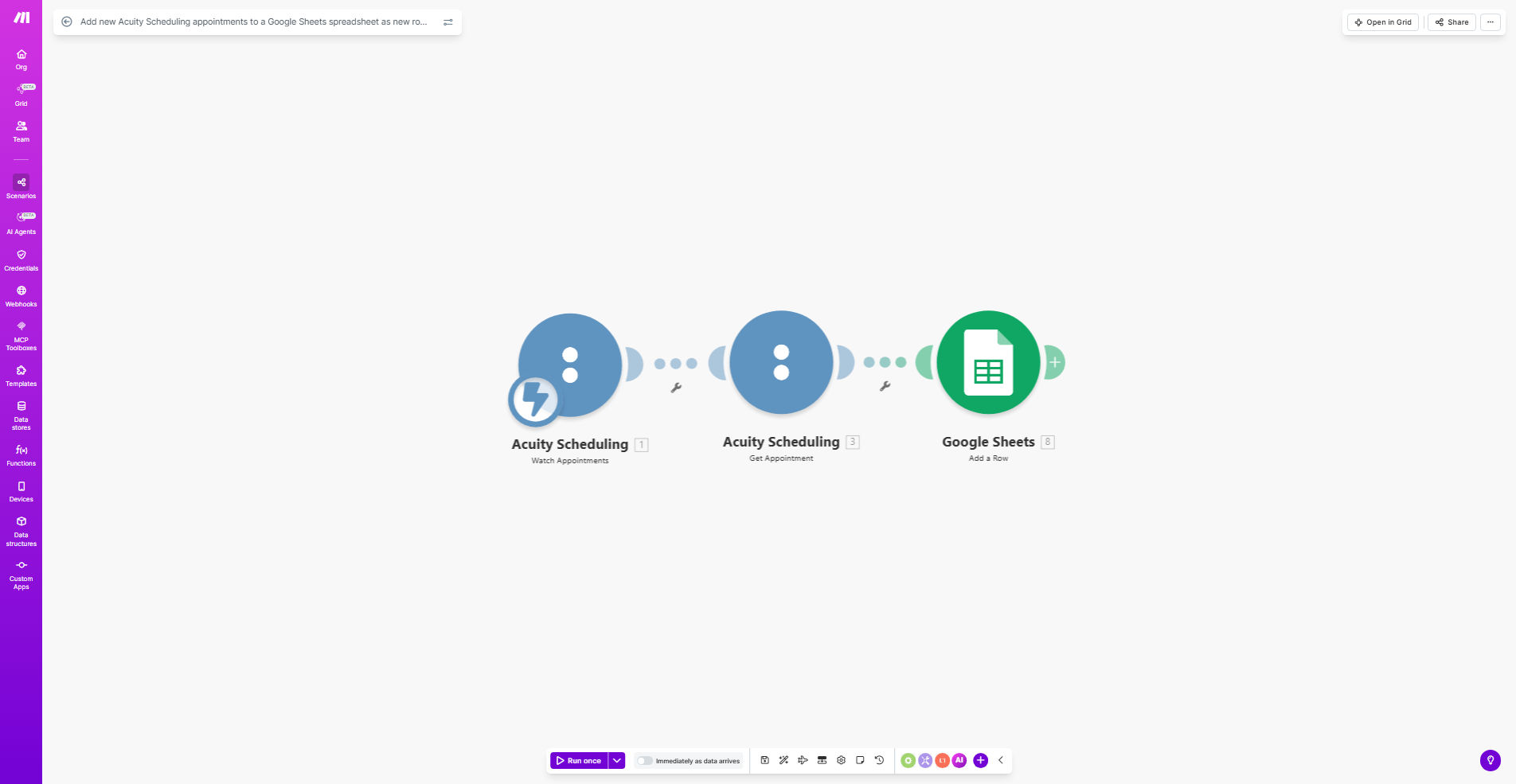
What This Workflow Does
This automation solves the tedious manual process of copying appointment details from Acuity Scheduling to spreadsheets. Service businesses like salons, clinics, and consultants waste hours each week transferring client booking information for record-keeping and reporting.
The Make.com workflow automatically detects new Acuity appointments and adds them as rows in your Google Sheets spreadsheet with all relevant details - client name, contact information, appointment time, service type, and any custom form responses. This creates a centralized, searchable database of all appointments without any manual data entry.
How It Works
1. Trigger on new Acuity appointments
The workflow starts whenever a new appointment is booked in your Acuity Scheduling account. Make.com instantly receives the appointment details through Acuity's API.
2. Extract appointment details
The automation parses all relevant information from the appointment including client contact details, service booked, practitioner assigned, and any custom intake form responses.
3. Format data for Google Sheets
The raw appointment data is transformed to match your spreadsheet's column structure. Dates/times are standardized, names are properly cased, and multi-line form responses are condensed.
4. Add new row to spreadsheet
The formatted appointment details are appended as a new row in your designated Google Sheet. The automation handles all authentication and API connections seamlessly.
Pro tip: Add a timestamp column to track exactly when each appointment was added to your spreadsheet for auditing purposes.
Who This Is For
This automation is ideal for service-based businesses using Acuity Scheduling that need to:
- Maintain accurate appointment records for compliance
- Analyze booking trends and practitioner productivity
- Share appointment data with accountants or team members
- Create client databases for marketing campaigns
Common users include healthcare practices, beauty salons, fitness studios, consultants, and professional services that book client appointments through Acuity.
What You'll Need
- An active Acuity Scheduling account
- A Google Sheets spreadsheet with column headers prepared
- A Make.com account (free tier available)
- API access enabled in both Acuity and Google Sheets
Quick Setup Guide
- Copy this template to your Make.com account
- Connect your Acuity Scheduling account in the first module
- Connect your Google Sheets account in the output module
- Specify your target spreadsheet and worksheet
- Map Acuity fields to your spreadsheet columns
- Turn on the scenario and test with a new appointment
Key Benefits
Eliminate manual data entry - Save 2-5 hours per week previously spent copying appointment details between systems.
Improve data accuracy - Automated transfers reduce human errors in recording appointment details by up to 90%.
Create reporting-ready data - Your spreadsheet becomes a powerful analytics tool for tracking bookings, revenue, and client trends.
Maintain compliance records - Automatic logging provides an audit trail of all appointments for regulatory requirements.
Enable team collaboration - Multiple staff can access the centralized appointment data without needing Acuity logins.