Make.com Acuity Scheduling ActiveCampaign CRM Automation Appointment Sync

Automatically Create ActiveCampaign Contacts from Acuity Appointments

Eliminate manual data entry by instantly syncing new scheduling bookings to your marketing automation platform

Get This Workflow → Make.com · Acuity Scheduling · Free Template
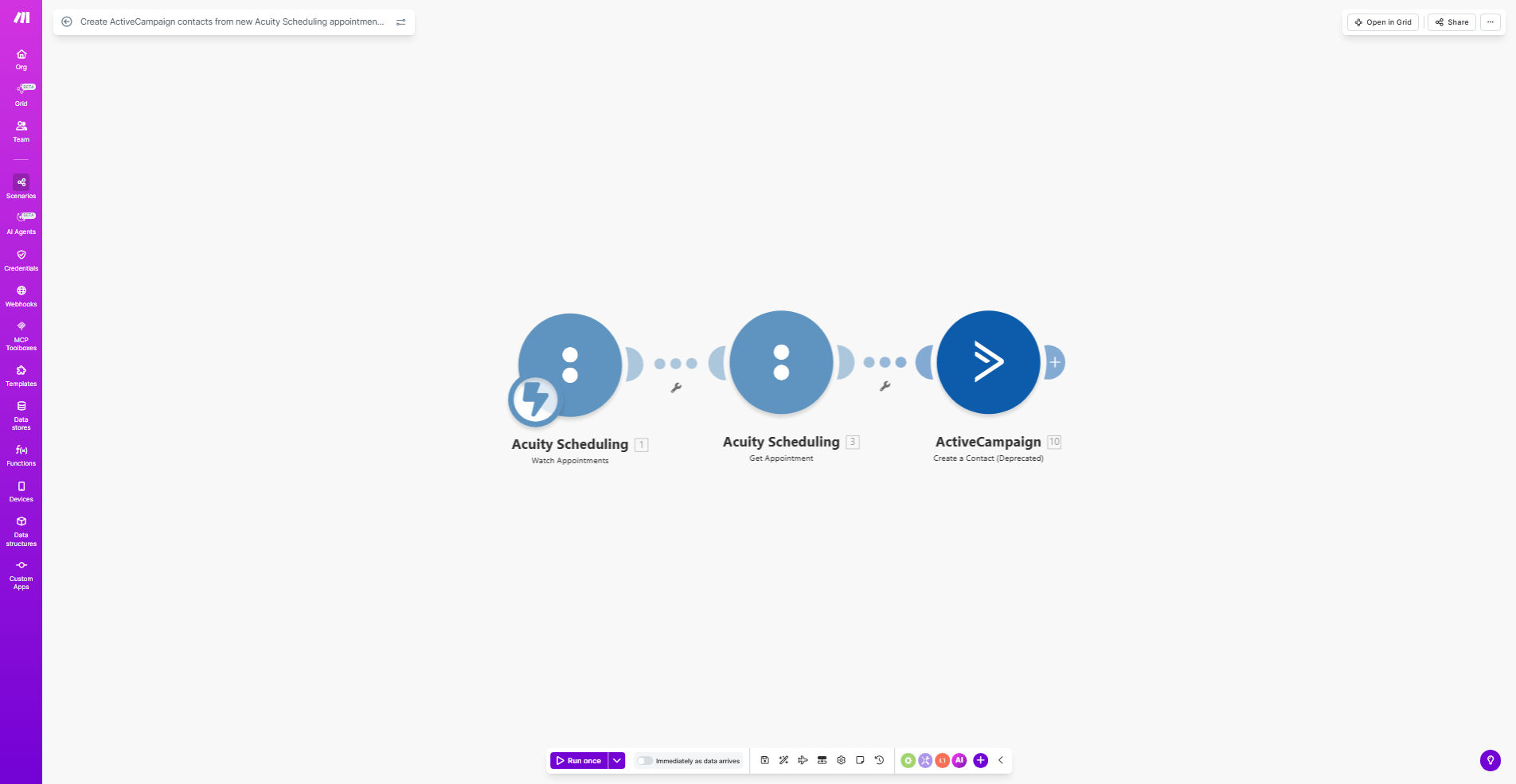
Make.com workflow diagram showing Acuity Scheduling to ActiveCampaign integration

What This Workflow Does

This automation solves a critical gap for service businesses using Acuity Scheduling for appointments and ActiveCampaign for marketing. When clients book appointments, their information currently sits isolated in your scheduling system. This workflow bridges that gap by automatically creating ActiveCampaign contacts the moment an appointment is scheduled.

The integration captures all relevant appointment details - name, email, phone, service booked, date/time, and any custom intake form responses. This creates rich, actionable contact profiles in ActiveCampaign where you can immediately trigger personalized email sequences, apply tags for segmentation, and track customer journeys from first booking through ongoing engagement.

How It Works

1. New Appointment Trigger

The workflow monitors your Acuity Scheduling account for new appointments via instant webhook notifications. No polling or scheduled checks needed - it reacts the moment a booking occurs.

2. Data Extraction

All appointment details are extracted including client information, appointment type, duration, location, and custom form responses. The system intelligently maps this data to corresponding ActiveCampaign fields.

3. Contact Creation

The workflow creates a new ActiveCampaign contact with all available data. You can configure it to add specific tags based on appointment type (like "Massage Client" or "Consultation Booked") for immediate segmentation.

Pro tip: Add a custom field in ActiveCampaign for "Last Appointment Date" to track client engagement over time and trigger re-engagement campaigns for lapsed clients.

4. Error Handling

The workflow includes built-in error handling to manage duplicate contacts, missing required fields, and API rate limits - ensuring reliable operation without manual oversight.

Who This Is For

This automation delivers the most value for:

  • Health/wellness practitioners (massage therapists, chiropractors, nutritionists)
  • Professional service providers (coaches, consultants, financial advisors)
  • Education/training businesses with scheduled sessions
  • Any business using Acuity for bookings that wants to automate marketing follow-up

What You'll Need

  1. An active Acuity Scheduling account with admin access
  2. An ActiveCampaign account with API access enabled
  3. A Make.com account (free tier works for basic usage)
  4. 10-15 minutes for initial configuration

Quick Setup Guide

  1. Clone the template in your Make.com account
  2. Connect your Acuity Scheduling account via OAuth
  3. Add your ActiveCampaign API credentials
  4. Map Acuity fields to corresponding ActiveCampaign fields
  5. Configure any desired tags or custom field mappings
  6. Turn on the scenario and test with a new appointment

Key Benefits

Eliminate 2-3 hours per week of manual data entry by automatically syncing appointments to your CRM. No more copying and pasting client information between systems.

Start marketing sequences immediately after booking with real-time contact creation. Send welcome emails, preparation instructions, or intake forms within minutes of appointment scheduling.

Improve segmentation with appointment-specific tags that automatically categorize contacts by service type, location, or practitioner - enabling hyper-targeted follow-up campaigns.

Capture 100% of new clients in your marketing system instead of losing leads to forgotten manual processes. Every booking becomes a marketable contact with complete history.

Enable advanced analytics by connecting appointment data to your marketing performance metrics. Track which services drive the most valuable long-term clients.

Frequently Asked Questions

Common questions about scheduling-to-CRM automation

Connecting Acuity Scheduling with ActiveCampaign ensures every new client who books an appointment automatically becomes a contact in your marketing system. This eliminates manual data entry and ensures you can immediately follow up with email sequences, tags, and targeted campaigns based on their booking details.

For example, a massage therapist could automatically send personalized preparation emails based on the specific service booked, while a business coach could trigger a pre-session questionnaire sequence - all without lifting a finger after the initial booking.

The workflow transfers all appointment details including name, email, phone number, appointment type, date/time, and any custom intake form responses. This creates rich contact profiles in ActiveCampaign for personalized marketing automation based on their specific service booking.

You can choose exactly which fields to sync and how they map to your ActiveCampaign custom fields. Common mappings include service type to tags, practitioner to custom fields, and intake answers to conditional workflow paths.

Contacts are created in ActiveCampaign within seconds of the appointment being booked in Acuity Scheduling. This real-time sync means you can trigger immediate welcome sequences or appointment reminders without delay.

Unlike manual imports or batch processes that might run once per day, this instant sync ensures no missed opportunities for timely follow-up when client interest is highest right after booking.

Yes, the workflow can be configured to add specific tags based on appointment type, location, or other criteria. You can also map custom fields from Acuity to corresponding custom fields in ActiveCampaign for advanced segmentation.

For instance, you might tag contacts with "New Client" or "Returning Client", or create custom fields for "Preferred Service" and "Last Visit Date" to power sophisticated automation sequences.

  • Tag contacts by service category (Massage, Facial, etc.)
  • Segment by location or practitioner
  • Track lifetime value with appointment history

The workflow can be set to either update existing contacts with new appointment data or skip duplicates. This prevents creating multiple records for the same client while keeping their profile current with latest bookings.

Most businesses choose to update existing contacts to maintain complete history while adding new tags or custom fields to reflect the most recent appointment details.

Yes, the integration handles all appointment types from 1:1 sessions to group classes. Each attendee can be added as a separate contact with details about the specific event they registered for.

For workshops or classes, you might add tags like "Yoga Workshop Attendee" or custom fields tracking which specific dates they attended, enabling targeted follow-up about related offerings.

Absolutely. Our team specializes in building tailored scheduling-to-CRM automations that match your exact business processes, including custom field mapping, conditional workflows, and multi-step automation sequences beyond this template's capabilities.

We can create solutions that integrate additional steps like sending SMS confirmations, updating internal databases, triggering invoice creation, or adding complex segmentation logic based on your unique business rules and customer journey.

  • Custom field mapping for your specific data
  • Multi-step automation sequences
  • Integration with other tools in your stack

Need a Custom Appointment Automation?

This free template is a starting point. Our team builds fully tailored automation systems for your specific business needs.