Make.com Acuity Scheduling Google Contacts Client Management Automation

Create Google Contacts from new Acuity Scheduling appointments

Automatically add clients to your contact list when they book appointments

Get This Workflow Make.com · Acuity Scheduling · Free Template
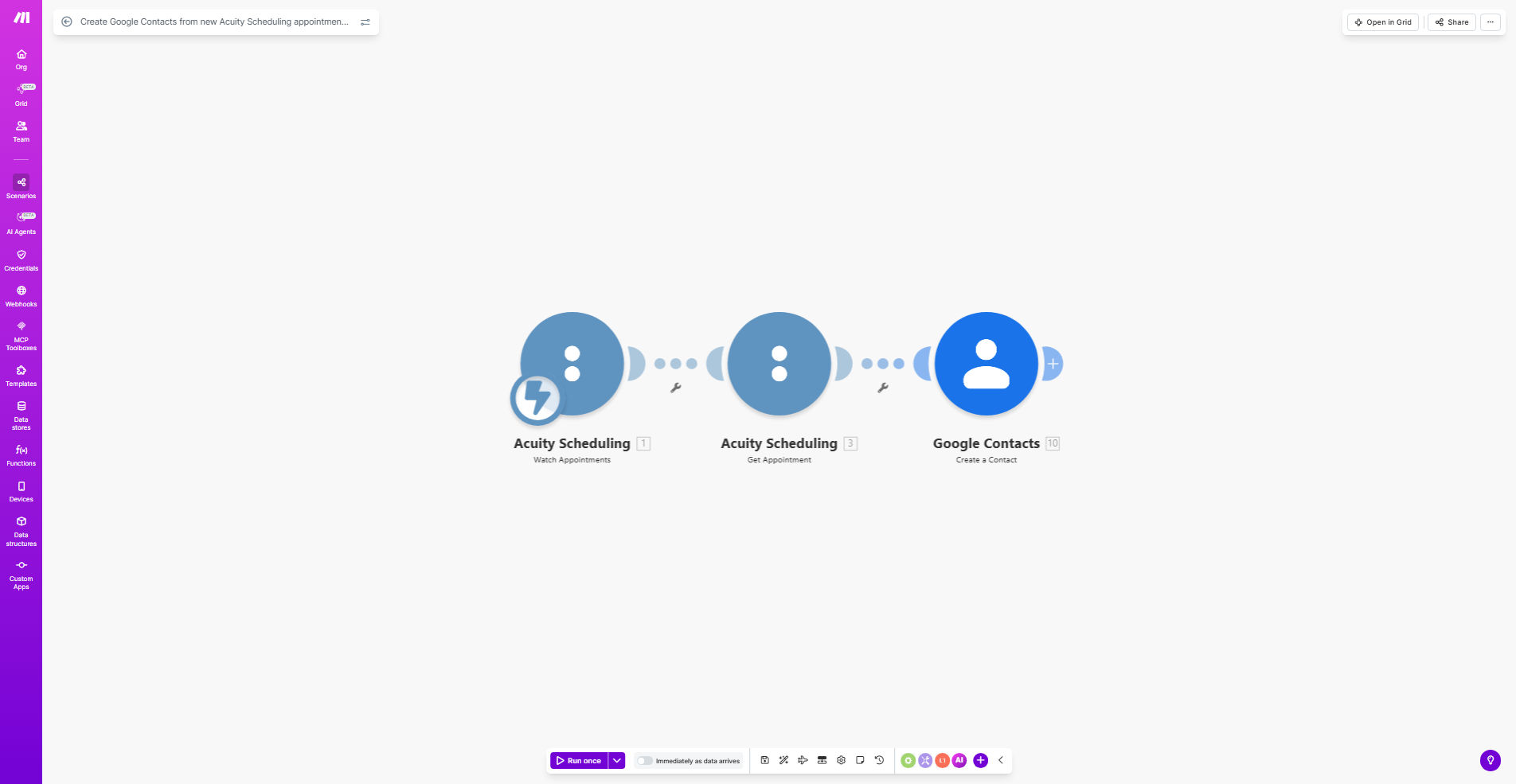
Workflow diagram showing Acuity Scheduling appointments syncing to Google Contacts

What This Workflow Does

This automation solves the common problem of manually transferring client information from booking systems to contact management tools. Every time a new appointment gets scheduled in Acuity Scheduling, the workflow automatically creates a corresponding contact in Google Contacts with all relevant client details.

Service businesses using Acuity Scheduling often waste valuable time copying client information between systems. This workflow eliminates that manual process while ensuring your Google Contacts stay perfectly synchronized with your appointment book. The result is a streamlined client management system where new contacts appear instantly without any staff intervention.

How It Works

1. New appointment trigger

The workflow monitors your Acuity Scheduling account for newly created appointments. When a client books a session, the system immediately detects this event.

2. Data extraction

Make.com retrieves all relevant client information from the appointment, including name, email, phone number, and any custom fields you've configured in Acuity.

3. Contact creation

The system connects to your Google Contacts and creates a new entry with the client's details. You can customize which fields get mapped during this process.

4. Optional categorization

The workflow can automatically assign labels or groups to new contacts based on appointment type, practitioner, or other criteria from Acuity Scheduling.

Who This Is For

This automation is ideal for:

  • Health and wellness practitioners (therapists, massage therapists, chiropractors)
  • Professional service providers (consultants, coaches, tutors)
  • Salons and spas managing client appointments
  • Any business using Acuity Scheduling that wants to streamline client record-keeping

What You'll Need

  1. An active Acuity Scheduling account with administrator access
  2. A Google account with Contacts enabled
  3. A Make.com account (free plan works for basic usage)
  4. Approximately 15 minutes for initial setup

Quick Setup Guide

  1. Click "Get This Workflow" to copy the template to your Make.com account
  2. Connect your Acuity Scheduling account in the Make.com scenario
  3. Connect your Google Contacts account
  4. Map the fields you want transferred (name, email, phone, etc.)
  5. Set any filters for which appointments should create contacts
  6. Activate the scenario and test with a new appointment

Pro tip: Create a specific label in Google Contacts (like "Acuity Clients") and have the workflow automatically apply it to all new entries. This makes filtering and segmenting these contacts easier later.

Key Benefits

Save 2-3 hours weekly by eliminating manual contact entry for every new appointment. The automation handles this instantly.

Reduce data entry errors that commonly occur when copying information between systems. The workflow transfers details perfectly every time.

Improve client follow-up by having all appointment-booked contacts immediately available in your Google ecosystem for email campaigns or personalized communication.

Maintain better records with automatically created contacts that include complete appointment details, not just basic information.

Scale effortlessly as your appointment volume grows - the automation handles 10 or 10,000 new contacts with equal reliability.

Frequently Asked Questions

Common questions about Acuity Scheduling and Google Contacts integration

Connecting Acuity Scheduling with Google Contacts automatically creates client records whenever new appointments are booked. This eliminates manual data entry, ensures your contact list stays updated, and enables better follow-up through email marketing or personalized communication.

For service businesses, this integration means never missing a new client in your contact management system. As soon as someone books through Acuity, they're immediately available in Google Contacts for outreach, reminders, or relationship building.

The workflow typically transfers the client's name, email, phone number, and appointment details from Acuity Scheduling to Google Contacts. You can customize which fields get mapped during setup to include only relevant information for your business needs.

Common additional fields include appointment type, practitioner name, booking notes, and any custom intake form responses. The flexibility allows you to capture exactly the client context you need for effective follow-up.

Automated contact creation saves administrative time, reduces human error in data entry, and ensures you never miss adding a new client to your CRM. Having all client contacts in Google makes it easier to segment audiences for marketing campaigns or personalized follow-ups.

The immediate transfer also means you can initiate welcome sequences or appointment reminders faster. Clients receive timely communication while their interaction with your business is still fresh in their minds.

Yes, you can configure the workflow to only create contacts for specific appointment types, locations, or practitioners. This prevents your Google Contacts from being cluttered with irrelevant entries while maintaining important client relationships.

For example, a multi-practitioner clinic might only want contacts created for paying clients, not internal meetings or staff appointments. The filtering options let you maintain a clean, business-relevant contact database.

The workflow can be set to either skip existing contacts or update their information with the latest appointment details. This prevents duplicate entries while keeping client records current with their latest interactions with your business.

For returning clients, updating their contact ensures you have their most recent contact information and can reference their appointment history when communicating with them.

Make.com uses OAuth 2.0 for secure connections between Acuity Scheduling and Google Contacts. Your client data remains encrypted during transfer, and you maintain control over what information gets shared between the platforms.

The integration only accesses the specific data fields you configure, never your entire contact database or scheduling system. You can revoke access at any time through either platform's security settings.

Our team at GrowwStacks specializes in building tailored automation solutions that connect Acuity Scheduling with your preferred CRM or marketing tools. We can create custom workflows that match your specific client management processes and business requirements.

Beyond basic contact creation, we can design systems that trigger personalized follow-up sequences, sync with additional platforms, or incorporate your unique business rules. This ensures your automation perfectly supports your client relationship strategy.

  • Custom field mapping for your intake forms
  • Integration with your email marketing platform
  • Automated segmentation based on service history

Need a Custom Client Management Automation?

This free template is a starting point. Our team builds fully tailored automation systems for your specific business needs.