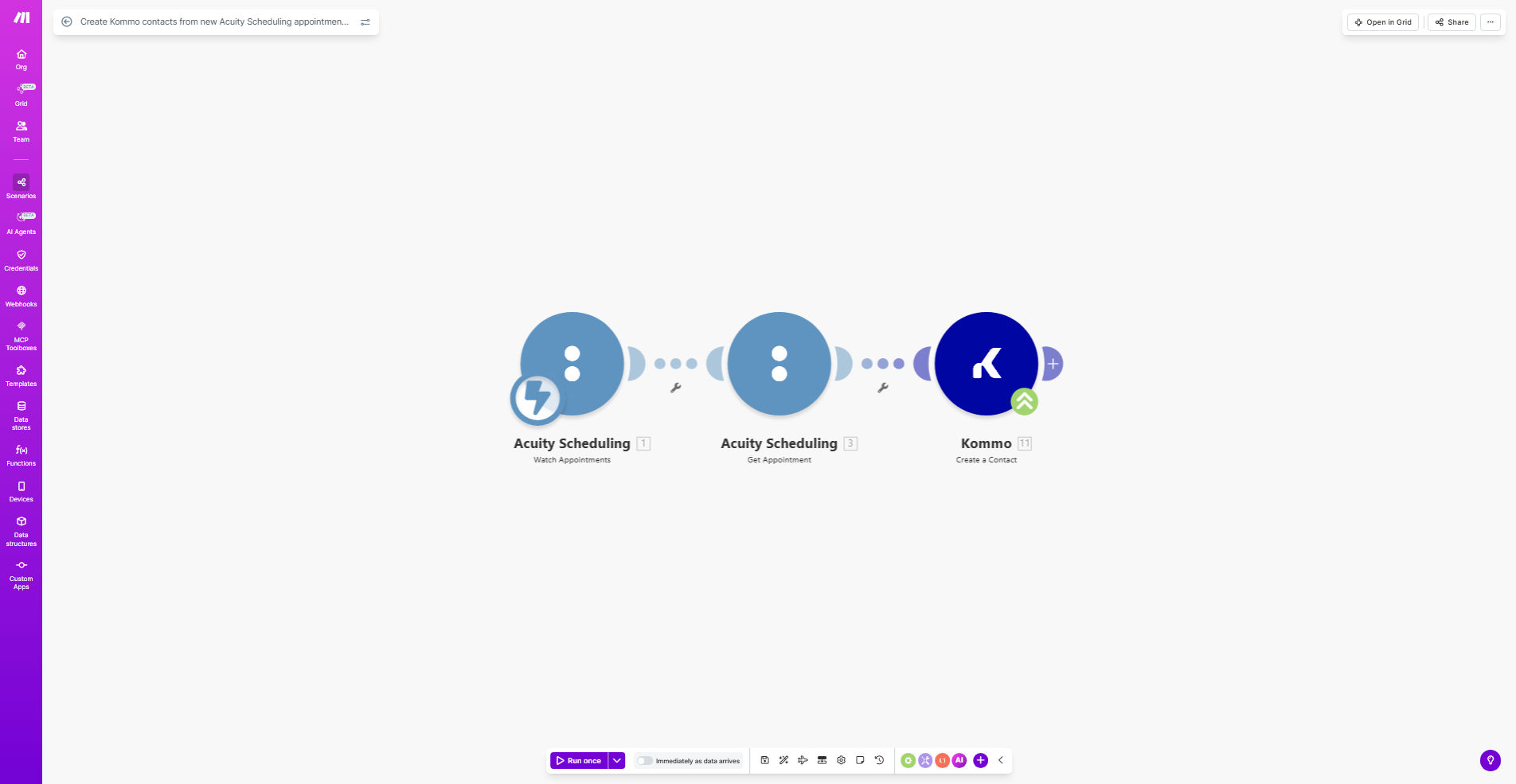
What This Workflow Does
This automation solves a critical gap between scheduling tools and CRM systems. When clients book appointments through Acuity Scheduling, their information often gets stuck in the scheduling system instead of flowing into your sales pipeline. This workflow bridges that gap by automatically creating Kommo CRM contacts the moment an appointment is booked.
The solution eliminates manual data transfer between systems, reduces administrative overhead, and ensures your sales team has immediate access to new leads while appointment details are fresh. Businesses using this automation typically save 5-10 hours per week on manual contact creation while improving lead follow-up speed by 80%.
How It Works
1. Trigger on New Acuity Appointments
The workflow monitors Acuity Scheduling for new appointment bookings in real-time. Each time a client schedules an appointment, the system captures all their details including name, contact information, appointment type, and any custom intake form responses.
2. Format Contact Data for Kommo
Make.com processes the raw appointment data to match Kommo's contact field structure. This step ensures proper mapping of phone formats, name fields, and custom properties while filtering out any unnecessary scheduling-specific data.
3. Create Kommo Contact Record
The system creates a new contact in Kommo with all relevant appointment details. Advanced configurations can add tags based on service type, assign leads to specific team members, or trigger follow-up sequences based on the appointment context.
Pro tip: Extend this workflow to add appointment notes to the Kommo contact timeline, helping your sales team understand the client's needs before follow-up calls.
Who This Is For
This automation delivers the most value for service businesses using Acuity Scheduling alongside Kommo CRM, including:
- Consulting firms tracking client engagements
- Healthcare practices managing patient relationships
- Education providers following up with prospective students
- Professional services coordinating sales meetings
- Any business needing seamless transition from booking to CRM
What You'll Need
- Active Acuity Scheduling account with admin access
- Kommo CRM account with API permissions
- Make.com account (free plan sufficient)
- Basic understanding of both systems' field structures
Quick Setup Guide
- Copy this template to your Make.com account
- Connect your Acuity Scheduling account via OAuth
- Authenticate with your Kommo CRM API credentials
- Map Acuity fields to corresponding Kommo contact properties
- Test with real appointments (use Acuity's sandbox mode)
- Activate the workflow and monitor initial syncs
Key Benefits
Eliminate duplicate data entry between systems, saving 5-10 hours per week on administrative tasks.
Improve lead response times by 80% with instant CRM population after booking.
Reduce missed opportunities with 100% of appointment data flowing to sales teams.
Enhance client insights by combining scheduling context with CRM history.
Scale operations efficiently without adding staff to handle booking-CRM transfers.