Make.com ClickUp Yodel.io Call Tracking Task Automation

Create ClickUp Tasks from Finished Yodel.io Calls

Automatically convert important calls into actionable tasks with all context preserved

Get This Workflow → Make.com · ClickUp · Free Template
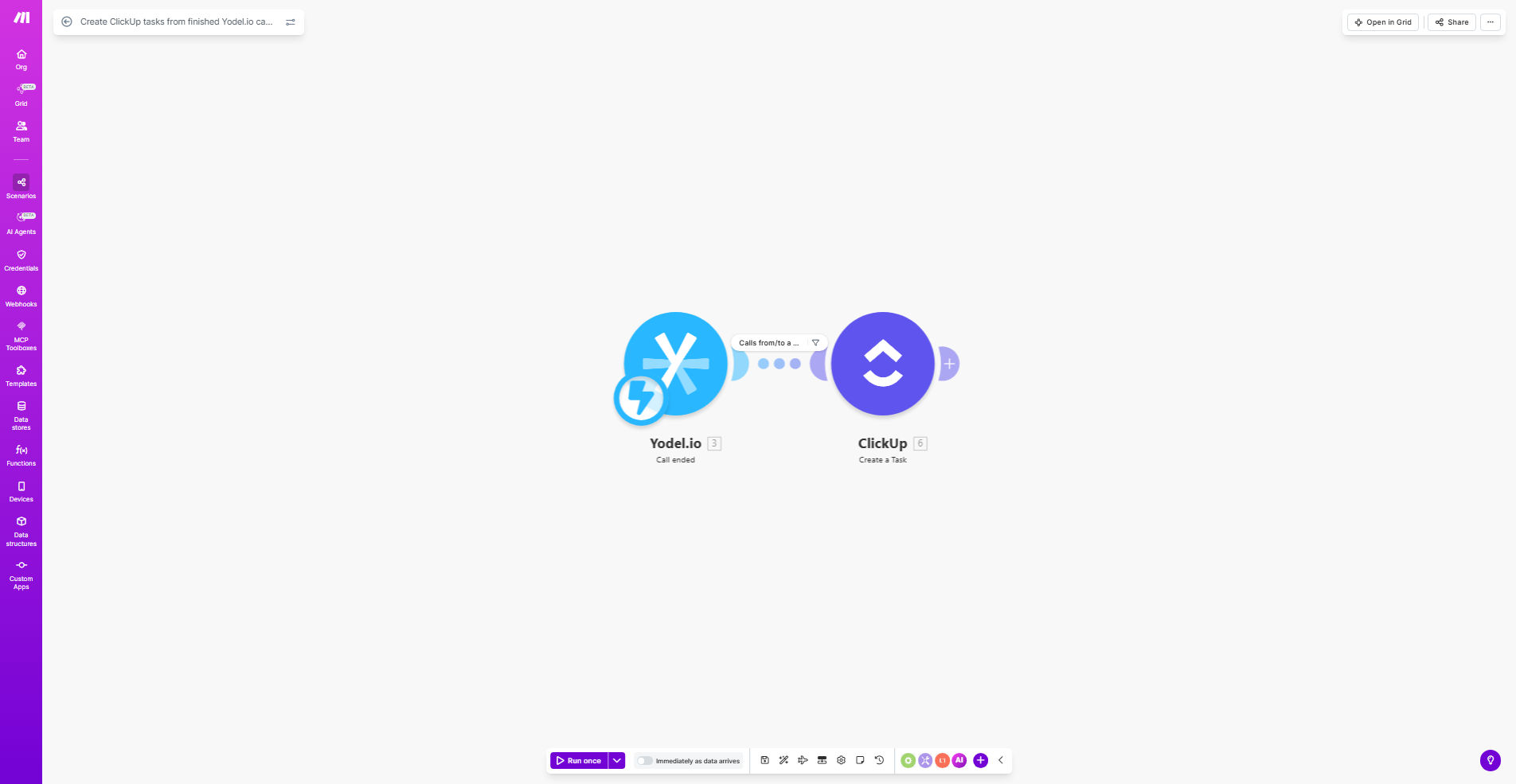
Automation workflow diagram showing Yodel.io calls creating ClickUp tasks

What This Workflow Does

This automation bridges the gap between phone conversations and task management by automatically creating ClickUp tasks whenever you complete calls through Yodel.io. Instead of manually noting call details and creating follow-up tasks, the workflow handles everything instantly.

The system captures all relevant call information - including caller details, duration, notes, and timestamps - then formats this data into a properly categorized ClickUp task. This ensures no important call falls through the cracks while eliminating repetitive administrative work.

How It Works

1. Yodel.io detects call completion

The workflow triggers whenever a call ends in your specified Yodel.io phone number. Make.com receives the call data through Yodel.io's API, including all available metadata about the conversation.

2. Data is processed and formatted

The workflow extracts key information like caller number, call duration, and any notes added during the call. You can customize which data points to include and how they're formatted for ClickUp.

3. Task is created in ClickUp

Using ClickUp's API, the workflow creates a new task in your specified list or space. The task includes all relevant call details as custom fields, description content, or comments based on your configuration.

Pro tip: Add conditional logic to create different task types based on call characteristics. For example, sales calls could generate 'Follow Up' tasks while support calls create 'Ticket' items.

Who This Is For

This workflow is ideal for:

  • Sales teams tracking prospect calls and follow-ups
  • Support teams converting customer calls into trackable tickets
  • Service businesses managing client communications
  • Any team using ClickUp that needs to action phone conversations

What You'll Need

  1. A Make.com account (free plan works)
  2. Yodel.io account with API access
  3. ClickUp account with API permissions
  4. The phone number(s) you want to track in Yodel.io
  5. The ClickUp list or space where tasks should be created

Quick Setup Guide

  1. Install the template from Make.com
  2. Connect your Yodel.io and ClickUp accounts
  3. Specify which Yodel.io number(s) to monitor
  4. Configure your ClickUp destination list and task fields
  5. Test with a sample call to verify task creation
  6. Activate the scenario for automatic processing

Key Benefits

Eliminate manual data entry between calls and task management, saving 2-5 minutes per call that would otherwise be spent creating and formatting tasks.

Never miss follow-ups from important calls, with automatic task creation ensuring every conversation has a documented next action.

Standardize call handling across your team by ensuring all calls generate consistently formatted tasks with the same key information.

Improve accountability by having a clear audit trail of which calls became which tasks, with all original call data preserved in ClickUp.

Gain insights into call-to-task conversion rates and follow-up timelines through ClickUp's reporting features.

Frequently Asked Questions

Common questions about call tracking and task automation

Connecting Yodel.io calls to ClickUp tasks ensures no important call details slip through the cracks. It automatically creates actionable tasks with call context, saving you manual data entry and improving follow-up consistency.

For sales teams, this means immediate tasks for follow-ups after prospect calls. Support teams benefit by converting customer issues into trackable tickets without additional work.

The workflow can transfer caller information, call duration, timestamps, notes, and any custom fields from Yodel.io. You can configure exactly which data points become task fields in ClickUp.

Common mappings include phone number → task name, call duration → time estimate, notes → task description, and custom Yodel.io fields → ClickUp custom fields.

Automating task creation eliminates manual steps between calls and action items. Sales teams get instant follow-up tasks, support teams can track resolution progress, and managers gain visibility into call outcomes.

The system reduces context switching - agents can focus on the call knowing the task will be created automatically. It also standardizes how calls become tasks across your entire team.

Yes, you can set rules to only create tasks for calls meeting specific criteria - like minimum duration, certain phone numbers, or call outcomes marked in Yodel.io.

For example, you might skip tasks for calls under 30 seconds, or only create high-priority tasks for calls from your VIP customer list. The workflow supports multiple conditional branches.

The workflow can create different ClickUp task templates based on call characteristics. For example, sales calls might generate 'Follow Up' tasks while support calls create 'Ticket' tasks.

You can configure separate task templates with different:

  • Task names and descriptions
  • Custom field values
  • Assignees and due dates
  • Priority levels and statuses

Make.com workflows have enterprise-grade reliability with error handling and retries. If any step fails, the system will retry or notify you rather than losing call data.

The workflow includes safeguards like:

  • Automatic retries for API failures
  • Error notifications via email or Slack
  • Data backups for interrupted processes
  • Detailed execution logs for troubleshooting

Absolutely! GrowwStacks specializes in building tailored automation between call systems and task managers. We can customize workflows for your specific CRM, task fields, and business rules.

Our custom solutions might include:

  • Integration with your existing CRM
  • Advanced call routing logic
  • Custom task templates matching your workflow
  • Reporting dashboards for call-to-task metrics

Need a Custom Call Tracking Automation?

This free template is a starting point. Our team builds fully tailored automation systems for your specific business needs.