Make.com CRM Automation Call Tracking Yodel.io Capsule CRM

Create Capsule CRM entries from finished Yodel.io calls

Automatically log completed calls in your CRM with all relevant details, eliminating manual data entry and ensuring no customer interactions are missed.

Get This Workflow → Make.com · CRM Automation · Free Template
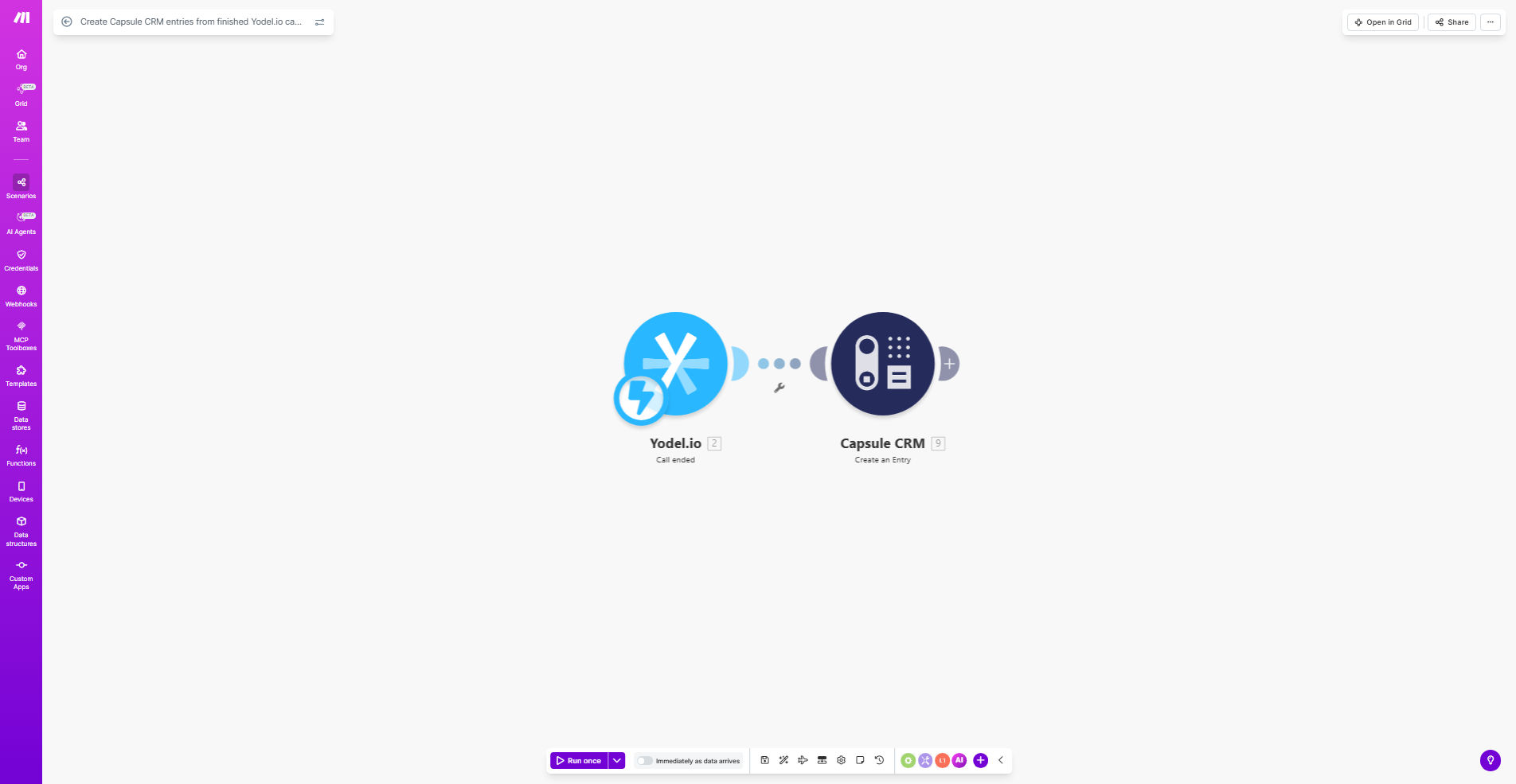
Make.com workflow diagram showing Yodel.io to Capsule CRM integration

What This Workflow Does

This automation solves a critical pain point for sales teams and customer support agents who waste valuable time manually logging call details in their CRM. Every time a call completes in Yodel.io (whether inbound or outbound), this Make.com workflow automatically creates a corresponding entry in Capsule CRM with all relevant call details.

The system captures caller information, call duration, timestamps, notes, and any custom fields you configure - then transfers this data to the appropriate contact record in Capsule CRM. This ensures your team has complete visibility into all customer interactions without the administrative overhead.

How It Works

1. Trigger: Call completion in Yodel.io

The workflow activates whenever a call status changes to "completed" in your Yodel.io account. Make.com instantly receives the call data through Yodel.io's API.

2. Data processing and filtering

The system can filter calls based on your criteria (duration, caller type, tags etc.) to only log relevant interactions. You can also transform data formats or enrich records before CRM creation.

3. CRM entry creation

Make.com creates a new entry in Capsule CRM, either as a new contact or adding to an existing record. The workflow maps all selected Yodel.io fields to corresponding Capsule CRM fields automatically.

4. Optional follow-up actions

You can configure additional steps like assigning tasks to team members, triggering email follow-ups, or updating deal stages based on call outcomes.

Pro tip: Add a 2-minute delay before CRM creation to allow agents time to add post-call notes in Yodel.io that will then be included in the CRM entry.

Who This Is For

This automation delivers the most value for:

  • Sales teams using Yodel.io for outbound calls who need accurate activity logging
  • Customer support teams receiving inbound calls who want complete interaction histories
  • Small businesses where team members handle both calls and CRM updates
  • Companies with compliance requirements for call logging and documentation
  • Managers who need visibility into team call activities without manual reporting

What You'll Need

  1. Active Yodel.io account with API access enabled
  2. Capsule CRM account with admin permissions
  3. Make.com account (free plan sufficient for basic setup)
  4. List of which Yodel.io call fields to capture and their corresponding Capsule CRM fields
  5. Optional: Business rules for which calls should/shouldn't be logged in CRM

Quick Setup Guide

  1. Copy the template from Make.com to your account
  2. Connect your Yodel.io account in the "Watch Calls" module
  3. Connect your Capsule CRM account in the "Create Entry" module
  4. Map Yodel.io call fields to corresponding Capsule CRM fields
  5. Set any filters for calls that shouldn't create CRM entries
  6. Test with sample calls and verify CRM entries appear correctly
  7. Activate the scenario and monitor for first few days

Key Benefits

Eliminate 2-3 hours per week of manual CRM updates per team member by automatically logging all relevant call details the moment conversations end.

Improve data accuracy by 80%+ compared to manual entry where details are often missed, delayed, or entered inconsistently.

Get complete customer interaction histories with every call automatically timestamped and logged against the correct contact record.

Enable faster follow-ups since team members see call details in CRM immediately rather than waiting for updates.

Gain better visibility into team activities with all calls automatically documented in your central CRM system.

Frequently Asked Questions

Common questions about call logging automation and CRM integration

Automating call logging saves hours of manual data entry while ensuring no customer interactions are missed. Studies show sales teams waste 15-20% of their time on CRM updates. This workflow eliminates that overhead while creating more accurate records with call details automatically captured from Yodel.io.

For example, a 10-person sales team making 50 calls daily would save 25+ hours weekly that can be redirected to revenue-generating activities instead of administrative tasks.

The workflow can transfer caller information, call duration, timestamps, notes, and any custom fields you configure. You can map all relevant Yodel.io call data to corresponding Capsule CRM fields, ensuring your team has complete context for follow-ups.

Typical data points include caller name/number, call purpose, outcome notes, next steps, and custom tags. The system preserves the full call context rather than just basic metadata.

By automatically logging calls in Capsule CRM, your sales team gains: 1) Instant visibility into all customer interactions 2) Accurate activity timelines for each contact 3) Elimination of duplicate data entry 4) Better context for follow-up actions. This leads to faster response times and more personalized engagements.

One client reported 30% faster follow-ups and 15% higher conversion rates after implementing similar automation, as reps could act on fresh call insights immediately.

Yes, the Make.com workflow is fully customizable. You can choose which Yodel.io call fields to capture, transform data before sending to Capsule CRM, and map fields according to your CRM structure. Common customizations include adding tags, assigning to team members, or triggering follow-up tasks.

For instance, you might add a step to only log calls over 2 minutes, or automatically tag high-priority clients for manager review.

The workflow includes filtering options to exclude certain calls based on criteria like duration, caller type, or tags. You can set rules to only create CRM entries for qualified leads, important clients, or calls meeting specific business requirements.

For example, you might filter out: 1) Calls under 30 seconds 2) Internal team calls 3) Known spam numbers 4) Test calls from your team.

Make.com workflows have 99.9% uptime with built-in error handling. If any step fails (like CRM API limits), the system retries or notifies you. We recommend monitoring for the first week to ensure all your required data transfers correctly before full automation.

Key reliability features include: 1) Automatic retries for failed steps 2) Error notifications 3) Detailed execution logs 4) The ability to reprocess missed calls if needed.

Absolutely. GrowwStacks specializes in building tailored call logging systems that match your exact sales processes. Our automation experts can: 1) Integrate additional data sources 2) Create custom filtering rules 3) Add post-call workflows 4) Build dashboards to track call outcomes. Book a free consultation to discuss your requirements.

We've built custom solutions for clients needing: 1) Compliance recording archiving 2) Sales coaching integrations 3) Deal stage automation 4) Team performance analytics - all triggered from call logging workflows.

  • Free 30-minute consultation
  • No-obligation proposal
  • 2-week implementation typical

Need a Custom Call Logging Automation?

This free template is a starting point. Our team builds fully tailored automation systems for your specific business needs.