Kommo Yodel.io Call Tracking CRM Automation Make.com

Automatically Create Kommo Notes from Yodel.io Calls

Never miss a call detail again with automated CRM notes that save your team hours each week

Get This Workflow Make.com · Free Template
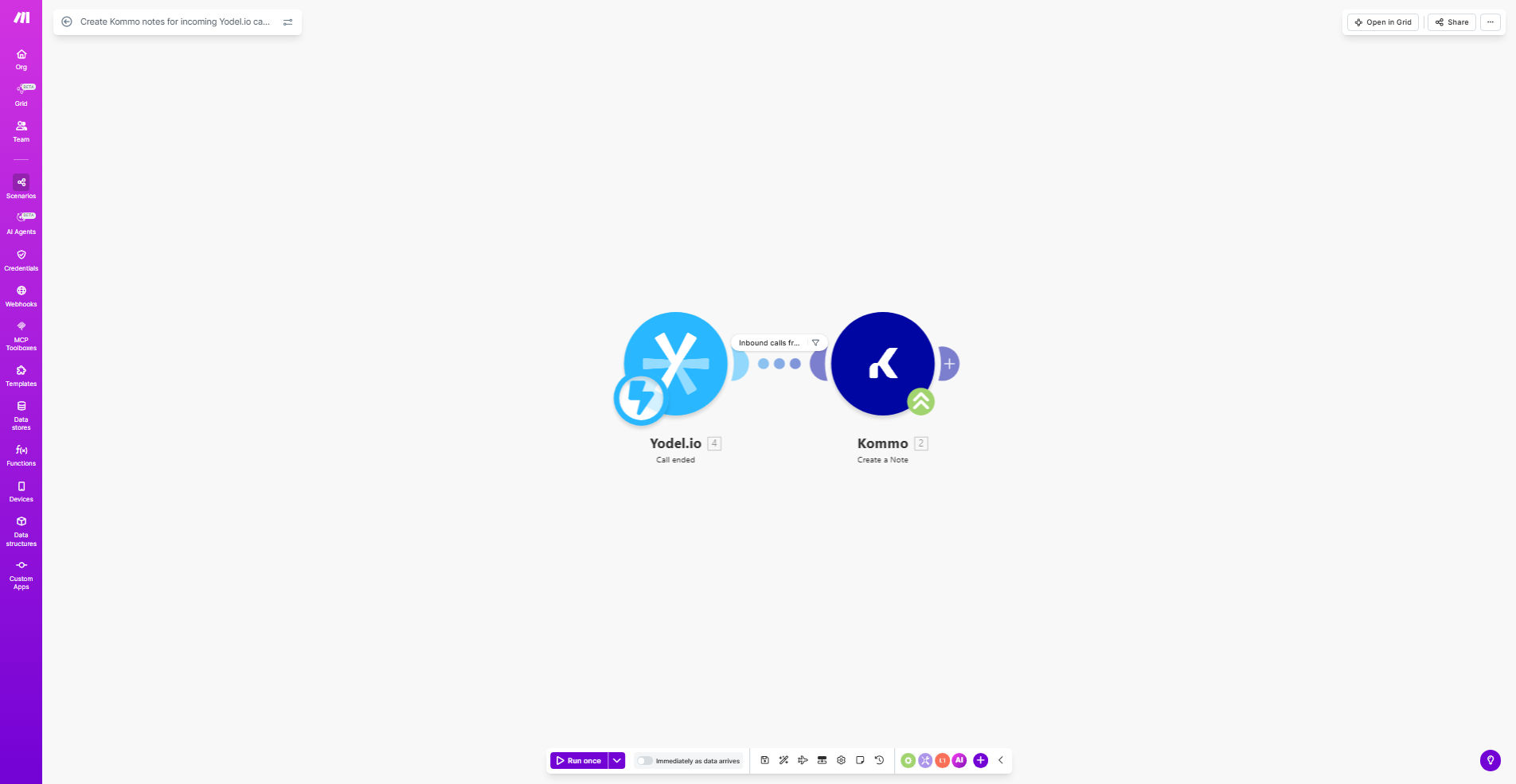
Make.com workflow diagram showing Yodel.io to Kommo integration for call notes

What This Workflow Does

This automation solves the common problem of sales teams forgetting call details or spending excessive time manually logging interactions. Every time you receive an incoming call through Yodel.io, the workflow automatically creates a detailed note in Kommo (formerly AmoCRM) with the call timestamp, duration, and caller information.

By eliminating manual data entry, this integration ensures your CRM always reflects the most current customer interactions. Sales managers gain visibility into team call activity, while reps can focus on conversations rather than note-taking. The automated system reduces human error and creates consistent documentation for every customer touchpoint.

How It Works

1. Call Received in Yodel.io

The workflow triggers immediately when Yodel.io detects an incoming call to your designated phone number. It captures the call metadata including the caller's number, call start time, and duration.

2. Data Processing in Make.com

Make.com formats the call data and checks against any filters you've set (e.g., minimum call duration or specific caller groups). This step ensures only relevant calls generate Kommo notes.

3. Kommo Note Creation

The system locates or creates the contact in Kommo, then adds a new note with the call details. The note template can be customized to include specific fields like call purpose or follow-up actions.

Who This Is For

This workflow benefits sales teams and customer support departments that:

  • Use Kommo as their primary CRM
  • Receive high volumes of customer calls through Yodel.io
  • Need accurate records of customer interactions
  • Want to reduce manual data entry for their teams
  • Require visibility into call activity for coaching and analytics

What You'll Need

  1. Active Yodel.io account with API access
  2. Kommo subscription with administrator privileges
  3. Make.com account (free plan sufficient for basic implementation)
  4. Designated phone number in Yodel.io for call tracking

Quick Setup Guide

  1. Copy this template to your Make.com account
  2. Connect your Yodel.io account in the "Incoming Call" trigger module
  3. Authenticate your Kommo account in the "Create Note" action
  4. Customize the note template with your preferred fields and formatting
  5. Test with sample calls and adjust filters as needed

Key Benefits

Time Savings: Eliminates 5-10 minutes of manual note-taking per call, freeing reps for more customer interactions.

Data Accuracy: Automated logging ensures call details are recorded consistently without human error or omission.

Improved Visibility: Managers gain real-time insights into call volume and team activity directly in Kommo.

Better Customer Service: Complete call histories enable more personalized follow-ups and context-aware support.

Scalable Process: The system handles increasing call volumes without additional administrative burden.

Frequently Asked Questions

Common questions about call tracking and CRM integration

Tracking calls in Kommo creates a complete customer communication history. This helps sales teams reference past conversations, understand customer needs better, and maintain consistent follow-ups. Automated notes eliminate manual data entry errors and ensure no call details are forgotten.

For example, when a customer calls back weeks later, any rep can quickly review previous discussions rather than asking the customer to repeat information. This professional touch improves customer experience while making your team more efficient.

The workflow captures caller ID, call duration, timestamp, and any available call metadata. You can customize which details to include in the Kommo notes, such as adding call summaries or categorizing by purpose.

Typical implementations include: call direction (inbound/outbound), associated deal or contact in Kommo, call disposition (new inquiry, follow-up, complaint), and custom tags based on your sales process stages.

Automated call notes save reps 5-10 minutes per call by eliminating manual note-taking. This time savings allows for more customer interactions. Complete call histories in Kommo also enable better deal tracking and improve handoffs between team members.

In one case study, a sales team increased calls per rep by 22% while improving note quality. The automated system ensured all calls were documented, revealing previously missed follow-up opportunities that boosted conversions.

Yes, the workflow can be configured to only log calls from specific numbers, during certain hours, or meeting duration thresholds. This prevents cluttering Kommo with irrelevant calls while ensuring important customer interactions are documented.

Common filters include: minimum call duration (e.g., 30+ seconds), known customer numbers vs. unknown callers, business hours vs. after-hours calls, and calls routed through specific Yodel.io menus or extensions.

Make.com provides reliable automation between Yodel.io and Kommo without coding. It handles API connections, error recovery, and can be extended to trigger follow-up tasks based on call content. The visual builder makes it easy to modify the workflow as your needs change.

Unlike one-time scripts, Make.com workflows continue running with monitoring and alerts. You can also add steps like SMS confirmations or calendar invites without additional development work.

The notes capture objective call data (time, duration, number) with 100% accuracy. For subjective content like call purpose, you can add dropdown menus in Yodel.io or train reps to use consistent call categorization for reliable automation.

Some teams combine this with call recording analysis (where legal) to automatically extract keywords and sentiment for even richer notes. The base workflow provides a solid foundation you can enhance over time.

Yes! GrowwStacks specializes in tailored call tracking systems that integrate with your CRM and business processes. We can add features like sentiment analysis, call scoring, and automated follow-up tasks based on call outcomes.

Our consultants will analyze your current workflow, identify automation opportunities, and build a solution that fits your exact sales methodology. The result is a competitive advantage through smarter call intelligence.

  • Custom call disposition categories
  • Automated task creation based on call content
  • Integration with your unique tech stack

Need a Custom Call Tracking Automation?

This free template is a starting point. Our team builds fully tailored automation systems for your specific business needs.