Make.com Call Recording Telegram Yodel.io Automation

Post Yodel.io call recordings to Telegram when a call is tagged in Yodel.io

Automatically share important call recordings with your team via Telegram whenever specific tags are applied in Yodel.io

Get This Workflow → Make.com · Call Recording · Free Template
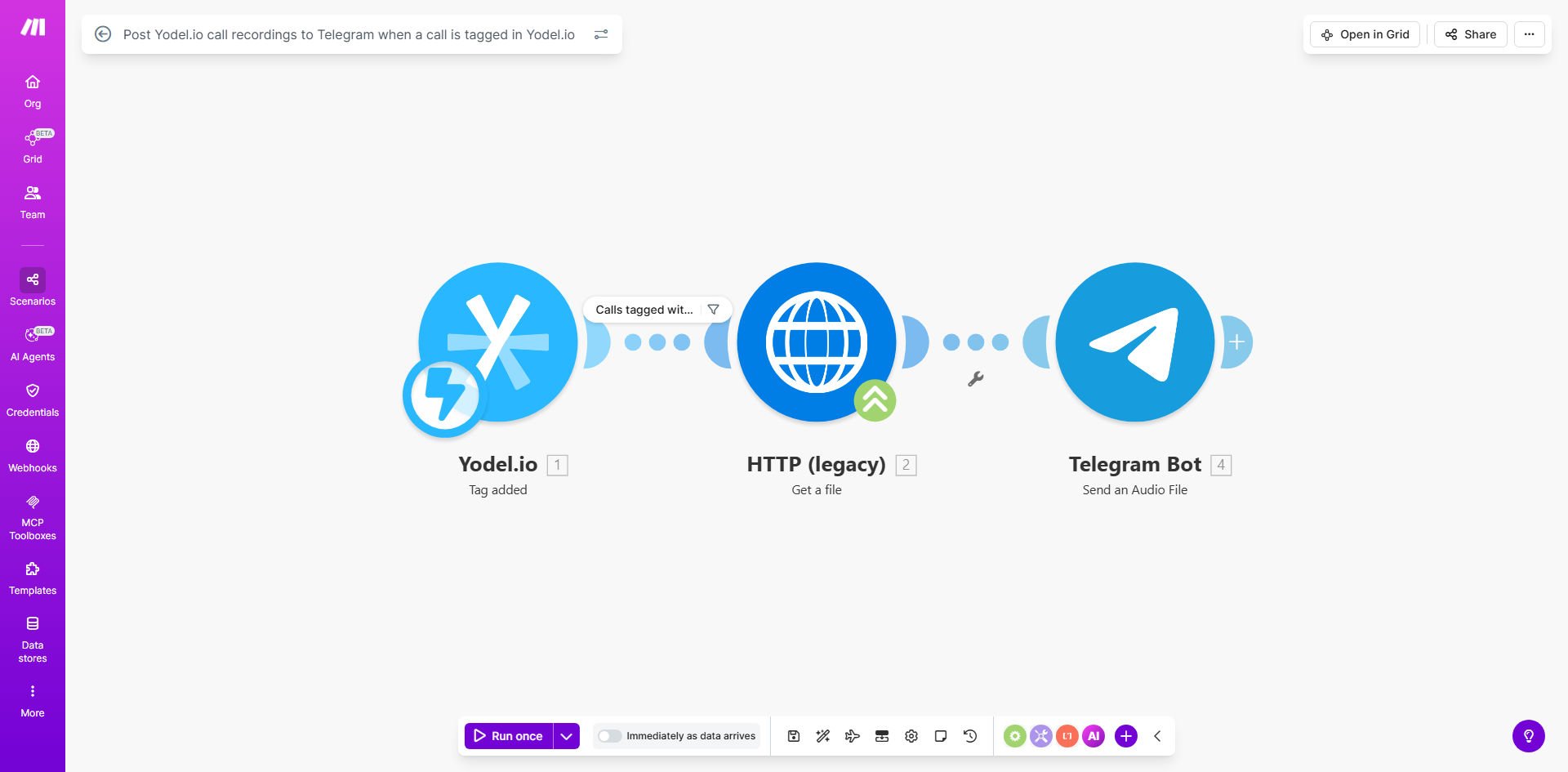
Make.com workflow diagram showing Yodel.io to Telegram call recording automation

What This Workflow Does

This automation solves the common challenge of manually sharing important call recordings with team members. When customer support agents, sales reps, or managers tag calls in Yodel.io (such as marking an escalation or training example), the system automatically posts the full recording to your designated Telegram channel.

The workflow eliminates time-consuming manual uploads while ensuring critical conversations are immediately available to relevant team members. This is particularly valuable for quality assurance, dispute resolution, training purposes, and maintaining organizational transparency around customer interactions.

How It Works

1. Tag detection in Yodel.io

The workflow monitors your Yodel.io account for new tags applied to call recordings. You can configure which specific tags trigger the automation (like "Escalation" or "Training Example").

2. Recording retrieval

When a matching tag is detected, the system fetches the complete call recording from Yodel.io along with relevant metadata like call duration, participants, and timestamp.

3. Telegram delivery

The recording is then securely transmitted to your specified Telegram channel with contextual information. Team members receive instant notifications with direct access to the audio file.

Pro tip: Create a dedicated Telegram channel for call recordings with clear naming conventions (e.g., "Support Escalations - Q3 2023") to maintain organization as your library grows.

Who This Is For

This automation delivers the most value for:

  • Customer support teams handling escalations
  • Sales organizations documenting negotiations
  • Training departments collecting real-world examples
  • Compliance teams maintaining call records
  • Remote teams needing shared context

What You'll Need

  1. An active Yodel.io account with call recording enabled
  2. A Telegram account with admin rights to a channel
  3. Make.com account (free tier sufficient)
  4. Decide which Yodel.io tags should trigger sharing

Quick Setup Guide

  1. Clone the template in your Make.com account
  2. Connect your Yodel.io and Telegram accounts
  3. Specify which tags should trigger the automation
  4. Set your destination Telegram channel
  5. Test with a sample tagged call
  6. Activate the scenario

Key Benefits

Save 5-10 minutes per important call by eliminating manual download-and-share processes. For teams handling 20+ tagged calls weekly, this adds up to 15+ hours saved monthly.

Improve response times by giving team members instant access to critical recordings without waiting for manual sharing.

Enhance accountability through automatic documentation of tagged calls in a centralized, searchable Telegram channel.

Streamline training with immediate access to real-world examples marked as training-worthy by frontline staff.

Frequently Asked Questions

Common questions about call recording automation and integration

Automating call recording sharing eliminates manual uploads and ensures your team instantly accesses important conversations. This is particularly valuable for customer support teams needing to reference calls for training, quality assurance, or dispute resolution without digging through multiple systems.

The automation also creates an audit trail of when recordings were shared and who had access, which can be crucial for compliance purposes in regulated industries.

Support escalations, sales negotiations, product feedback sessions, and compliance-related calls gain the most value from automated sharing. These recordings often require immediate team visibility or archival for future reference.

For example, a customer threatening to churn might be tagged "Escalation" in Yodel.io, triggering instant sharing to your CS leadership channel where it can be addressed promptly.

Telegram offers end-to-end encryption for secret chats, but standard channels use server-client encryption. For sensitive calls, we recommend additional security measures like password-protected recordings or using Telegram's private channels with restricted access.

For PCI compliance or healthcare-related calls, consider additional encryption or alternative sharing methods to meet regulatory requirements.

Yes, the Make.com template allows you to specify exactly which Yodel.io tags should trigger the automation. Common examples include 'Escalation', 'Training', 'Compliance', or custom tags matching your workflow.

You can create sophisticated rules like only sharing calls tagged "Escalation" that are longer than 5 minutes, or excluding calls tagged "Internal" from being shared.

The workflow can be modified to distribute recordings to different channels based on tag criteria. For example, sales calls could go to your sales team channel while support escalations route to your CS leadership channel.

More advanced configurations can even parse call transcripts to route based on keywords mentioned during the conversation, creating a smart distribution system.

Recordings typically appear in Telegram within 30-60 seconds of tagging in Yodel.io, depending on recording length and internet speeds. The automation processes calls sequentially to maintain reliability.

For time-sensitive situations, you can prioritize certain tags to jump the queue or implement parallel processing for mission-critical recordings.

Absolutely. Our team specializes in building tailored call recording workflows that integrate with your existing tools and processes. We can add features like transcription, sentiment analysis, or CRM logging based on your specific requirements.

Custom solutions might include automatically creating support tickets from tagged calls, generating AI summaries for leadership review, or integrating with your knowledge base to surface relevant articles based on call content.

  • Custom tagging logic matching your workflows
  • Multi-channel distribution rules
  • Advanced security and compliance features

Need a Custom Call Recording Automation?

This free template is a starting point. Our team builds fully tailored automation systems for your specific business needs.