Make.com Call Tracking CRM Automation Yodel.io Zoho CRM

Add finished incoming Yodel.io calls to Zoho CRM

Automatically log completed calls from Yodel.io to Zoho CRM records, eliminating manual data entry and improving customer follow-ups

Get This Workflow Make.com · Call Tracking · Free Template
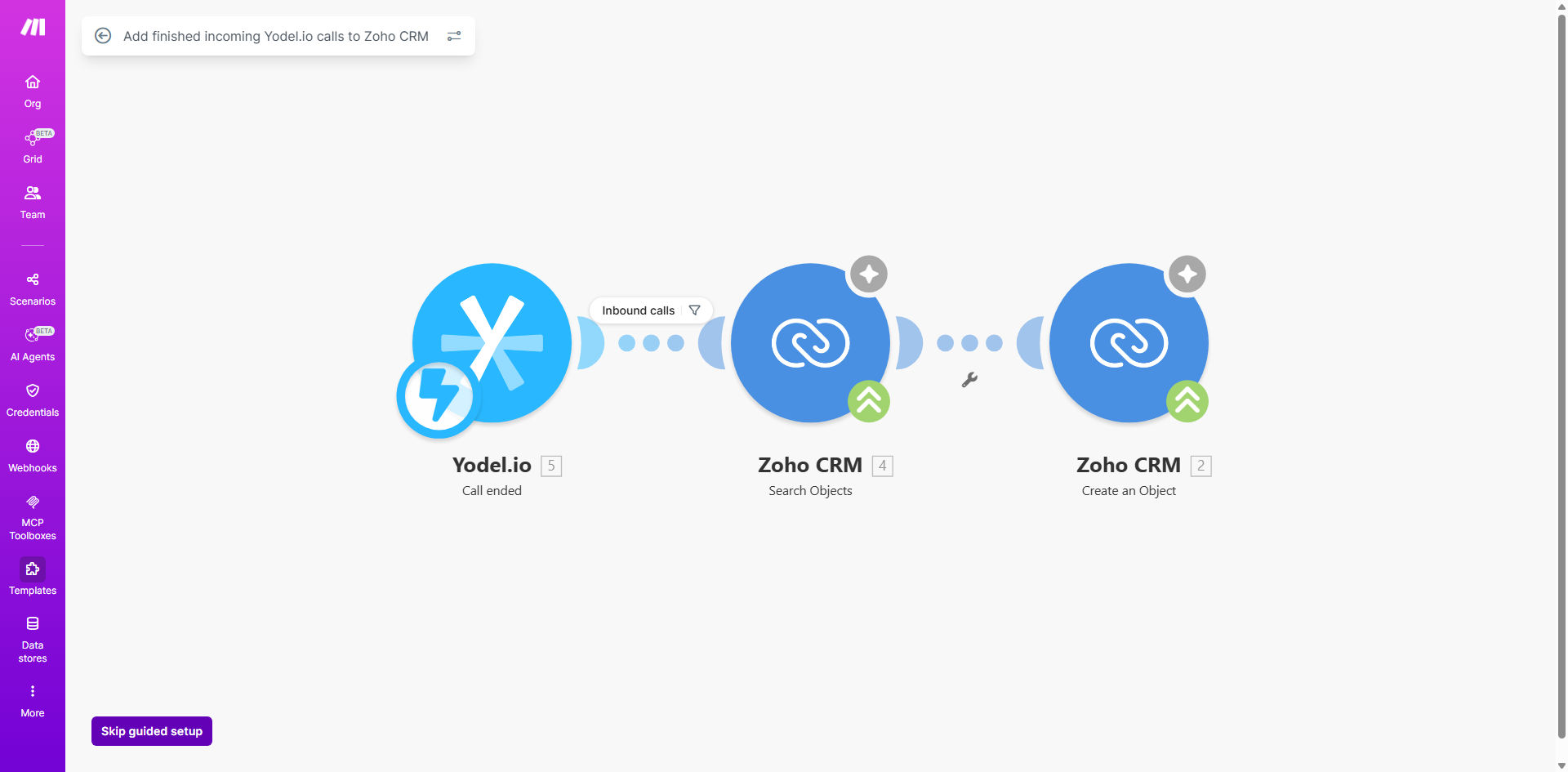
Screenshot of Yodel.io to Zoho CRM call logging automation in Make.com

What This Workflow Does

This automation solves the tedious manual process of logging call details from Yodel.io into Zoho CRM. Every time a sales or support call completes in Yodel.io, the workflow automatically captures all relevant call data and creates or updates the corresponding contact record in Zoho CRM.

The system ensures no call goes unlogged, providing your team with complete customer interaction histories without the administrative burden. This eliminates the common problem of missed or incomplete call notes that can lead to poor customer experiences and lost sales opportunities.

How It Works

1. Trigger on completed calls

The workflow monitors Yodel.io for call completion events via webhook. Each time an incoming call finishes in Yodel.io, it sends the call details to Make.com.

2. Process call data

Make.com extracts key information like caller number, duration, timestamp, and call status. The system can optionally enrich this data with additional context from Yodel.io's call analytics.

3. Match or create CRM record

The workflow searches Zoho CRM for existing contacts matching the caller's phone number. If found, it updates their record. If not, it creates a new contact with the call details.

4. Log call activity

A detailed call note gets added to the contact's activity timeline in Zoho CRM, including all relevant metadata for future reference by your sales team.

Pro tip: Configure the workflow to also create follow-up tasks in Zoho CRM based on call outcomes (e.g., "Call back in 3 days" for interested prospects).

Who This Is For

This automation delivers the most value for:

  • Sales teams making outbound calls through Yodel.io who need complete call histories in CRM
  • Customer support teams teams handling inbound calls where tracking interactions is critical
  • Businesses with high call volumes where manual logging creates significant administrative overhead
  • Organizations prioritizing data-driven sales processes that rely on complete customer interaction data

What You'll Need

  1. Active Yodel.io account with admin access to configure webhooks
  2. Zoho CRM subscription with API access to the API
  3. Make.com account (free plan sufficient for basic implementation)
  4. Phone numbers mapped between Yodel.io to your CRM contact fields

Quick Setup Guide

  1. Connect your Yodel.io account in Make.com using API credentials
  2. Set up the webhook trigger to capture call completion events
  3. Map the call data fields to corresponding Zoho CRM fields
  4. Test with sample calls to verify data flows correctly
  5. Activate the automation and monitor initial executions

Key Benefits

Eliminate manual data entry - Save 5-10 minutes per call by automating the workflow automatically logging all details.

Improve data accuracy - Automated logging prevents human errors in call notes and follow-ups.

Enhance customer insights - Sales teams get complete interaction histories before follow-up calls.

Scale call operations - Handle increasing call volumes without proportional administrative overhead.

Better compliance - Automated logging creates audit trails for quality assurance.

Frequently Asked Questions

Common questions about call tracking automation and CRM integration

Integrating call tracking with CRM eliminates manual data entry, ensures accurate call logging, and enables better customer follow-ups. Sales teams can immediately see call history and details without switching between systems.

This integration creates a single source of truth for all customer interactions. For example, when a prospect calls back, the rep instantly sees previous call notes, duration,

  • Reduces duplicate data entry
  • Enables context-aware follow-ups
  • Creates audit trails for coaching

Common data includes caller phone number, call duration, timestamp, call status (answered/missed), and any notes or tags from Yodel.io.

This creates a complete customer interaction history directly in Zoho CRM.

Automated call logging saves 5-10 minutes per call by eliminating manual entry. Sales reps get complete customer histories instantly, enabling faster follow-ups and more personalized outreach based on actual call interactions.

For example, reps can reference specific points from previous calls demonstrate attentive follow-up.

This integration reduces administrative work by 70%, improves data accuracy by eliminating human error, and increases sales team productivity by giving them instant access to call context before customer follow-ups.

A manufacturing client saw 40% faster follow-up times after implementing this automation.

The automation runs reliably with Make.com handling all API connections. It processes each call completion event individually, with error handling for any connection issues between Yodel.io and Zoho CRM.

The system includes automatic retries failed API calls ensure no data loss.

Yes, the workflow can be modified to include specific call details like recording links, custom fields from Yodel.io, or to trigger additional CRM actions like creating follow-up tasks.

Most clients add custom fields for call disposition, product interest, or satisfaction scores to enhance follow-up quality.

GrowwStacks specializes in building tailored call tracking automations that match your specific CRM workflows and business processes. We can create custom integrations with additional triggers, data mapping, and reporting.

Our engineers will work with your team to design solution that fits your sales process, compliance requirements, and reporting needs.

  • Custom call scoring algorithms
  • Integration with other systems
  • Advanced reporting dashboards

Need a Custom Call Tracking Automation?

This free template is a starting point. Our team builds fully tailored automation systems for your specific business needs.