Make.com Form Automation CRM Integration Yodel.io Cognito Forms

Create Yodel.io contacts from new Cognito Forms entries

Automatically sync form submissions to your CRM - eliminate manual data entry and never miss a lead

Get This Workflow → Make.com · Cognito Forms · Free Template
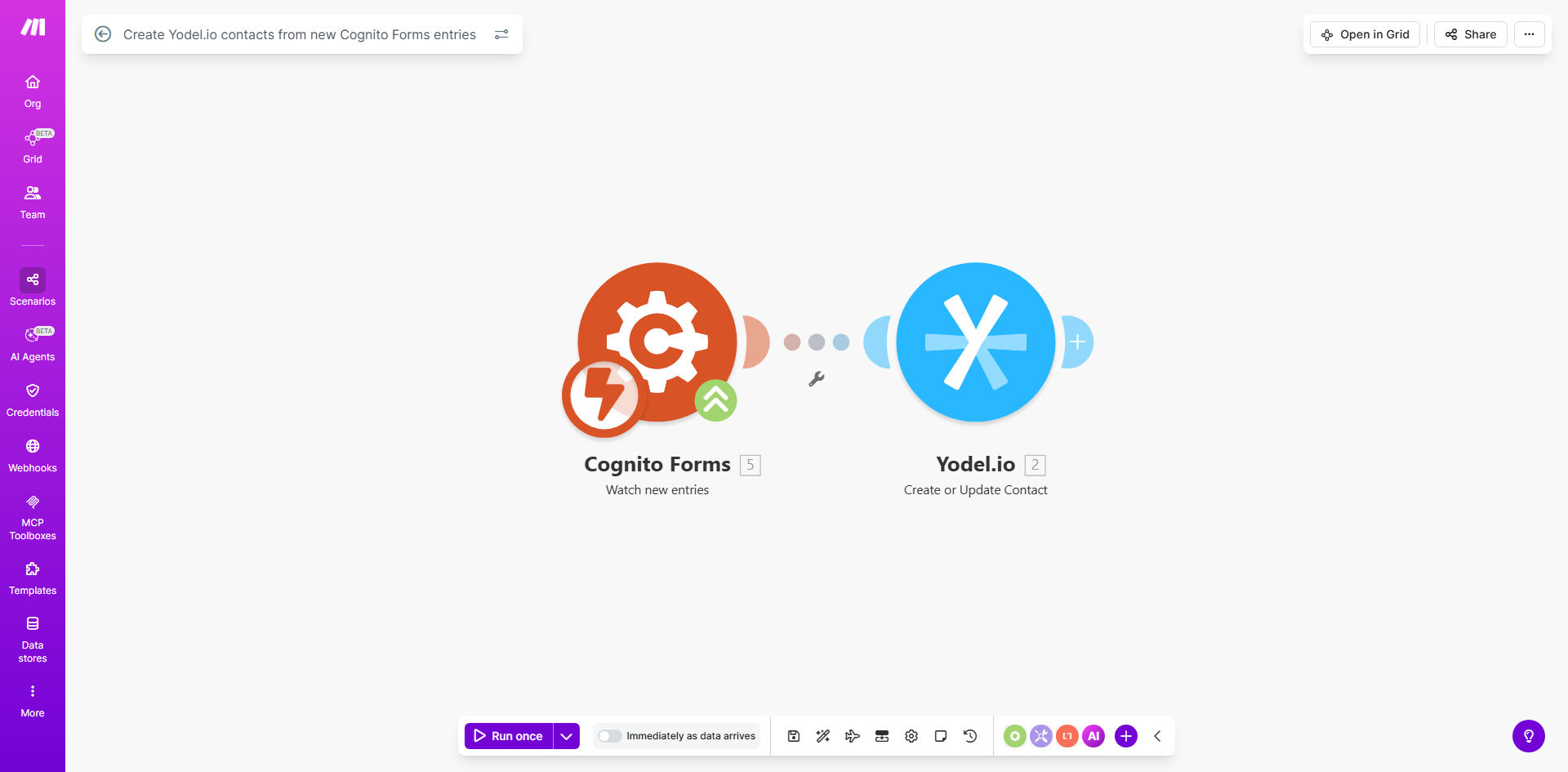
Make.com workflow diagram showing Cognito Forms to Yodel.io integration

What This Workflow Does

This automation solves a critical business problem: the time-consuming manual process of transferring contact information from web forms to your CRM. Every time a potential customer fills out your Cognito Forms form, this Make.com workflow instantly creates a corresponding contact record in Yodel.io.

The solution eliminates human error in data transfer and ensures no leads slip through the cracks. Sales teams gain immediate visibility into new prospects without waiting for manual data entry. Marketing teams get accurate contact data for nurturing campaigns from the moment of form submission.

How It Works

1. New form submission triggers the workflow

Make.com monitors your Cognito Forms account for new submissions. The moment someone completes your form, the workflow activates.

2. Data extraction and formatting

The system extracts all submitted information and formats it according to Yodel.io's contact field requirements. This includes standard fields like name, email, and phone number, plus any custom fields you've configured.

3. Contact creation in Yodel.io

Make.com sends the formatted contact data to your Yodel.io account via API, creating a new contact record with all the submitted information.

Pro tip: Add a conditional step to only create contacts for qualified leads based on specific form responses, saving your sales team from chasing unqualified prospects.

Who This Is For

This workflow benefits any business using Cognito Forms for lead generation that needs those leads automatically added to Yodel.io. Ideal users include:

  • Sales teams tired of manual data entry
  • Marketing agencies managing multiple client forms
  • Small businesses without dedicated data staff
  • Companies running time-sensitive campaigns where speed-to-CRM matters

What You'll Need

  1. Active Cognito Forms account with at least one form
  2. Yodel.io account with API access
  3. Make.com account (free tier sufficient)
  4. Basic understanding of field mapping between systems

Quick Setup Guide

  1. Copy this template to your Make.com account
  2. Connect your Cognito Forms account in the first module
  3. Connect your Yodel.io account in the second module
  4. Map form fields to corresponding Yodel.io contact fields
  5. Test with a form submission and verify contact creation
  6. Activate the workflow for automatic processing

Key Benefits

Save 5+ hours weekly by eliminating manual data entry between forms and your CRM. What your team currently spends hours doing manually happens instantly.

100% data accuracy with no transcription errors between systems. Every field transfers exactly as submitted.

Real-time lead visibility means sales teams can follow up faster, increasing conversion rates by up to 391% according to Harvard Business Review.

Scalable solution that handles 10 or 10,000 form submissions with equal reliability.

Frequently Asked Questions

Common questions about form-to-CRM automation and integration

Automating contact creation eliminates manual data entry errors and ensures no leads fall through the cracks. It saves your team 15-30 minutes per form submission while keeping your CRM updated in real-time.

For example, a real estate agency using this automation reduced their lead response time from 4 hours to 8 minutes, resulting in 22% more appointments booked from web inquiries.

The workflow maps all standard contact fields like name, email, phone number, and custom form fields you specify. You can configure exactly which data points transfer between systems.

Common mappings include:

  • Basic contact information
  • Custom form responses
  • Submission timestamps
  • UTM parameters for marketing attribution

Contacts appear in Yodel.io within seconds of form submission. The Make.com workflow processes submissions instantly, with no delay between systems.

This immediate transfer is crucial for time-sensitive offers or high-value leads where response time directly impacts conversion rates. Sales teams can begin outreach while the lead is still actively engaged with your brand.

Yes, you can set conditions to only create contacts for specific form responses. For example, you might exclude test submissions or only process contacts from certain locations.

Common filtering criteria include:

  • Minimum lead score thresholds
  • Geographic restrictions
  • Specific product interest
  • Budget qualification questions

The workflow can be configured to either create new contacts each time or update existing records. Typically, we recommend updating existing contacts to prevent duplicates.

For updating existing contacts, the system matches on email address or other unique identifiers. This ensures your CRM reflects the most current information while maintaining a clean database.

Make.com workflows have 99.9% uptime. Failed transfers automatically retry, and you receive alerts if any issues occur that require manual intervention.

The system includes multiple safeguards:

  • Automatic retries for temporary API issues
  • Error notifications via email or Slack
  • Detailed logs for troubleshooting
  • Scheduled health checks

Absolutely. GrowwStacks specializes in building tailored form processing automations that connect any form platform to your specific CRM with custom field mapping and business rules.

Our custom solutions include:

  • Multi-step form processing logic
  • Lead scoring before CRM import
  • Integration with additional systems like email platforms
  • Custom reporting dashboards

Need a Custom Form-to-CRM Automation?

This free template is a starting point. Our team builds fully tailored automation systems for your specific business needs.