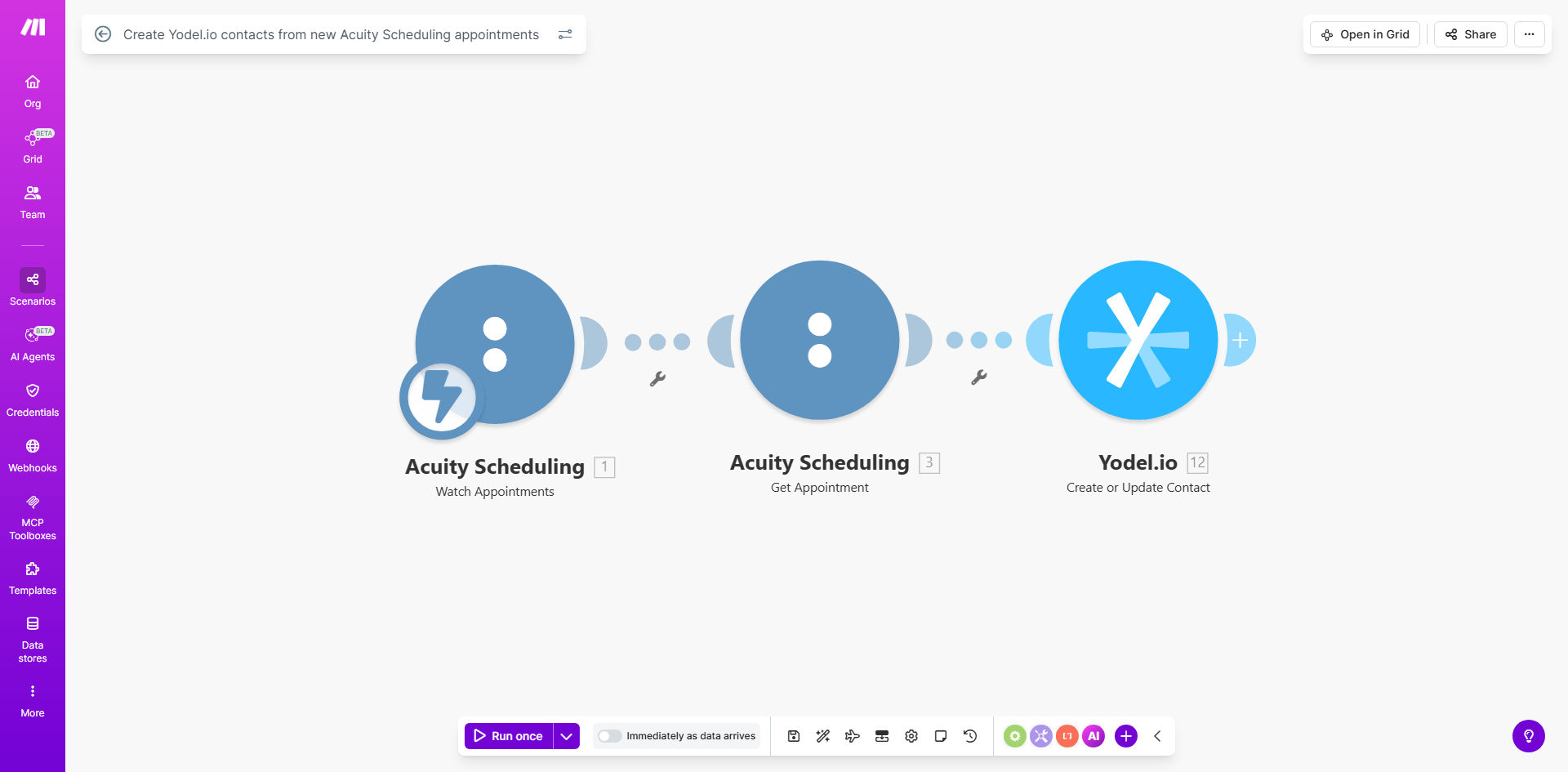
What This Workflow Does
This automation solves a common pain point for service businesses using Acuity Scheduling for appointments and Yodel.io for customer communication. Without automation, staff must manually transfer client information between systems - a time-consuming process prone to errors and delays.
The workflow automatically creates a new Yodel.io contact record whenever someone books an appointment in Acuity Scheduling. It captures all essential client details including name, contact information, and appointment specifics, ensuring your sales and support teams have immediate access to new client information.
How It Works
1. Trigger: New Acuity Scheduling appointment
The workflow activates whenever a new appointment is created in your Acuity Scheduling account. Make.com monitors your Acuity account in real-time for these events.
2. Extract client and appointment details
The system pulls all relevant information from the appointment, including client name, email, phone number, appointment type, date/time, and any custom fields you've set up in Acuity.
3. Format data for Yodel.io
Appointment data is transformed to match Yodel.io's contact field requirements. You can customize which Acuity fields map to which Yodel.io properties.
4. Create Yodel.io contact
The workflow sends the formatted data to Yodel.io's API, creating a new contact record with all the appointment details attached.
Pro tip: Add a tagging step to categorize contacts based on appointment type (e.g., "Consultation", "Service Appointment") for better segmentation in Yodel.io.
Who This Is For
This automation is ideal for:
- Service businesses using Acuity for online booking
- Teams that need immediate access to new client information
- Businesses wanting to automate their CRM data entry
- Companies using Yodel.io for sales follow-ups or appointment reminders
What You'll Need
- An active Acuity Scheduling account
- A Yodel.io account with API access
- A Make.com account (free tier available)
- Admin access to both systems to set up API connections
Quick Setup Guide
- Clone the template in your Make.com account
- Connect your Acuity Scheduling account in the first module
- Connect your Yodel.io account in the contact creation module
- Map the Acuity fields to corresponding Yodel.io contact fields
- Test with a new appointment to verify the contact creation
- Turn on the scenario to go live
Key Benefits
Eliminate manual data entry: Save 2-5 minutes per appointment by automatically transferring client information to your CRM.
Improve follow-up speed: Contacts are available in Yodel.io immediately after booking, enabling faster communication.
Reduce errors: Automated transfers prevent typos and missed entries common with manual processes.
Better client experience: Faster, more personalized communication thanks to immediate CRM access.
Scalable solution: Works equally well for 10 or 10,000 appointments per month.