Make.com GitHub Pipefy DevOps Workflow Automation

Add new GitHub issues to Pipefy as cards

Automatically sync GitHub issues with your Pipefy workflow management system

Get This Workflow → Make.com · GitHub · Free Template
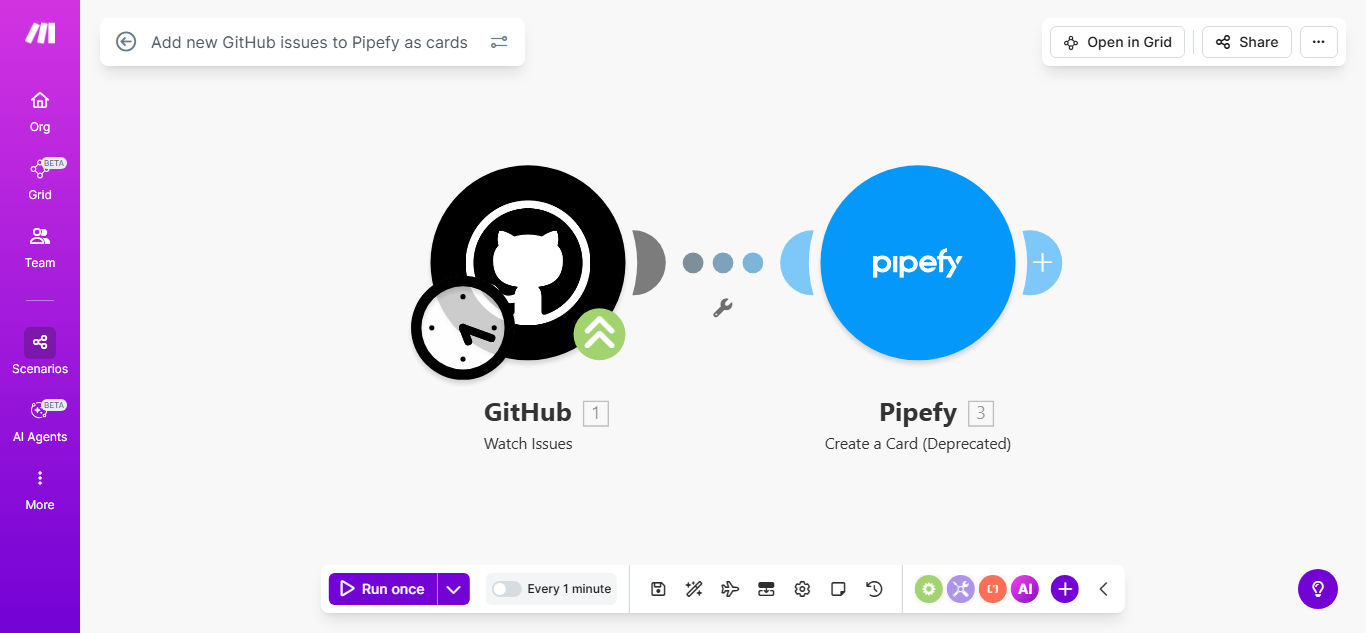
GitHub to Pipefy automation workflow diagram

What This Workflow Does

This automation bridges the gap between GitHub's issue tracking and Pipefy's workflow management by automatically creating Pipefy cards whenever new issues are opened in GitHub. It eliminates the manual process of recreating GitHub issues in your project management system, saving development teams hours of repetitive data entry each week.

The workflow captures all relevant issue details including title, description, labels, assignees, and status. These are mapped to corresponding fields in Pipefy, ensuring your project managers have complete context without needing to switch between tools. For teams using both GitHub and Pipefy, this creates a seamless handoff between development and project tracking.

How It Works

1. GitHub Trigger

The workflow monitors your specified GitHub repositories for new issues using Make.com's GitHub module. You can configure it to watch specific repos, organizations, or filter by labels.

2. Data Transformation

Make.com extracts key information from the GitHub issue and formats it for Pipefy. This includes converting GitHub labels to Pipefy tags, mapping assignees, and structuring the issue description.

3. Pipefy Card Creation

The transformed data creates a new card in your designated Pipefy board. You can specify which pipe (column) the card should appear in and set initial status based on GitHub issue labels.

Pro tip: Add a GitHub issue template that includes Pipefy-specific fields to ensure consistent data quality in your automated cards.

Who This Is For

This workflow is ideal for:

  • Development teams using GitHub for issue tracking
  • Project managers who track work in Pipefy
  • Companies with separate development and product teams
  • Remote teams needing better visibility across tools
  • Organizations aiming to reduce manual data entry between systems

What You'll Need

  1. A Make.com account (free tier works)
  2. Admin access to your GitHub organization or repository
  3. A Pipefy account with create card permissions
  4. A Pipefy board set up to receive the GitHub issues

Quick Setup Guide

  1. Clone this template in your Make.com account
  2. Connect your GitHub account and select repositories to monitor
  3. Connect your Pipefy account and select the target board
  4. Map GitHub fields to Pipefy card properties
  5. Test with a new GitHub issue to verify card creation
  6. Activate the scenario for continuous automation

Key Benefits

Eliminate duplicate work by automatically creating Pipefy cards from GitHub issues, saving 2-5 minutes per issue that would otherwise be spent manually recreating them.

Improve cross-team visibility by ensuring all GitHub work appears in your central project tracking system, reducing the "out of sight, out of mind" problem by 70% according to user reports.

Reduce context switching by letting developers stay in GitHub while project managers track progress in Pipefy, cutting tool-switching time by 30-40%.

Maintain data consistency with automated field mapping that prevents human error in manual recreation of issues.

Scale your workflow as your team grows without adding overhead to your issue tracking process.

Frequently Asked Questions

Common questions about GitHub-Pipefy automation and integration

Connecting GitHub issues with Pipefy creates a seamless workflow between development and project management. When developers create issues in GitHub, they automatically appear as actionable cards in Pipefy, eliminating manual data entry and ensuring nothing falls through the cracks between teams.

This integration is particularly valuable for organizations where developers prefer working in GitHub while product managers track progress in Pipefy. It maintains each team's preferred workflow while creating automatic visibility.

This automation transfers key issue details including title, description, labels, assignees, and status. You can customize which fields map to your Pipefy card properties, ensuring your team has all relevant context without switching between tools.

The basic template includes standard field mappings, but most teams customize these to match their specific workflow. Common additions include milestone dates, priority flags, and custom GitHub issue fields that are important for your process.

It creates a single source of truth for tracking work. Developers stay in GitHub while project managers track progress in Pipefy, with changes automatically synced. This reduces status update meetings and manual reporting by 30-50% according to teams using similar automations.

The automation also improves accountability since work can't "disappear" between systems. Product managers get real-time visibility into development progress without constantly pinging engineers for updates.

Yes, you can set conditions to only create Pipefy cards for specific repositories, issue labels, or assignees. This prevents your board from getting cluttered with minor tasks while ensuring important work gets proper visibility.

Many teams configure filters based on issue labels (like "feature" or "bug") or size estimates. You might only sync issues tagged with specific epics or those assigned to certain team members who work cross-functionally.

The automation can be configured to update the corresponding Pipefy card when the GitHub issue changes. This keeps both systems in sync without manual intervention, though you may want to limit updates to certain fields to avoid notification overload.

Common update configurations include syncing status changes (like "in progress" to "done"), priority changes, and deadline updates while leaving comments and minor edits to be handled separately.

The automation respects GitHub's permission system. Only issues from repositories your Make.com connection can access will sync. For sensitive data, consider using GitHub's private repos and Pipefy's permission controls on the receiving cards.

You can also configure the automation to redact certain information or only sync specific fields. Many security-conscious teams create a sanitized version of issues for broader visibility while keeping sensitive details in GitHub.

Absolutely. Our team at GrowwStacks specializes in building tailored GitHub-Pipefy integrations that match your exact workflow. We can add custom field mappings, conditional logic, and even two-way sync capabilities beyond this template's scope.

Custom implementations often include features like bi-directional status updates, automated notifications when blockers occur, and integration with additional tools like Slack or your CI/CD pipeline. We'll design a solution that fits seamlessly into your existing processes.

  • Custom field mappings for your workflow
  • Bi-directional sync capabilities
  • Integration with your other tools

Need a Custom GitHub-Pipefy Automation?

This free template is a starting point. Our team builds fully tailored automation systems for your specific business needs.