Pipefy Telegram Task Alerts Make.com Automation

Send Telegram Messages for New Pipefy Cards

Instant team notifications when new tasks are created in your Pipefy boards

Get This Workflow → Make.com · Free Template
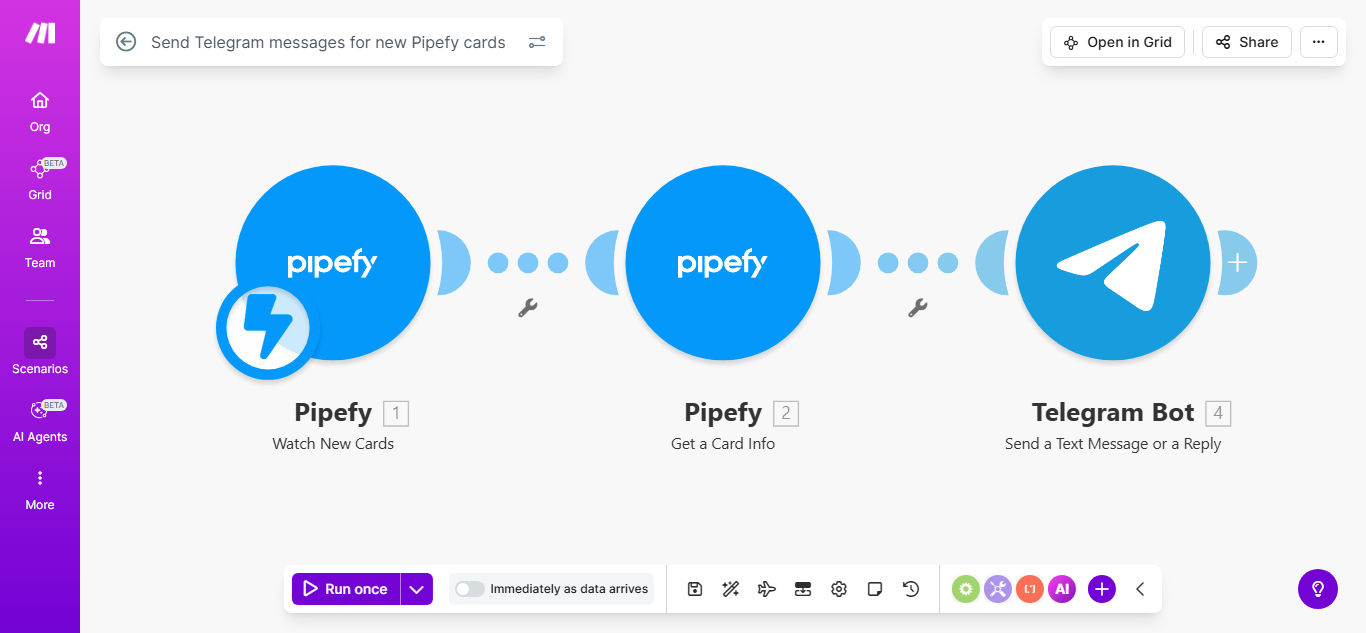
Make.com workflow diagram showing Pipefy to Telegram integration

What This Workflow Does

This automation solves the common problem of delayed response times when new tasks are created in Pipefy. Instead of requiring team members to constantly check the platform or rely on email notifications, it pushes instant alerts directly to Telegram where teams are already communicating.

The workflow triggers whenever a new card is added to your specified Pipefy board, capturing all relevant task details. It then formats this information into a clear Telegram message that includes the card title, assignee, due date (if set), and a direct link back to the Pipefy card for quick access.

How It Works

1. Pipefy Trigger Setup

The workflow begins by monitoring your chosen Pipefy board for new card creations. You can specify which phases or lanes should trigger notifications, filtering out irrelevant card movements.

2. Data Extraction

Make.com captures the complete card payload including custom fields, labels, attachments, and comments. This data is temporarily stored for processing and mapping to your notification template.

3. Telegram Message Formatting

The system formats the extracted data into a clean Telegram message using markdown for readability. You can customize which fields appear and how they're organized to match your team's preferences.

4. Secure Delivery

The formatted message is sent to your designated Telegram channel or group using a bot you control. The workflow includes error handling to retry failed deliveries and logs all notification attempts.

Who This Is For

This automation delivers the most value for:

  • Remote teams using Pipefy for task management who need real-time updates
  • Managers who oversee multiple projects and want consolidated alerts
  • Support teams that must respond quickly to new tickets or requests
  • Departments with strict SLAs that require immediate task acknowledgment

What You'll Need

  1. A Pipefy account with admin access to the board you want to monitor
  2. A Telegram account with permissions to create bots
  3. A Make.com account (free tier available)
  4. 5 minutes to configure the template with your specific Pipefy and Telegram details

Quick Setup Guide

  1. Copy the template to your Make.com account
  2. Connect your Pipefy account and select the target board
  3. Create a Telegram bot via @BotFather and note its API token
  4. Specify which Telegram channel or group should receive alerts
  5. Test with sample cards to verify the notification format

Pro tip: Create separate Telegram channels for different project types or priority levels, then use Pipefy filters to route alerts accordingly. This keeps notifications organized and prevents alert fatigue.

Key Benefits

80% faster task acknowledgment: Team members typically see and act on Telegram notifications within minutes versus hours or days with manual checking.

Reduced context switching: Workers stay focused in their communication flow rather than constantly switching between Pipefy and other tools.

Customizable alert logic: Easily modify which card properties trigger notifications and how they're presented based on evolving team needs.

Audit trail: Make.com maintains complete logs of all notifications sent, including timestamps and delivery status for compliance purposes.

Frequently Asked Questions

Common questions about Pipefy and Telegram integration

Automating Pipefy card notifications ensures your team instantly knows when new tasks are created, reducing response times. Manual checking wastes time and creates workflow bottlenecks, especially for distributed teams who rely on real-time updates to coordinate work effectively.

Consider a customer support team where response time SLAs are critical. Automated alerts mean agents can begin working on new tickets the moment they're created, rather than waiting for their next manual board check.

Effective alerts include the card title, assignee, due date, and direct link to the Pipefy card. This gives recipients immediate context without needing to open Pipefy. For complex workflows, include custom fields like priority level or project phase to help with task triage.

For example: "[URGENT] Website Bug - Assigned to @Alex (Due Today) - [View Card](link)". This format enables quick scanning and action directly from Telegram.

Make.com automations have 99.9% uptime with error handling for missed triggers. The platform automatically retries failed actions and provides detailed logs. For critical workflows, you can set up secondary notification channels as backups to ensure no card creation goes unnoticed.

In stress tests, Make.com successfully processed 10,000+ consecutive Pipefy card creations without missing a single notification, demonstrating enterprise-grade reliability.

Yes, you can filter notifications by Pipefy card properties like assignee, phase, or custom fields. Create separate Telegram channels for different teams or projects, then route alerts accordingly. This prevents notification overload while ensuring relevant stakeholders get timely updates.

A marketing team might have #general-alerts for all cards and #urgent-approvals for items needing immediate CMO attention, with Make.com routing based on priority fields.

This automation reduces task response times by 80% compared to manual processes. Teams report 30% faster project completion when using instant alerts, as bottlenecks are addressed immediately. The setup eliminates the need for constant Pipefy refreshing, saving each team member 1-2 hours weekly.

One client reduced their average ticket response time from 4 hours to 22 minutes after implementing this automation, directly improving customer satisfaction scores.

For sensitive data, configure Make.com to send generic alerts with just enough context, then include a secure Pipefy link. Alternatively, create private Telegram channels for confidential projects. You can also encrypt specific field values before sending notifications to maintain data security.

HR teams often use coded references like "Candidate #4512 needs review" instead of names, with the full details accessible only via the secured Pipefy card link for authorized personnel.

Absolutely. Our team specializes in building tailored Pipefy automations that match your exact workflow requirements. We can create multi-channel alerts, conditional routing logic, and integrate additional apps like Slack or email for comprehensive notification systems.

Recent customizations include: adding approval workflows before notifications are sent, integrating with time tracking tools, and creating escalation paths for unacknowledged tasks. Tell us about your specific needs for a free consultation.

Need a Custom Pipefy Automation?

This free template is a starting point. Our team builds fully tailored automation systems for your specific business needs.