Make.com Shopify Pipefy Product Management Automation

Automatically Create Pipefy Records from New Shopify Products

Eliminate manual data entry by instantly syncing new Shopify products to your Pipefy tables

Get This Workflow → Make.com · Shopify · Free Template
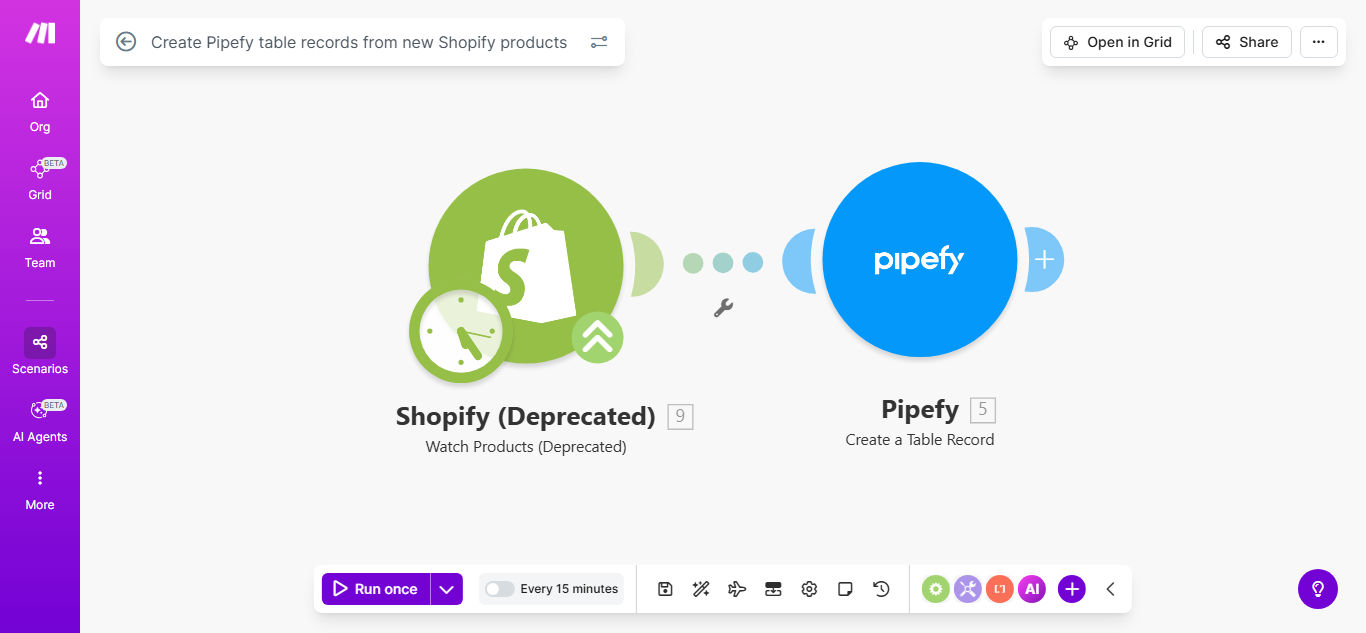
Make.com workflow diagram showing Shopify to Pipefy integration

What This Workflow Does

This automation solves a critical pain point for ecommerce teams managing products across Shopify and Pipefy. Every time you add a new product in Shopify, the workflow automatically creates a corresponding record in your specified Pipefy table, with all relevant product details mapped to the appropriate fields.

Manual product data entry between systems is time-consuming and error-prone. This integration ensures your product information stays consistent across platforms while saving your team 5-10 hours per week on administrative tasks. It's particularly valuable for businesses that use Pipefy for product development workflows, inventory management, or supplier coordination.

How It Works

1. New product trigger

The workflow monitors your Shopify store for new product creation events using Make.com's Shopify connector. It instantly detects when a product is added.

2. Data extraction

Key product information is extracted from Shopify, including title, description, variants, pricing, images, and any custom metadata fields you specify.

3. Pipefy record creation

The workflow connects to your Pipefy account and creates a new record in your designated table. All Shopify product fields are mapped to corresponding Pipefy table columns according to your configuration.

4. Error handling

The automation includes built-in error handling to retry failed operations and send notifications if any issues occur during the sync process.

Who This Is For

This automation is ideal for:

  • Ecommerce teams managing large product catalogs
  • Businesses using Pipefy for product development workflows
  • Companies that need to sync product data with suppliers or manufacturers
  • Retailers maintaining centralized product information systems
  • Teams wanting to eliminate manual data entry between systems

What You'll Need

  1. A Make.com account (free or paid plan)
  2. Admin access to your Shopify store
  3. A Pipefy account with table creation permissions
  4. The Pipefy table ID where records should be created
  5. Basic understanding of field mapping between systems

Quick Setup Guide

  1. Clone the template from Make.com to your account
  2. Connect your Shopify store via the Shopify module
  3. Authenticate with your Pipefy account
  4. Specify the target Pipefy table ID
  5. Map Shopify product fields to Pipefy table columns
  6. Test with a new product creation
  7. Activate the automation

Pro tip: Create a dedicated "Products" table in Pipefy with columns that match your Shopify product structure before setting up the automation. This makes field mapping much simpler.

Key Benefits

Eliminate manual data entry: Save 5-10 hours per week by automatically syncing products instead of copying information between systems.

Reduce errors: Automated field mapping ensures data consistency with zero typos or missed fields that commonly occur with manual entry.

Faster product launches: New products become available in Pipefy instantly, accelerating downstream workflows like supplier coordination or marketing planning.

Centralized product information: Maintain a single source of truth across your ecommerce and operations platforms.

Scalable solution: The automation handles 10 or 10,000 products with equal reliability, growing with your business.

Frequently Asked Questions

Common questions about Shopify-Pipefy automation and integration

Connecting Shopify with Pipefy eliminates manual data entry when adding new products. It ensures your product management system stays updated automatically, reducing errors and saving your team 5-10 hours per week on administrative tasks.

For example, an apparel brand launching 50 new seasonal products would traditionally require copying each product's details from Shopify to Pipefy. This automation handles that instantly with perfect accuracy.

  • Eliminates duplicate data entry
  • Ensures consistent product information
  • Accelerates product launch workflows

You can sync product names, descriptions, prices, variants, inventory levels, images, and custom metadata. The automation maps Shopify product fields to corresponding Pipefy table columns for seamless data transfer.

The template includes common field mappings out of the box, which you can customize to match your specific Pipefy table structure. Advanced users can even transform data during the sync process.

The workflow triggers instantly whenever a new product is created in Shopify, typically processing within 2-5 minutes. For bulk imports, you can configure batch processing to handle large product catalogs efficiently.

Some businesses schedule hourly checks for new products, while others rely on real-time triggers. The approach depends on your product launch frequency and urgency requirements.

Yes, you can add conditions to only sync products matching specific criteria like product type, tags, price range, or inventory status. This prevents cluttering your Pipefy tables with irrelevant products.

A common use case is only syncing products tagged "Active" or those in certain collections. The filtering happens before the Pipefy record creation, saving unnecessary operations.

The basic template only handles new product creation. However, you can extend it to update existing Pipefy records when products change in Shopify by adding an update module to the workflow.

Many businesses start with new product syncs, then expand to handle updates later. This phased approach lets you validate the core automation before adding complexity.

Make.com's platform provides 99.9% uptime for automations. The workflow includes error handling to retry failed operations and sends notifications if any sync issues occur, ensuring data consistency between systems.

For mission-critical product data, you can add secondary validation steps or implement a manual review queue for certain product categories while maintaining automation for others.

Absolutely! GrowwStacks specializes in building tailored Shopify-Pipefy integrations with custom field mapping, conditional logic, and advanced error handling to match your specific product management workflows.

Our automation experts can design solutions that handle complex scenarios like multi-table relationships in Pipefy, product variant transformations, or syncing with additional systems like your ERP or PIM.

  • Custom field mappings
  • Multi-system integrations
  • Advanced error recovery

Need a Custom Shopify-Pipefy Automation?

This free template is a starting point. Our team builds fully tailored automation systems for your specific business needs.