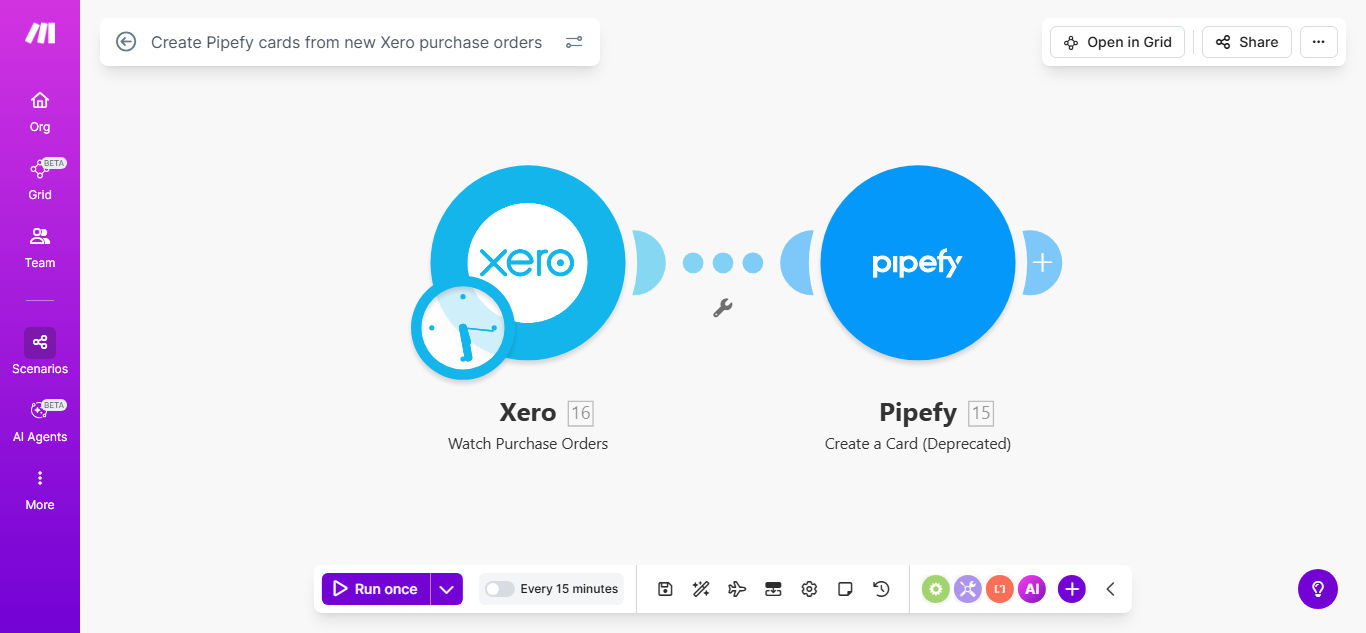
What This Workflow Does
This automation bridges your accounting and procurement systems by automatically creating Pipefy cards whenever new purchase orders appear in Xero. It eliminates manual data entry between systems, reducing errors and accelerating your procurement cycle.
When finance teams create purchase orders in Xero, the relevant details automatically flow into Pipefy as new cards in your procurement pipeline. This gives purchasing teams immediate visibility into new requests while maintaining a clean audit trail between the systems.
How It Works
1. New Purchase Order Detection
The workflow monitors your Xero account for newly created purchase orders. You can filter which POs trigger the automation based on amount, vendor, or other criteria.
2. Data Extraction
Key details like vendor information, line items, amounts, and due dates are extracted from the Xero purchase order.
3. Pipefy Card Creation
The workflow creates a new card in your designated Pipefy board, populating all relevant fields with the purchase order data.
4. Notification & Routing
Optional steps can notify approvers or route cards to specific pipeline phases based on purchase amount or department.
Who This Is For
This automation is ideal for businesses that:
- Use Xero for accounting and Pipefy for procurement
- Process more than 20 purchase orders monthly
- Have separate finance and purchasing teams
- Need better visibility into procurement status
- Want to reduce manual data entry between systems
What You'll Need
- A Make.com account (free or paid)
- Admin access to your Xero account
- Editor access to your Pipefy board
- Clear mapping of which Xero PO fields should populate Pipefy cards
Quick Setup Guide
- Install the template in your Make.com account
- Connect your Xero and Pipefy accounts
- Configure which Xero purchase orders should trigger the workflow
- Map Xero fields to your Pipefy card format
- Test with sample purchase orders
- Activate the automation
Pro tip: Start by automating only certain types of purchase orders (like those over $1,000) to validate the workflow before scaling to all POs.
Key Benefits
Eliminate manual data entry between Xero and Pipefy, reducing errors and saving 2-5 hours per week typically spent on administrative tasks.
Accelerate procurement cycles by giving purchasing teams instant visibility into new orders rather than waiting for email notifications or manual updates.
Maintain perfect audit trails as every Pipefy card links back to the original Xero purchase order with all details preserved.
Scale your processes without adding headcount as purchase volume grows, since the automation handles the repetitive work.