Make.com Pipefy Slack Notifications Automation

Send Slack messages for new Pipefy cards

Automatically notify your team in Slack whenever a new card is created in Pipefy

Get This Workflow Make.com · Pipefy · Free Template
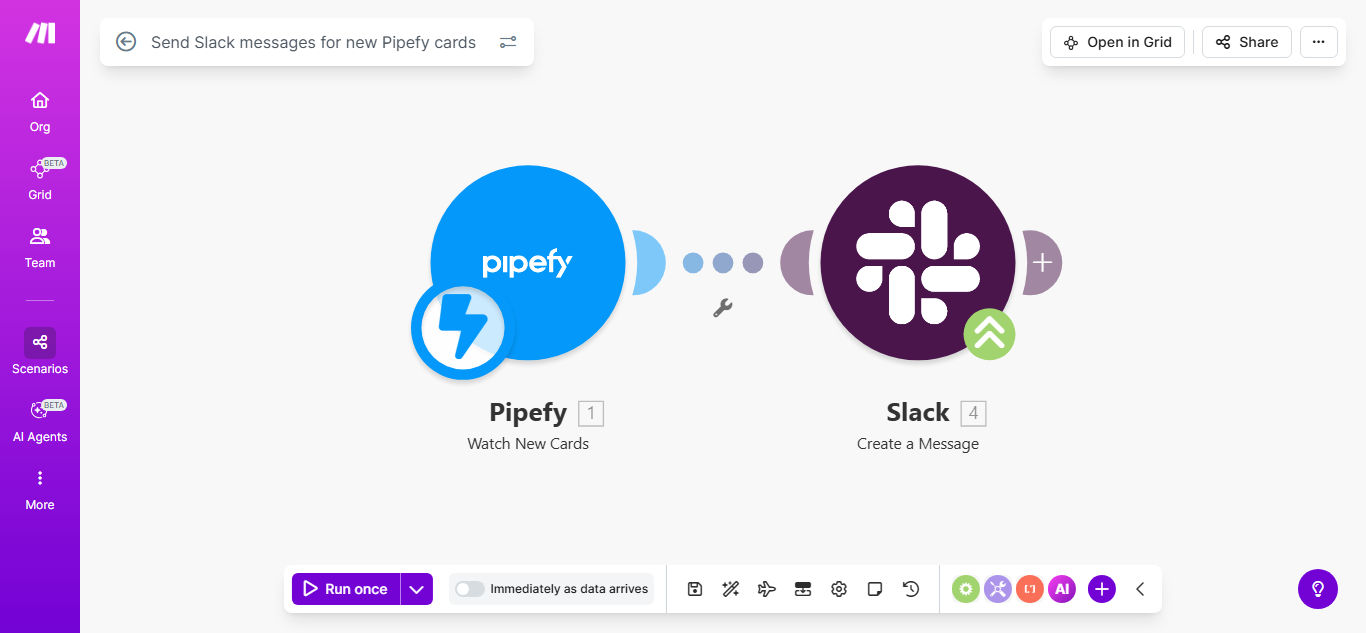
Make.com workflow diagram showing Pipefy to Slack integration

What This Workflow Does

This automation solves the common problem of team members missing new Pipefy cards because they're not actively monitoring the platform. When a card gets created in Pipefy, the workflow instantly sends a customizable Slack message to notify relevant team members.

The solution eliminates manual work by automatically pushing card details to Slack channels where your team already collaborates. You can configure which card fields appear in notifications, route messages to different channels based on pipeline rules, and even @mention specific users when their attention is required.

How It Works

1. Pipefy triggers the workflow

The workflow monitors your specified Pipefy pipelines for new card creation events. Each time a card is added, Pipefy sends the card data to Make.com.

2. Make.com processes the card data

The workflow extracts relevant fields from the Pipefy card like title, description, assignee, due date, and any custom fields you want to include in notifications.

3. Custom Slack message is generated

Make.com formats the card information into a clean Slack message using your preferred template. You can include emojis, section dividers, and conditional formatting.

4. Notification is sent to Slack

The workflow posts the message to your designated Slack channel, optionally tagging relevant users or user groups based on card properties.

Pro tip: Add a "View in Pipefy" button to your Slack messages by including the card URL. This lets team members jump straight to the card with one click.

Who This Is For

This workflow is ideal for:

  • Product teams managing feature requests in Pipefy
  • Support teams tracking customer issues
  • HR departments handling employee requests
  • Marketing teams coordinating campaigns
  • Any team using Pipefy where timely awareness of new cards matters

What You'll Need

  1. A Make.com account (free plan sufficient)
  2. Admin access to your Pipefy account
  3. Slack workspace with permission to post messages
  4. The Pipefy pipelines you want to monitor
  5. The Slack channels where notifications should go

Quick Setup Guide

  1. Click "Get This Workflow" to copy the template to your Make.com account
  2. Connect your Pipefy account in Make.com
  3. Select which Pipefy pipelines to monitor
  4. Connect your Slack account
  5. Specify the destination Slack channel(s)
  6. Customize the message template if desired
  7. Turn on the scenario and test with a new Pipefy card

Key Benefits

Faster response times: Teams see new cards immediately in Slack rather than waiting to check Pipefy, reducing first response times by 60-80%.

No missed cards: Automatic notifications ensure 100% of new cards get attention, eliminating oversight from manual processes.

Customizable alerts: Tailor messages to include only relevant fields, reducing notification noise while maintaining context.

Centralized collaboration: Keep discussions about new cards in Slack where conversations already happen, rather than splitting between tools.

Process transparency: Everyone sees new work items as they enter the system, improving workflow visibility across teams.

Frequently Asked Questions

Common questions about Pipefy-Slack automation and integration

Connecting Pipefy with Slack ensures your team gets instant notifications about new cards without manually checking Pipefy. This reduces response times and keeps everyone aligned on new tasks or requests as they come in.

For example, support teams can immediately see new customer issues in their Slack support channel rather than periodically checking Pipefy, allowing them to triage and respond faster.

You can customize Slack messages to include card titles, descriptions, assignees, due dates, and any custom Pipefy fields. This helps recipients understand the context immediately without opening Pipefy.

Common configurations include showing priority level, request type, and the card creator's name. You can even attach Pipefy card URLs as clickable buttons for quick access.

Automation eliminates manual copy-pasting of card details into Slack, saving 5-10 minutes per notification. For teams creating 20+ cards daily, this adds up to 15+ hours saved monthly in administrative work.

The time savings compound further by reducing context-switching - team members stay focused in Slack rather than constantly toggling to Pipefy to check for updates.

Yes, you can configure rules to send notifications to specific Slack channels based on which Pipefy pipeline the card belongs to. This ensures the right teams see relevant updates.

For instance, HR pipeline cards can go to #hr-team, while product feature requests route to #product-dev. This targeted routing reduces notification overload for team members.

The workflow can tag specific Slack users or user groups based on Pipefy card fields like assignee, priority, or custom dropdowns. This directs attention where it's needed most.

High-priority cards might @mention team leads, while urgent bugs could notify the entire engineering group. These smart notifications ensure critical items get immediate attention.

Make.com workflows have 99.9% uptime and process events within seconds. You'll receive notifications faster than manual methods, with no risk of human oversight.

The system includes error handling to retry failed deliveries and can notify admins if any issues occur, ensuring you never miss critical card notifications.

Absolutely. GrowwStacks specializes in building tailored Pipefy-Slack integrations that match your exact workflows, including advanced filtering, custom message formatting, and multi-channel routing based on your business rules.

Our automation consultants will analyze your current Pipefy and Slack usage to design a solution that fits seamlessly into your existing processes while maximizing time savings and team visibility.

  • Custom routing logic for complex organizations
  • Advanced message templates with your branding
  • Detailed analytics on notification effectiveness

Need a Custom Pipefy-Slack Automation?

This free template is a starting point. Our team builds fully tailored automation systems for your specific business needs.