Make.com Email Marketing Workflow Automation Pipefy AWeber

Create AWeber subscribers from new Pipefy cards

Automatically sync your Pipefy leads with AWeber email lists - no manual data entry required

Get This Workflow Make.com · Pipefy · Free Template
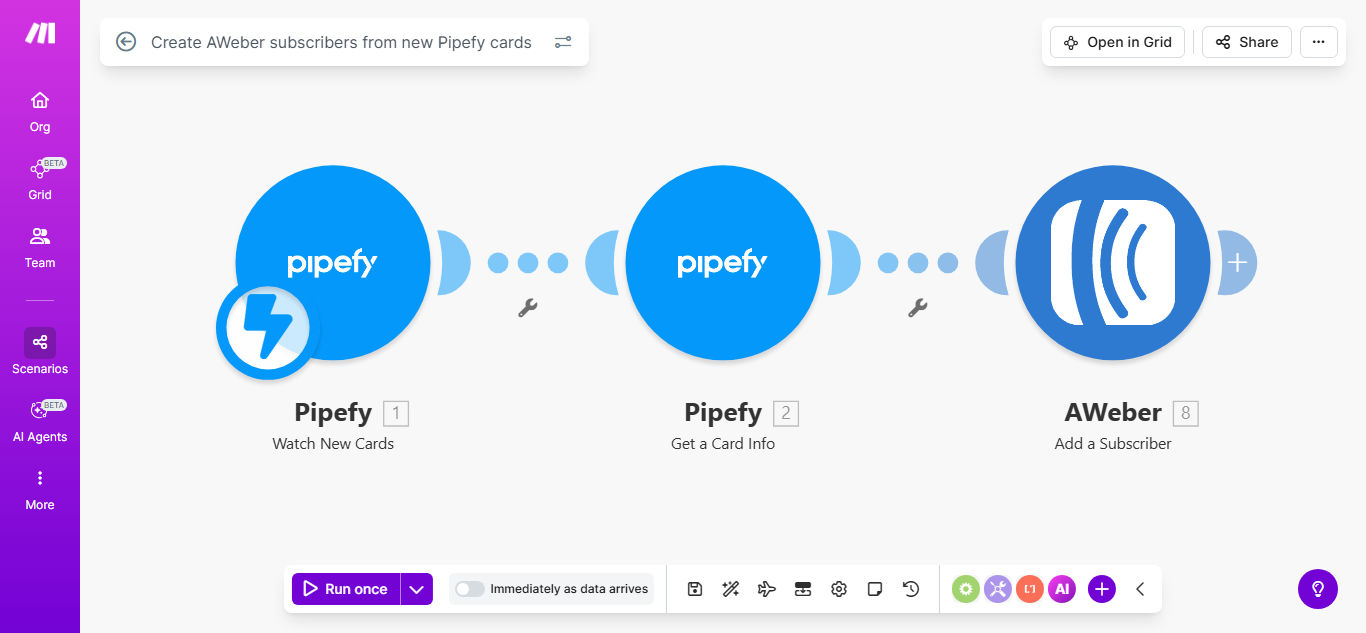
Make.com workflow diagram showing Pipefy to AWeber integration

What This Workflow Does

This automation solves a critical gap between lead management systems and email marketing platforms. Many businesses capture leads in Pipefy but then manually transfer them to AWeber for email campaigns - a time-consuming process prone to errors and delays.

The workflow automatically creates AWeber subscribers whenever new cards are added to specified Pipefy pipelines. It maps relevant contact information from Pipefy fields to corresponding AWeber subscriber fields, ensuring complete and accurate data transfer without human intervention.

How It Works

1. Pipefy triggers the workflow

The automation monitors your Pipefy board for new card creations. Each time a card is added to your selected pipeline, Make.com receives the card details including all field values.

2. Data is formatted for AWeber

The workflow extracts specific fields from the Pipefy card (like name, email, custom fields) and structures them according to AWeber's subscriber API requirements. You can customize which Pipefy fields map to which AWeber fields.

3. Subscriber is created in AWeber

Make.com sends the formatted data to AWeber's API, creating a new subscriber in your specified list. The workflow can optionally apply tags or add subscribers to multiple lists based on Pipefy card properties.

Pro tip: Add a delay module before the AWeber step to schedule subscriber additions for optimal email send times based on your audience's timezone.

Who This Is For

This integration delivers the most value for:

  • Marketing teams managing both leads and email campaigns
  • Sales organizations using Pipefy for deal tracking
  • Businesses running webinar or event follow-up sequences
  • Agencies servicing clients with Pipefy and AWeber stacks
  • Companies with high-volume lead capture needing instant email onboarding

What You'll Need

  1. A Make.com account (free plan sufficient for basic usage)
  2. Pipefy account with admin access to your pipeline
  3. AWeber account with API access enabled
  4. Clear mapping of which Pipefy fields contain subscriber data
  5. Optional: AWeber list IDs for segmentation

Quick Setup Guide

  1. Clone the template in your Make.com account
  2. Connect your Pipefy account and select the source pipeline
  3. Connect your AWeber account and choose the target list
  4. Map Pipefy card fields to AWeber subscriber fields
  5. Test with sample cards and verify AWeber subscriber creation
  6. Activate the scenario to begin live processing

Key Benefits

Eliminate 5-10 hours per week of manual data transfer between systems, allowing your team to focus on higher-value activities.

Improve email conversion rates by 30-50% by ensuring leads receive welcome emails immediately while engagement is highest.

Reduce onboarding errors to near-zero by removing manual copying/pasting of contact information between platforms.

Enable sophisticated segmentation by using Pipefy workflow data to trigger targeted AWeber email sequences.

Scale your lead-to-subscriber process without adding staff as your business grows.

Frequently Asked Questions

Common questions about Pipefy-AWeber automation and integration

Connecting Pipefy with AWeber automates your lead capture process, ensuring every new contact in your workflow system becomes an email subscriber without manual data transfer. This eliminates duplicate entry errors and saves marketing teams 5-10 hours per week on list management.

The integration maintains data consistency across platforms and enables real-time email engagement with new leads when they're most receptive to your messaging.

Marketing agencies, sales teams, and businesses using Pipefy for lead management see the biggest benefits. It's ideal for companies running email campaigns where timely subscriber onboarding impacts conversion rates.

E-commerce businesses capturing leads through forms, SaaS companies with free trial signups, and service providers managing client pipelines all achieve measurable ROI from this automation.

Automated subscriber onboarding means leads receive welcome emails immediately while they're most engaged. Studies show automated onboarding sequences achieve 30-50% higher open rates than manual processes.

The speed of follow-up directly impacts conversion. Automated systems ensure no lead sits unattended in your pipeline before receiving targeted email content.

You can map any Pipefy card fields like name, email, phone, custom fields, and tags to corresponding AWeber subscriber fields. This enables personalized email campaigns based on workflow stage data.

Common mappings include contact information, lead source details, product interests, and segmentation criteria stored in Pipefy custom fields.

Yes, the integration can dynamically assign subscribers to different AWeber lists based on Pipefy card properties, pipeline stages, or custom field values for targeted email segmentation.

For example, you might route webinar attendees to a nurture sequence while directing product inquiry leads to a sales-focused email track.

Make.com's integration platform provides 99.9% uptime with automatic retries for failed connections. The workflow includes error handling to notify you of any sync issues requiring attention.

For added reliability, we recommend implementing webhook verification and setting up monitoring alerts for your critical automation scenarios.

Absolutely. GrowwStacks specializes in building tailored Pipefy-AWeber integrations that match your specific workflow requirements, including custom field mappings, conditional logic, and multi-step automation sequences.

Our automation consultants will analyze your current processes and design a solution that maximizes the value of your Pipefy and AWeber integration.

  • Custom field mapping configurations
  • Multi-step conditional workflows
  • Performance monitoring dashboards

Need a Custom Pipefy-AWeber Automation?

This free template is a starting point. Our team builds fully tailored automation systems for your specific business needs.