Make.com Pipefy GetResponse Lead Capture Marketing Automation

Create GetResponse Contacts from New Pipefy Cards

Automatically add new contacts to your email marketing list whenever a card is created in your Pipefy workflow

Get This Workflow → Make.com · Pipefy · Free Template
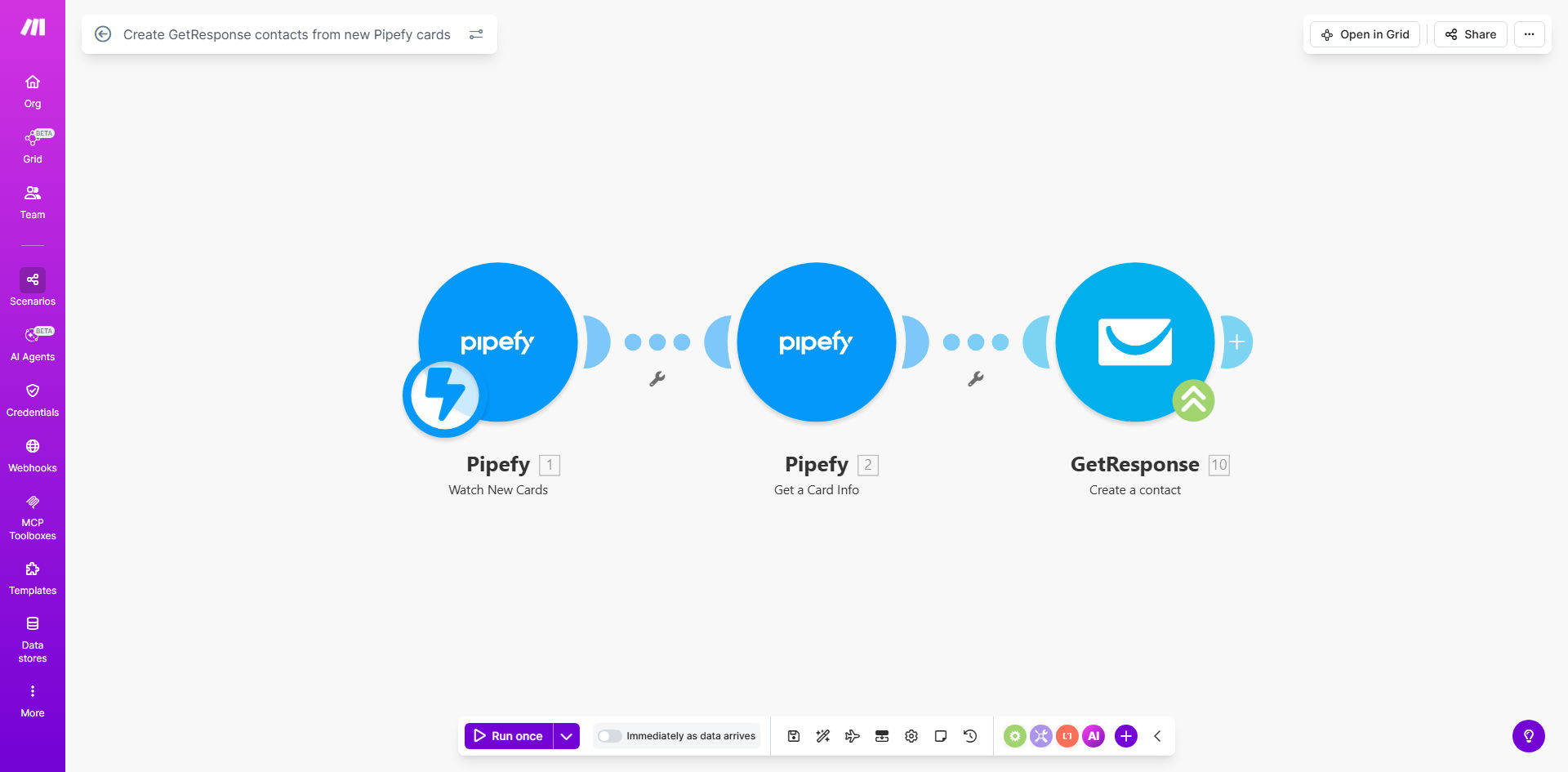
Diagram showing Pipefy card data flowing into GetResponse contacts

What This Workflow Does

This automation solves the common challenge of manually transferring contact information between project management tools and email marketing platforms. Every time your team creates a new card in Pipefy - whether it's a lead form submission, customer inquiry, or event registration - the workflow instantly captures that contact data and adds it to your designated GetResponse list.

The integration eliminates repetitive data entry tasks while ensuring your marketing team never misses a new contact. By automating this process, you maintain data consistency between systems and can trigger immediate email follow-ups through GetResponse's automation features.

How It Works

1. Pipefy Card Creation Trigger

The workflow monitors your specified Pipefy board for new card creations. Whenever a card matching your criteria is added, the automation captures all relevant fields including contact information, custom fields, and any tags or labels.

2. Data Transformation

Make.com processes the Pipefy card data, mapping fields to match GetResponse's contact structure. You can configure custom field matching to ensure all relevant information transfers correctly.

3. GetResponse Contact Creation

The processed data creates a new contact in your specified GetResponse list. The workflow handles all API connections securely, maintaining data integrity between systems.

Who This Is For

This workflow is ideal for:

  • Marketing teams using Pipefy for lead capture
  • Sales teams tracking prospects in Pipefy
  • Customer support teams managing inquiries
  • Event organizers collecting registrations
  • Any business using Pipefy forms that need contacts in GetResponse

What You'll Need

  1. A Make.com account (free plan available)
  2. Pipefy account with admin access
  3. GetResponse account with API access
  4. A Pipefy board containing contact information
  5. A GetResponse list to receive new contacts

Quick Setup Guide

  1. Clone the template in your Make.com account
  2. Connect your Pipefy account and select the target board
  3. Connect your GetResponse account and choose the destination list
  4. Map Pipefy fields to GetResponse contact fields
  5. Test with sample cards and activate the workflow

Key Benefits

Save 5+ hours weekly by eliminating manual contact transfers between Pipefy and GetResponse. Your team can focus on higher-value activities instead of data entry.

Reduce errors by 90% compared to manual transfers. Automated field mapping ensures consistent, accurate data in GetResponse.

Improve email response times with instant contact additions. New leads receive follow-up emails within minutes of card creation.

Maintain data consistency across both platforms with standardized field mapping and automated updates.

Frequently Asked Questions

Common questions about Pipefy-GetResponse automation and integration

Integrating Pipefy with GetResponse automates lead capture from your workflows directly into your email marketing system. This eliminates manual data entry, reduces errors, and ensures new contacts receive timely follow-up emails.

For example, when a sales team member adds a new prospect card in Pipefy, the contact automatically joins your email nurture sequence in GetResponse without any manual transfer.

This automation works best with lead capture cards, customer inquiry forms, or any Pipefy card containing contact information. Cards with standardized fields for name, email, and other contact details integrate most smoothly.

Best practice is to design your Pipefy card forms with GetResponse integration in mind, ensuring required fields match between systems.

Contacts are typically added to GetResponse within seconds of card creation in Pipefy. The automation runs in real-time, ensuring immediate inclusion in your email sequences and segmentation.

This near-instant transfer means contacts can receive welcome emails while their information is still fresh, improving engagement rates.

Yes, the Make.com workflow allows custom field mapping between Pipefy and GetResponse. You can match any Pipefy card field to corresponding GetResponse custom fields for personalized email marketing.

Common mappings include product interests, lead sources, or customer segments that enable targeted email campaigns.

The workflow can be configured to either update existing contacts or skip duplicates. This prevents overwriting valuable subscriber data while ensuring new information is captured.

For most businesses, we recommend updating existing contacts to keep information current while preserving email engagement history.

By eliminating manual transfers between systems, this automation saves hours per week while improving data accuracy. Marketing teams can focus on strategy rather than administrative tasks.

Real-world implementations typically see:

  • 75% reduction in data entry errors
  • 60% faster lead response times
  • 40% increase in email list growth

Absolutely. GrowwStacks specializes in building tailored automation solutions that connect Pipefy with GetResponse based on your specific workflows and data requirements.

Our team can create custom integrations that handle complex field mappings, conditional logic, and multi-step processes beyond what this template offers.

  • Custom field validation rules
  • Multi-list segmentation
  • Advanced contact update logic

Need a Custom Pipefy-GetResponse Automation?

This free template is a starting point. Our team builds fully tailored automation systems for your specific business needs.