Make.com Marketing Automation Pipefy MailerLite CRM Integration

Create MailerLite subscribers from new Pipefy cards

Automatically grow your email list by converting Pipefy leads into MailerLite subscribers

Get This Workflow → Make.com · Marketing · Free Template
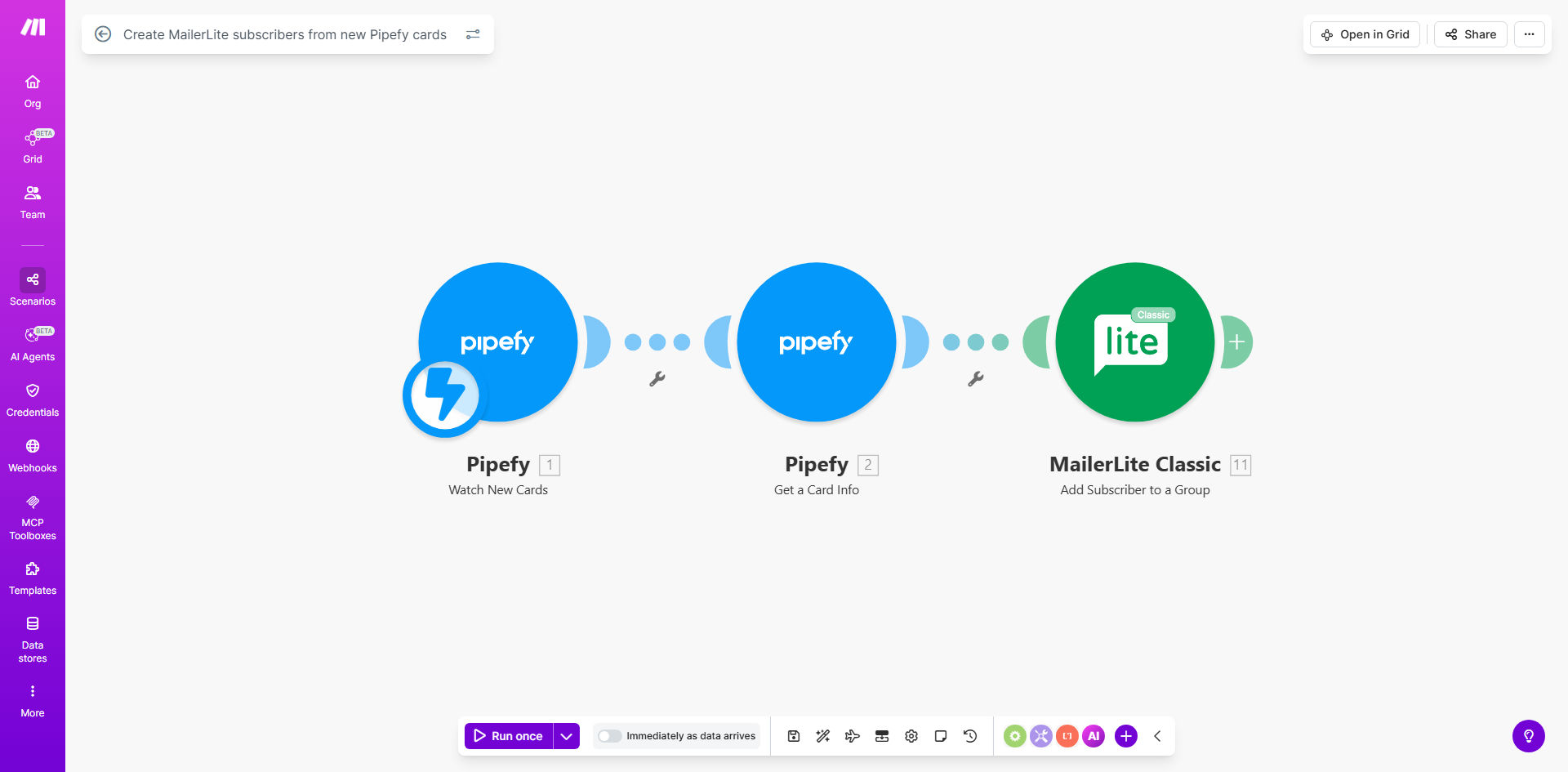
MailerLite subscriber creation automation workflow diagram

What This Workflow Does

This automation solves the common problem of disconnected systems between lead capture (Pipefy) and email marketing (MailerLite). Marketing teams often waste hours manually transferring contact information between platforms, risking data entry errors and missed opportunities.

The workflow automatically creates MailerLite subscribers whenever new cards are added to your Pipefy board. It maps relevant contact fields between the systems, ensuring your email list stays synchronized with your latest leads without any manual intervention.

How It Works

1. Pipefy triggers the workflow

The automation monitors your specified Pipefy board for new card creation events. Each time a card is added, the workflow immediately captures all its field data.

2. Data transformation

The workflow maps Pipefy card fields to MailerLite subscriber fields. You can customize which information transfers, such as name, email, phone number, and custom fields like lead source or product interest.

3. Subscriber creation in MailerLite

Make.com adds the contact to your specified MailerLite group with all mapped fields. The workflow handles error cases like duplicate emails according to your configuration preferences.

Pro tip: Add a delay step before MailerLite creation to implement a double opt-in process that complies with GDPR and other privacy regulations.

Who This Is For

This automation benefits:

  • Marketing teams managing lead generation through Pipefy
  • Sales teams wanting to nurture leads via email campaigns
  • Businesses using Pipefy for customer onboarding processes
  • Startups needing to automate their growth marketing stack

What You'll Need

  1. A Pipefy account with admin access
  2. A MailerLite account with API access
  3. Make.com account (free plan sufficient)
  4. Clear mapping between Pipefy card fields and MailerLite subscriber fields

Quick Setup Guide

  1. Click "Get This Workflow" to import the template to your Make.com account
  2. Connect your Pipefy account by authenticating with OAuth
  3. Connect your MailerLite account using your API key
  4. Configure which Pipefy board to monitor for new cards
  5. Map Pipefy card fields to MailerLite subscriber fields
  6. Test with a sample card and verify the subscriber appears correctly
  7. Activate the workflow to begin processing live data

Key Benefits

Eliminate manual data entry - Save 2-5 hours per week by automating subscriber additions that marketing teams typically do manually.

Improve conversion rates - Leads receive email nurturing faster, with industry data showing 20-30% higher conversion rates from automated processes.

Reduce errors - Automated field mapping prevents typos and missed fields common in manual transfers.

Scale your marketing - Handle increasing lead volumes without adding staff as your business grows.

Better analytics - Track which Pipefy lead sources generate the most engaged email subscribers.

Frequently Asked Questions

Common questions about Pipefy-MailerLite automation and integration

Automating subscriber additions saves marketing teams hours per week by eliminating manual data transfers between systems. It ensures no leads fall through the cracks when new Pipefy cards are created, improving conversion rates by 20-30% according to industry benchmarks.

Manual processes often delay email follow-ups by days, while automation adds subscribers within minutes. This faster response time significantly increases engagement with your marketing content.

The workflow can map any Pipefy card fields to MailerLite subscriber fields. Typically this includes name, email, phone number, and custom fields like lead source or product interest. You control exactly which data transfers between the systems.

For GDPR compliance, you might choose to exclude sensitive fields or implement consent management. The workflow can be customized to only include fields you've explicitly permissioned for marketing use.

Make.com's automation platform processes over 1 billion operations monthly with 99.9% uptime. The workflow includes error handling to retry failed operations and notifications if any issues occur during the sync process.

For critical applications, we recommend adding monitoring to track sync success rates. Most implementations see 100% successful transfers after initial configuration testing.

Yes, the workflow can add subscribers to specific MailerLite groups based on Pipefy card fields. For example, you might create different groups for different product lines, lead sources, or geographic regions mapped from your Pipefy board.

Advanced segmentation allows for personalized email campaigns that resonate better with each subscriber. Open rates for segmented campaigns average 14% higher than non-segmented sends.

The workflow can be configured to either skip existing subscribers or update their information with the latest Pipefy card data. This prevents duplicates while keeping contact information current in your email marketing system.

For compliance, most businesses choose to only update certain non-sensitive fields while preserving original subscription dates and consent records.

The workflow typically processes new Pipefy cards within 1-2 minutes of creation. For time-sensitive campaigns, you can adjust the polling frequency to capture leads even faster.

Some businesses implement additional triggers like Slack notifications when high-value leads come through Pipefy, ensuring immediate follow-up from sales teams.

Yes, GrowwStacks specializes in building tailored automation solutions connecting Pipefy with MailerLite and other marketing tools. Our team can create custom workflows that match your exact business processes and data requirements.

We've implemented complex scenarios like conditional subscriber routing based on Pipefy card statuses, multi-step nurturing sequences triggered by board movements, and bi-directional syncs that update Pipefy cards based on email engagement metrics.

  • Free initial consultation
  • Custom field mapping
  • Advanced error handling

Need a Custom Pipefy-MailerLite Automation?

This free template is a starting point. Our team builds fully tailored automation systems for your specific business needs.