Make.com CRM Integration Marketing Automation Pipefy ActiveTrail

Automate ActiveTrail Contacts from Pipefy Cards

Sync customer data between your CRM and email marketing platform automatically - no manual exports or duplicate contacts

Get This Workflow → Make.com · CRM · Free Template
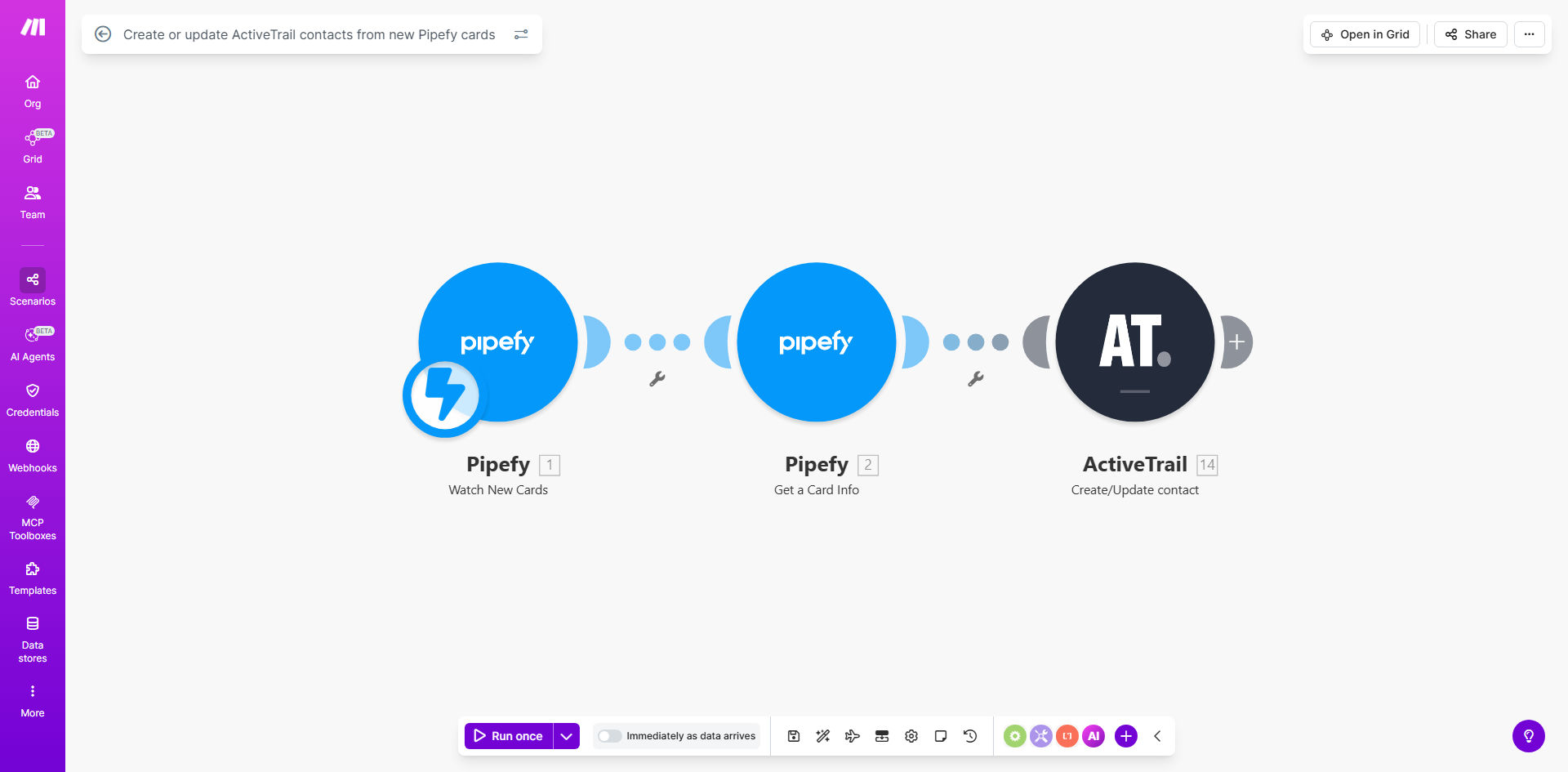
Diagram showing Pipefy cards syncing with ActiveTrail contacts

What This Workflow Does

This automation eliminates the tedious manual process of copying customer data from Pipefy cards to ActiveTrail contacts. Every time your sales team creates or updates a card in Pipefy, the workflow instantly syncs the relevant contact information to ActiveTrail - creating new contacts or updating existing ones automatically.

The solution solves three critical problems: 1) Marketing teams working with outdated contact lists, 2) Sales teams wasting time on data entry instead of selling, and 3) Inconsistent customer data between systems causing failed email deliveries or irrelevant messaging.

How It Works

1. Pipefy card trigger

The workflow monitors your specified Pipefy board for new or updated cards. When detected, it captures all relevant contact fields from the card including custom fields you've defined.

2. Data validation

The system checks for required fields (like email address) and formats data to match ActiveTrail's requirements. Invalid entries trigger error notifications while valid data proceeds.

3. ActiveTrail contact lookup

Before creating a new contact, the workflow searches ActiveTrail for existing records matching the email address. This prevents duplicate contacts while ensuring updates reach the right profile.

4. Contact creation/update

Depending on the lookup result, the workflow either creates a new ActiveTrail contact with all mapped fields or updates the existing contact with new information from Pipefy.

Pro tip: Add conditional logic to only sync cards from specific pipeline phases, creating automatic segmentation in ActiveTrail based on sales funnel position.

Who This Is For

This automation delivers the most value for businesses using Pipefy as their CRM/sales pipeline tool while running email marketing campaigns through ActiveTrail. Ideal users include:

  • Sales teams tired of manually updating marketing contacts
  • Marketing managers needing accurate customer data for campaigns
  • Operations teams reducing data entry errors between systems
  • Growing businesses scaling their sales-marketing coordination

What You'll Need

  1. A Make.com account (formerly Integromat)
  2. Admin access to your Pipefy account
  3. ActiveTrail API credentials
  4. Identified which Pipefy fields map to ActiveTrail contact properties
  5. Optional: Defined segmentation tags in ActiveTrail for different Pipefy pipeline stages

Quick Setup Guide

  1. Click "Get This Workflow" to copy the template to your Make.com account
  2. Connect your Pipefy account in the first module
  3. Add your ActiveTrail API credentials in the HTTP module
  4. Map Pipefy card fields to corresponding ActiveTrail contact properties
  5. Test with sample cards to verify field mappings
  6. Activate the scenario to begin real-time syncing

Key Benefits

Eliminate 2-3 hours per week of manual data entry between systems while achieving 100% data accuracy in your marketing lists.

Improve email deliverability by ensuring ActiveTrail always has current customer information, reducing bounce rates by up to 40%.

Enable smarter segmentation by syncing Pipefy pipeline stages as ActiveTrail tags for targeted campaign automation.

Reduce CRM adoption friction for sales teams by automatically sharing their updates with marketing.

Create audit-ready data trails with Make.com's execution logs showing exactly when contacts were added or updated.

Frequently Asked Questions

Common questions about CRM-marketing automation integration

Automating contact sync eliminates manual data entry errors and ensures your marketing team always has up-to-date customer information. This prevents duplicate contacts, missed follow-ups, and outdated customer profiles that can hurt campaign performance.

For example, when sales reps move deals to "Closed-Won" in Pipefy, the contact automatically gets tagged in ActiveTrail for post-sale nurture sequences - without anyone remembering to update the marketing system.

You can sync contact details like names, emails, phone numbers, plus custom fields from Pipefy cards. The workflow maps relevant fields to ActiveTrail's contact properties, including segmentation tags based on Pipefy pipeline stages.

Common mappings include company size from Pipefy dropdowns to ActiveTrail custom fields, or opportunity value ranges that trigger different email sequences. The specific fields depend on your sales process and marketing needs.

The workflow triggers instantly whenever a new card is created or updated in Pipefy. Real-time syncing ensures your email campaigns always target the most current customer data without delays.

Make.com processes these updates within seconds, compared to manual batch imports that might run weekly. This is especially valuable for time-sensitive campaigns following up on new leads or recent purchases.

The workflow checks for existing contacts by email address and updates their record rather than creating duplicates. This maintains clean contact lists while preserving all historical engagement data in ActiveTrail.

Updates might include new phone numbers, changed job titles, or additional tags reflecting their current position in your sales pipeline. The system logs all changes for complete visibility.

Yes, you can configure conditions to only sync cards from specific pipelines, phases, or with certain field values. This prevents irrelevant contacts from cluttering your marketing lists.

For instance, you might exclude cards marked "Competitor" or only sync contacts who've opted in for marketing communications. The template includes commented examples of common filtering scenarios.

By ensuring ActiveTrail always has accurate customer data, your email campaigns achieve higher deliverability and engagement rates. You can also trigger targeted nurture sequences based on Pipefy workflow changes.

One client saw a 28% increase in email open rates after implementing this sync, because their segmentation reflected real-time sales pipeline movements rather than static lists. Automated welcome series for new leads began within minutes instead of days.

Absolutely! Our team at GrowwStacks specializes in building tailored integrations between Pipefy and ActiveTrail that match your specific sales and marketing workflows. We can add custom field mappings, conditional logic, and multi-step automation sequences.

Popular customizations include syncing deal stage changes to trigger specific email sequences, adding lead scoring based on Pipefy activity, or creating ActiveTrail segments that update when cards move between phases. Book a free consultation to discuss your requirements.

  • Custom field mapping for your unique data structure
  • Multi-step automation sequences based on pipeline movement
  • Error handling for your specific edge cases

Need a Custom CRM-Marketing Automation?

This free template is a starting point. Our team builds fully tailored automation systems for your specific business needs.