Make.com Zoho Mail Telegram Email Automation Notifications

Get new emails from Zoho Mail in Telegram

Automatically forward important emails to Telegram for instant mobile notifications

Get This Workflow → Make.com · Zoho Mail · Free Template
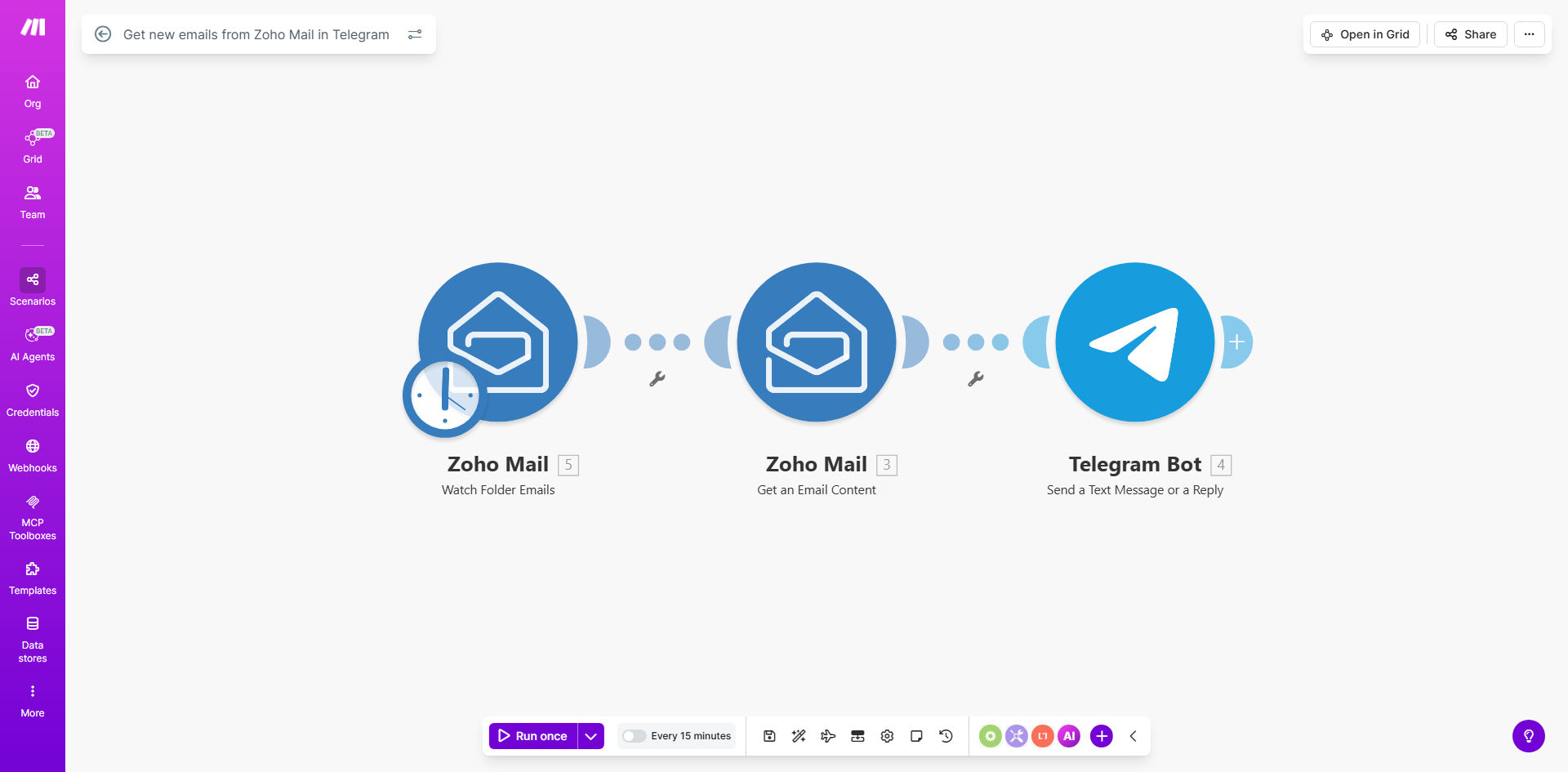
Zoho Mail to Telegram workflow diagram showing email forwarding process

What This Workflow Does

This automation solves the common problem of missing important emails buried in crowded inboxes. It monitors your Zoho Mail account for new messages in specified folders and instantly forwards them to Telegram as notifications.

Business professionals waste an average of 2.1 hours daily managing email overload. This workflow eliminates the need to constantly check your inbox while ensuring urgent messages get immediate attention through Telegram's push notifications.

How It Works

1. Zoho Mail Trigger

The workflow starts when a new email arrives in your selected Zoho Mail folder. Make.com detects this event instantly through Zoho's API.

2. Email Content Extraction

Key details like sender name, email subject, and a message snippet are extracted from the email. You can customize which information gets included.

3. Telegram Message Formatting

The email details are formatted into a clean Telegram message with proper spacing, emojis for visual scanning, and clickable links where applicable.

4. Instant Delivery

The formatted message is sent to your specified Telegram chat or channel, appearing as a notification on all your devices within seconds.

Pro tip: Create a dedicated Telegram channel for email alerts to keep them separate from personal chats and enable message history search.

Who This Is For

This workflow is ideal for:

  • Sales teams needing instant lead notifications
  • Executives who want priority emails pushed to their preferred app
  • Remote workers managing multiple email accounts
  • Support teams monitoring shared inboxes
  • Anyone who frequently misses time-sensitive emails

What You'll Need

  1. A Zoho Mail account with access to API connections
  2. A Telegram account with at least one active chat
  3. A Make.com account (free plan works for basic usage)
  4. 5-10 minutes for initial setup

Quick Setup Guide

  1. Click "Get This Workflow" to duplicate the template in Make.com
  2. Connect your Zoho Mail account in the first module
  3. Specify which folders to monitor for new emails
  4. Connect your Telegram account in the second module
  5. Choose the chat/channel where notifications should appear
  6. Test with a sample email and adjust formatting as needed

Key Benefits

80% faster response times to critical emails by eliminating inbox checking delays. Important messages reach you instantly via push notification.

Saves 2-3 hours weekly by automating manual email forwarding and reducing unnecessary inbox visits throughout the day.

Never miss urgent requests with Telegram's reliable notifications that work even when email apps are closed.

Customizable filtering ensures only relevant emails trigger notifications, preventing alert fatigue from less important messages.

Frequently Asked Questions

Common questions about email-to-messenger automation

Forwarding emails to Telegram provides instant mobile notifications for urgent messages without constantly checking your inbox. It's ideal for sales teams needing real-time lead alerts or executives who want priority messages pushed to their preferred communication platform.

The average professional checks email 15 times daily. Telegram notifications eliminate this habit while ensuring truly important messages get immediate attention through a channel you already use frequently.

The integration monitors specified Zoho Mail folders for new messages, extracts key details like sender and subject, then formats them into Telegram-friendly notifications. This happens instantly without manual forwarding or copy-pasting between apps.

Behind the scenes, Make.com uses Zoho's API to check for new emails every few minutes (configurable), then formats the content using Telegram's bot API to deliver clean, readable messages with proper formatting and links.

Yes, you can configure rules to only forward emails matching specific criteria - like certain senders, subjects containing keywords, or messages marked as important. This prevents notification overload from less urgent emails.

Common filtering approaches include:

  • Domain whitelisting (e.g. only @clientdomain.com)
  • Subject line keywords ("URGENT", "Invoice")
  • Priority flags (high importance only)

This workflow reduces email response times by 60-80% for critical messages, eliminates manual forwarding tasks saving 2-3 hours weekly, and ensures no important emails get buried in crowded inboxes.

For sales teams, faster response to leads can increase conversion rates by 20-30%. Support teams benefit from never missing customer escalations. Managers gain peace of mind knowing urgent requests won't be overlooked.

The integration only shares specified email metadata (sender, subject, snippet) through Make.com's secure API connections. Full email content remains in Zoho Mail unless you explicitly configure otherwise.

For maximum security:

  • Use Telegram's secret chats for sensitive notifications
  • Limit forwarded content to headers only
  • Regularly audit connected apps

Absolutely. Many teams create a dedicated Telegram channel where multiple members receive the same email notifications. This works well for shared inbox monitoring or department-wide alerts.

Team implementations often include:

  • @mentions for specific members when action needed
  • Custom emoji reactions for acknowledgment
  • Separate channels by priority level

Yes! GrowwStacks specializes in tailored email automation solutions. We can build custom workflows that forward specific emails to your preferred messaging apps with advanced filtering, formatting, and priority routing based on your business needs.

Our typical customizations include:

  • Multi-level priority routing to different teams
  • Integration with CRM systems to enrich notifications
  • Custom templates matching your brand voice
  • Advanced spam filtering and whitelisting

Need a Custom Email Automation?

This free template is a starting point. Our team builds fully tailored automation systems for your specific business needs.