Make.com Zoho Mail Trello Email Automation Task Management

Create Trello cards from new Zoho Mail emails

Automatically convert important emails into actionable Trello cards without manual work

Get This Workflow → Make.com · Email Automation · Free Template
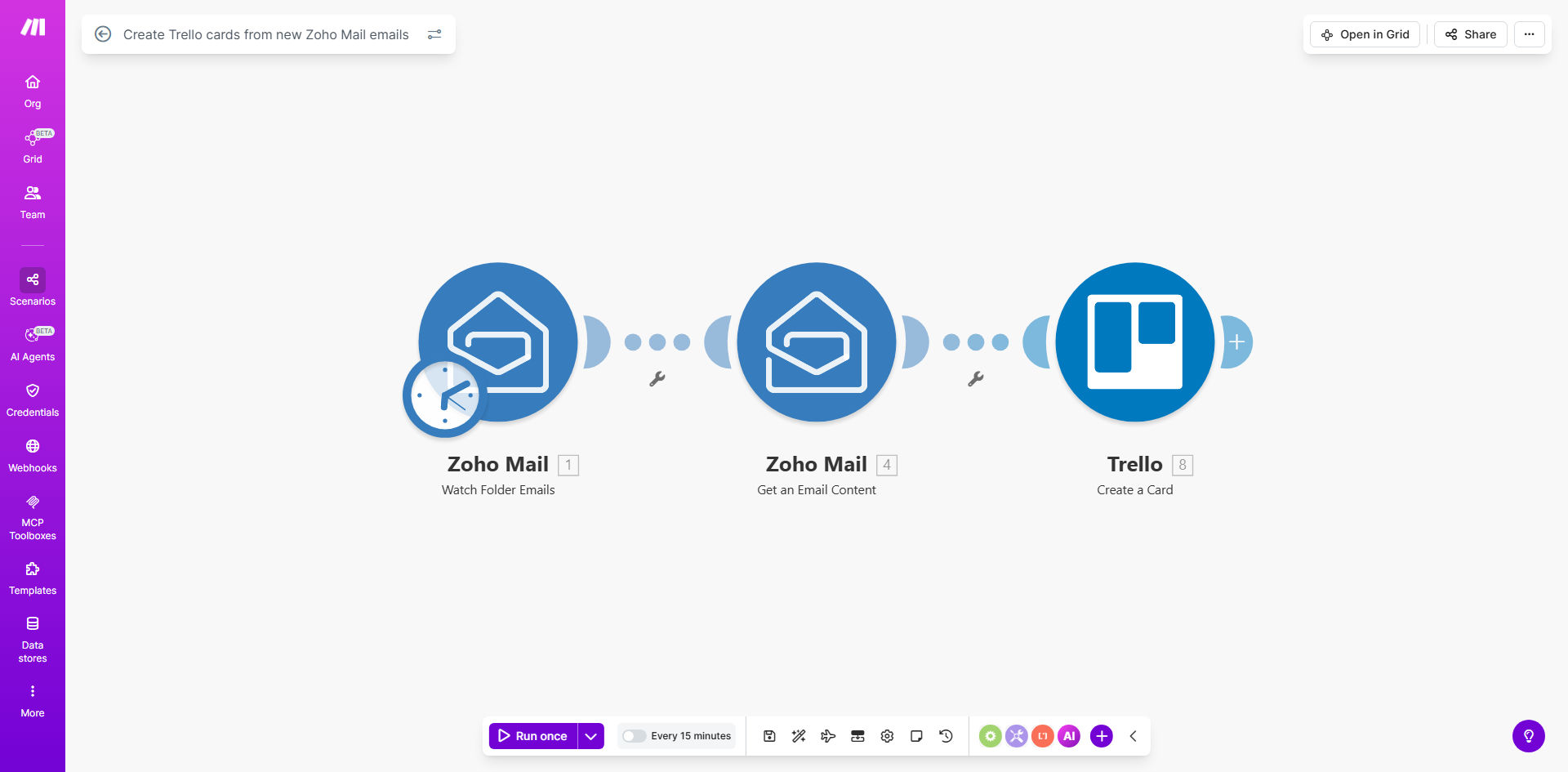
Make.com workflow diagram showing Zoho Mail to Trello integration

What This Workflow Does

This automation solves the common problem of important emails getting lost in crowded inboxes. When critical requests or action items arrive via email, they often require manual conversion into tasks or projects in your task management system.

The workflow automatically monitors specified Zoho Mail folders for new emails and creates corresponding Trello cards with all relevant details. This ensures no important request falls through the cracks while eliminating tedious manual data entry between systems.

How It Works

1. Email Monitoring

The workflow continuously checks your designated Zoho Mail folders for new incoming messages based on your specified criteria (specific labels, senders, or keywords).

2. Data Extraction

When a new email arrives, the system extracts key information including the subject line, sender details, email body content, and any attachments.

3. Card Creation

The extracted email data gets formatted into a new Trello card in your specified board and list. You can customize which email fields map to which Trello card fields.

Pro tip: Set up separate workflows for different email folders to automatically sort cards into different Trello lists based on email source.

Who This Is For

This automation is ideal for:

  • Teams using Zoho Mail for communication and Trello for task management
  • Project managers who receive task requests via email
  • Support teams converting customer emails into tracked tickets
  • Freelancers managing client requests and projects
  • Any professional drowning in email-based action items

What You'll Need

  1. A Make.com account (free plan available)
  2. Zoho Mail account with access to the folders you want to monitor
  3. Trello account with a board ready to receive new cards
  4. Basic understanding of Trello card structure (lists, labels, members)

Quick Setup Guide

  1. Click "Get This Workflow" to copy the template to your Make.com account
  2. Connect your Zoho Mail account in the first module
  3. Specify which folders/labels to monitor for new emails
  4. Connect your Trello account in the second module
  5. Select the target board and list for new cards
  6. Map email fields to Trello card fields as needed
  7. Test with a sample email and activate the workflow

Key Benefits

Save 5-10 minutes per task by eliminating manual card creation from emails. For teams handling 20+ email-based tasks weekly, this adds up to 16+ hours saved monthly.

Never miss important requests with automatic conversion of emails to tracked tasks. Critical action items won't get buried in your inbox.

Standardize task creation by applying consistent formatting rules to all email-converted cards, improving team workflow consistency.

Centralize communication by bringing email discussions into Trello where the whole team can collaborate and track progress.

Frequently Asked Questions

Common questions about email-to-task automation and integration

Connecting Zoho Mail with Trello helps convert important emails into actionable tasks automatically. This eliminates manual card creation and ensures no important requests get lost in your inbox.

For teams handling multiple projects, this integration creates a seamless bridge between communication and task execution. Customer requests, internal assignments, and project updates can all flow directly into your task management system.

This workflow works best for emails containing task requests, project updates, or action items. You can filter specific folders or labels to only process relevant emails.

Common use cases include customer support tickets, project change requests, internal task assignments, and vendor communications. The system works particularly well for standardized request formats where key information appears in predictable email fields.

By automatically converting emails to Trello cards, teams save 5-10 minutes per task on manual data entry. It also creates a standardized workflow for tracking email-based requests.

Productivity gains come from eliminating context switching between email and task management tools. Teams can focus on execution rather than administrative work, with all relevant information automatically organized in Trello.

Yes, you can map specific email fields like subject, sender, body content, and attachments to different Trello card fields. The template provides flexible configuration options.

Advanced customization might include parsing specific data patterns from emails, adding default labels based on sender, or automatically assigning cards to team members. The workflow can be extended with additional processing steps as needed.

The automation only processes emails in your designated Zoho Mail folders. Spam emails won't trigger card creation unless specifically moved to your monitored folder.

For critical communications, consider setting up a dedicated folder for automated processing rather than monitoring your general inbox. This gives you more control over which emails convert to tasks.

Make.com workflows have 99.9% uptime reliability. The system includes error handling to retry failed operations and notifications if any issues occur during processing.

The template includes built-in safeguards like duplicate checking and rate limiting to prevent accidental card spam. You can also configure email notifications if the workflow encounters any processing errors.

Yes, GrowwStacks specializes in building custom email automation solutions tailored to your specific business processes and tools beyond just Zoho Mail and Trello.

Our team can design workflows that integrate with your existing CRM, helpdesk, or project management systems. We handle complex parsing rules, multi-step approvals, and conditional logic that goes beyond basic templates.

  • Custom field mapping for your specific email formats
  • Advanced filtering and routing logic
  • Integration with your unique tech stack

Need a Custom Email-to-Task Automation?

This free template is a starting point. Our team builds fully tailored automation systems for your specific business needs.