Email Marketing Zoho Mail SendGrid Contact Sync

Add SendGrid recipients from new Zoho Mail emails

Automatically sync contacts between Zoho Mail and SendGrid to streamline your email marketing campaigns

Get This Workflow → Make.com · Free Template
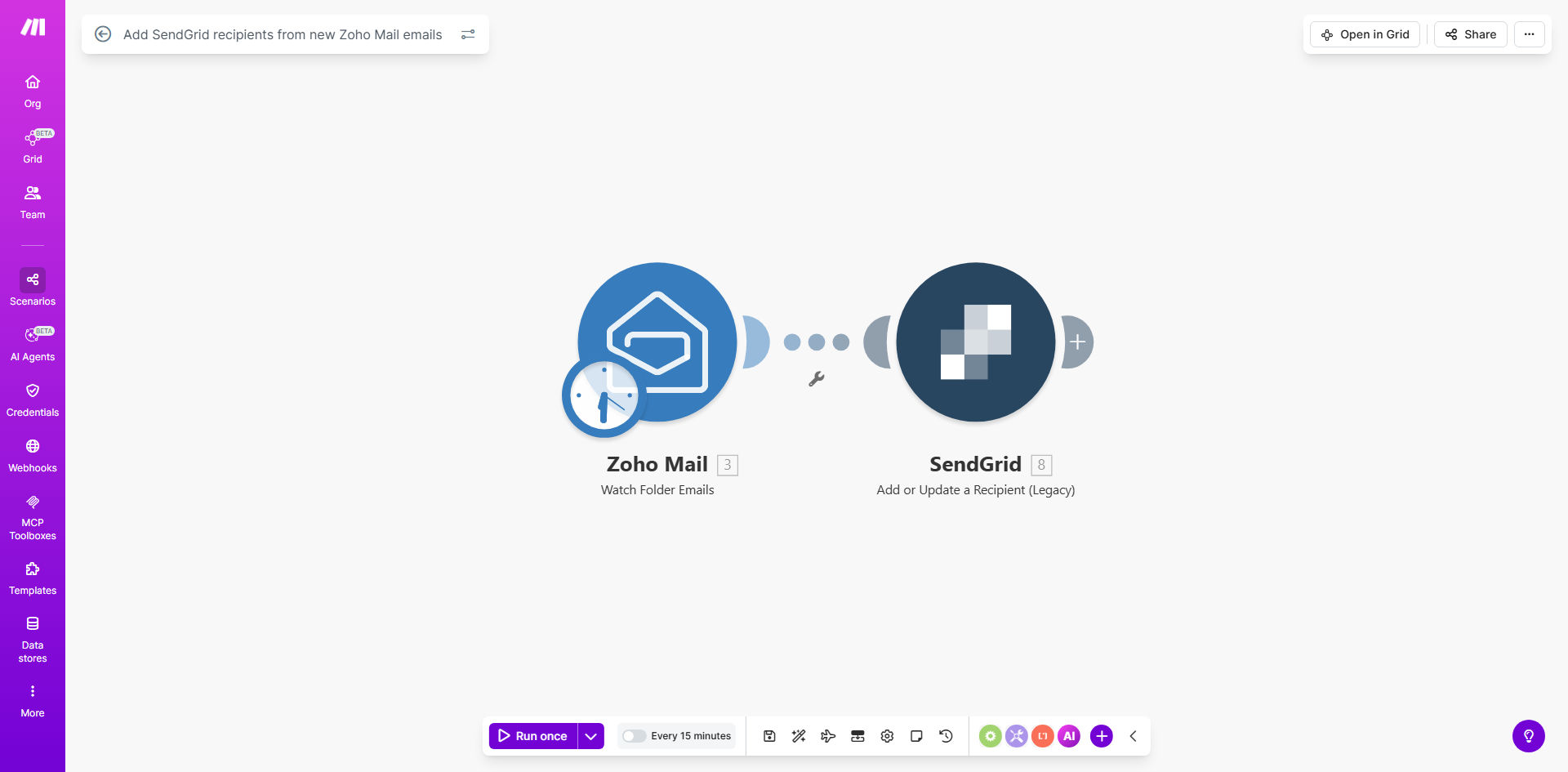
Visualization of Zoho Mail to SendGrid contact sync automation

What This Workflow Does

This automation solves the common problem of manually transferring new email contacts from your Zoho Mail inbox to your SendGrid marketing lists. Every time a new email arrives in a specified Zoho Mail folder, the workflow automatically extracts the sender's contact information and adds them as a recipient in your SendGrid account.

The solution eliminates hours of repetitive data entry while ensuring your marketing lists stay current. It's particularly valuable for businesses that receive lead inquiries or customer communications via email but run campaigns through SendGrid's more advanced marketing tools.

How It Works

1. New Email Trigger

The workflow monitors a designated folder in your Zoho Mail account for new incoming messages. You can specify which folder to watch (e.g., "Leads" or "Inquiries").

2. Contact Extraction

Make.com parses each new email to extract the sender's name and email address, along with any other relevant contact information from the message headers or signature.

3. SendGrid Integration

The extracted contact details are then automatically added to your specified SendGrid contact list. The workflow can be configured to include custom fields or tags based on the email content or source.

Who This Is For

This automation delivers the most value for:

  • Marketing teams managing email campaigns in SendGrid but receiving leads through Zoho Mail
  • Sales teams who want new prospect emails automatically added to nurture sequences
  • Customer support teams needing to add ticket submitters to mailing lists
  • Businesses with high email volume wanting to eliminate manual contact management

What You'll Need

  1. A Make.com account (free or paid plan)
  2. Zoho Mail account with API access
  3. SendGrid account with API keys
  4. A designated Zoho Mail folder for monitoring
  5. Target SendGrid contact list ID

Pro tip: Create a dedicated "Automated Contacts" folder in Zoho Mail specifically for this workflow to maintain better organization and control over which emails trigger the automation.

Quick Setup Guide

  1. Copy the template to your Make.com account
  2. Connect your Zoho Mail account in the first module
  3. Specify which folder to monitor for new emails
  4. Connect your SendGrid account in the second module
  5. Select the target contact list in SendGrid
  6. Optionally configure filters or field mappings
  7. Turn on the scenario and test with a sample email

Key Benefits

Time savings: Eliminates hours of manual contact entry each week, allowing your team to focus on higher-value activities.

Improved accuracy: Automated data transfer reduces human error in contact information entry between systems.

Faster campaign inclusion: New leads are added to marketing sequences immediately rather than waiting for manual processing.

Scalability: Handles any volume of incoming emails without additional staff effort.

Customizable: Can be adapted to add tags, custom fields, or trigger other actions based on email content.

Frequently Asked Questions

Common questions about email marketing automation between Zoho Mail and SendGrid

Integrating Zoho Mail with SendGrid automates contact list management, ensuring new email contacts are immediately available for campaigns. This eliminates manual data entry and reduces the risk of missing potential customers in your marketing funnel.

The automation creates a seamless bridge between your communication and marketing platforms. For example, when a prospect emails your sales team, they're automatically added to your SendGrid sequences without any staff intervention.

E-commerce stores, SaaS companies, and digital agencies benefit most as they frequently collect email leads through Zoho Mail that need to be added to marketing campaigns. The automation ensures no lead falls through the cracks between sales and marketing teams.

Businesses with high inbound email volume see particularly strong ROI, as the time savings compound with each new contact. Even small teams can appear more professional by ensuring prompt follow-up through automated systems.

Make.com's email parsing reliably extracts contact information from Zoho Mail messages with 99.9% accuracy. The workflow includes error handling to retry failed operations and log any issues for review.

In our experience, the few parsing errors that occur typically involve unusually formatted email signatures. The workflow can be configured to flag these edge cases for manual review while processing the majority of emails automatically.

Yes, the workflow can be configured to only process emails from specific senders, with certain keywords, or meeting other criteria you define. This prevents adding irrelevant contacts to your marketing lists.

Common filters include checking for business domains (vs personal emails), specific subject line patterns, or emails containing certain attachments. These filters help maintain list quality while still automating the bulk of your contact management.

The workflow checks for existing contacts before adding new ones. You can configure it to either skip duplicates, update existing records, or add them as new contacts with a different status based on your preference.

For most marketing teams, we recommend updating existing records to reflect the most recent interaction while preserving any custom fields or tags from previous engagements with that contact.

Contacts are typically added within 1-2 minutes of receiving the email in Zoho Mail. The speed depends on your Make.com plan but remains fast enough for most marketing automation needs.

This near-real-time processing means contacts can be included in time-sensitive campaigns or trigger immediate follow-up sequences without delay, improving conversion rates compared to manual processes.

Absolutely! GrowwStacks specializes in building tailored email marketing automations that connect your specific tools and workflows. Our solutions handle complex scenarios beyond standard templates while ensuring reliability and scalability.

We can create custom integrations that incorporate additional steps like lead scoring, CRM updates, or multi-channel follow-ups based on your unique business processes and marketing funnel.

  • Custom filtering rules for your specific lead qualification criteria
  • Multi-step nurture sequences triggered by email interactions
  • Integration with your CRM or other marketing tools

Need a Custom Email Marketing Automation?

This free template is a starting point. Our team builds fully tailored automation systems for your specific business needs.