Square Zoho Mail Financial Alerts Payment Processing

Automate Square Refund Alerts via Zoho Mail

Get instant email notifications when refunds exceed your specified amount

Get This Workflow → Make.com · Free Template
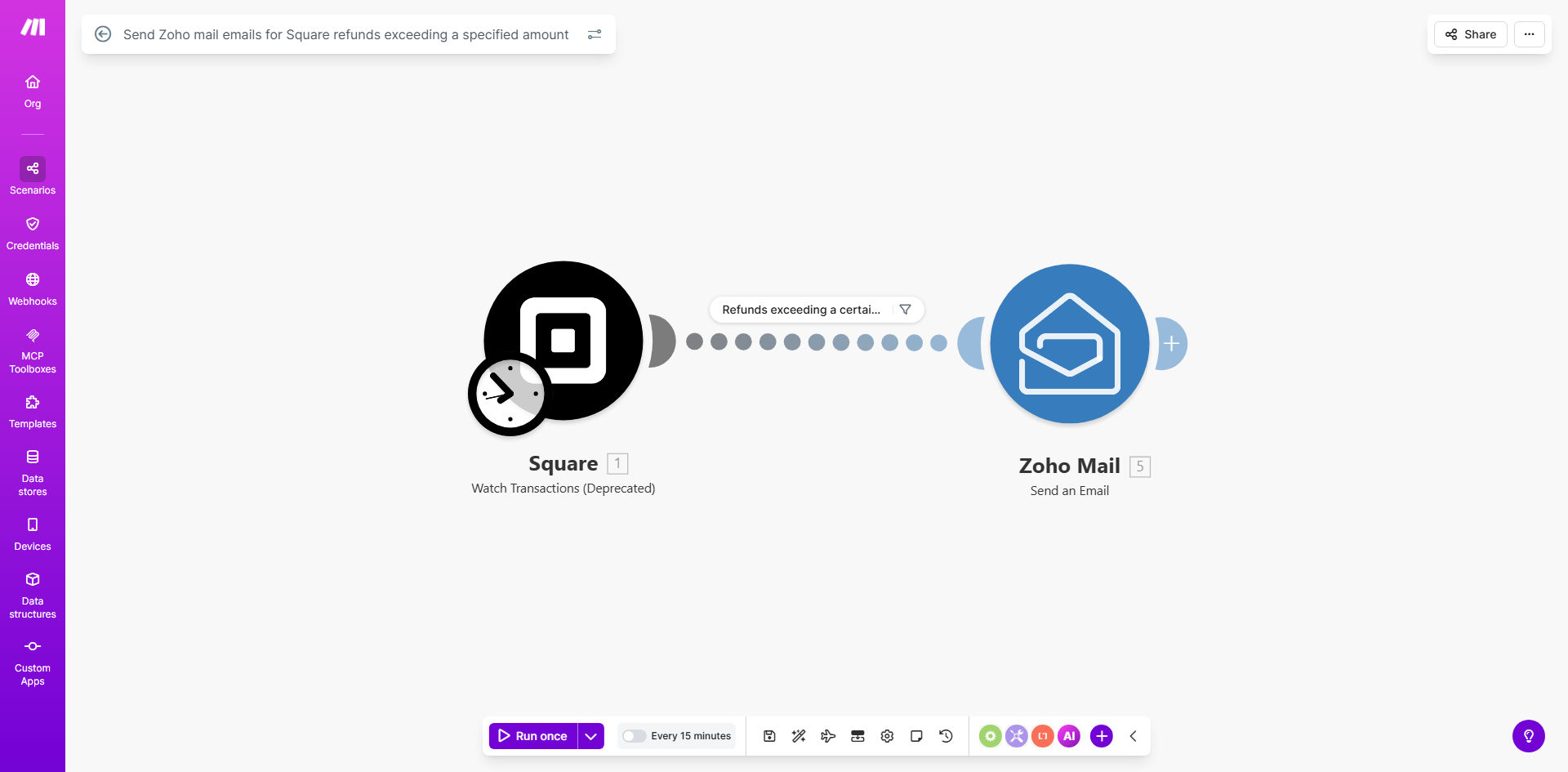
Square refund alert automation workflow diagram showing connection between Square and Zoho Mail

What This Workflow Does

This automation monitors your Square transactions for refunds that exceed a specified dollar amount you define. When such a refund occurs, the system automatically sends a detailed alert email through Zoho Mail to your designated recipients. This helps businesses maintain financial oversight and quickly address potentially problematic transactions.

The workflow solves the challenge of manually monitoring refunds, which can be time-consuming and prone to oversight. By automating alerts for significant refund amounts, you can promptly investigate potential fraud cases, customer satisfaction issues, or accounting discrepancies without constantly checking your Square dashboard.

How It Works

1. Square Refund Monitoring

The workflow continuously checks your Square account for new refund transactions. It compares each refund amount against your predefined threshold to determine if it requires an alert.

2. Threshold Evaluation

When a refund is detected, the system evaluates whether the amount exceeds your configured limit. This threshold is completely customizable based on your business needs and risk tolerance.

3. Alert Generation

For qualifying refunds, the automation compiles relevant transaction details including amount, date, customer information, and any available refund reason into a structured email format.

4. Zoho Mail Delivery

The system then sends this alert through your Zoho Mail account to your specified recipients, ensuring timely notification of significant refund activity.

Who This Is For

This automation is ideal for:

  • Retail businesses using Square for payments
  • E-commerce stores needing financial oversight
  • Service providers tracking customer satisfaction through refund patterns
  • Finance teams requiring real-time transaction monitoring
  • Business owners wanting to reduce manual reconciliation work

Pro tip: Combine this with a customer follow-up workflow to automatically request feedback when large refunds occur, helping you identify and address service issues.

What You'll Need

  1. An active Square account with transaction history
  2. A Zoho Mail account for sending alerts
  3. Make.com account (free tier available)
  4. Approximately 15 minutes for initial setup

Quick Setup Guide

  1. Install the template from Make.com
  2. Connect your Square account
  3. Configure your Zoho Mail settings
  4. Set your refund amount threshold
  5. Specify email recipients and message format
  6. Test with a sample refund
  7. Activate the automation

Key Benefits

Fraud detection: Large unexpected refunds can indicate fraudulent activity. Immediate alerts allow for quick investigation and response.

Time savings: Eliminates manual checking of Square transactions, saving several hours per week for finance teams.

Improved customer service: Prompt awareness of refunds enables faster follow-up to understand and address customer concerns.

Financial control: Maintains tighter oversight over cash flow by flagging significant outgoing transactions.

Customizable thresholds: Adapt the alert criteria as your business grows or your risk profile changes.

Frequently Asked Questions

Common questions about Square refund alerts and automation

Large refunds can indicate potential fraud, customer dissatisfaction, or accounting discrepancies. Immediate alerts help you investigate issues promptly, maintain financial control, and improve customer service by addressing problems before they escalate.

For example, a restaurant might notice a pattern of large refunds occurring at specific times, indicating possible staff training needs or point-of-sale system issues.

The ideal threshold depends on your average transaction value. A good rule is 2-3 times your average sale amount. For most businesses, setting alerts for refunds above $100-500 catches significant transactions without overwhelming your inbox.

Consider your industry standards - a jewelry store might set a higher threshold than a coffee shop. You can always adjust the amount based on your initial monitoring results.

Yes, you can configure the workflow to notify different teams - finance for accounting purposes, customer service for follow-ups, or management for oversight. The template can be modified to send alerts to multiple Zoho Mail recipients.

Some businesses create tiered alerts - store managers get notifications for medium refunds, while owners only get alerts for the largest transactions.

The Make.com automation triggers near real-time, typically within minutes of the refund being processed in Square. This immediate notification allows for rapid response to potential issues.

The actual delivery time may vary slightly based on Zoho Mail's processing, but you'll generally receive alerts much faster than if you were manually checking reports.

The basic template includes refund amount, date, transaction ID, and customer details. You can enhance it with additional Square data like original purchase details, reason for refund (if provided), and links to the Square dashboard for quick access.

Advanced configurations might include product/service details, staff member who processed the original sale, or even automatic generation of follow-up tasks in your CRM.

While designed for Square, the same workflow logic can be adapted for Stripe, PayPal, or other processors. The key components - monitoring transactions and triggering alerts - are transferable across platforms with minor adjustments.

The main differences would be in how each processor's API returns refund data, but the core functionality remains similar for most major payment platforms.

Absolutely. GrowwStacks specializes in tailoring automation solutions to your specific business needs. We can create custom workflows that integrate with your existing systems, add conditional logic, and include additional data points relevant to your operations.

Our team can build solutions that combine refund alerts with inventory adjustments, customer satisfaction surveys, or even automated fraud detection rules based on your unique business patterns.

Need a Custom Refund Alert Automation?

This free template is a starting point. Our team builds fully tailored automation systems for your specific business needs.