Make.com Zoho Mail Meistertask Task Automation Email Processing

Automatically Create Meistertask Tasks from Zoho Mail

Convert important emails into actionable tasks without manual copying—saving 2-3 hours per week on administrative work

Get This Workflow Make.com · Zoho Mail · Free Template
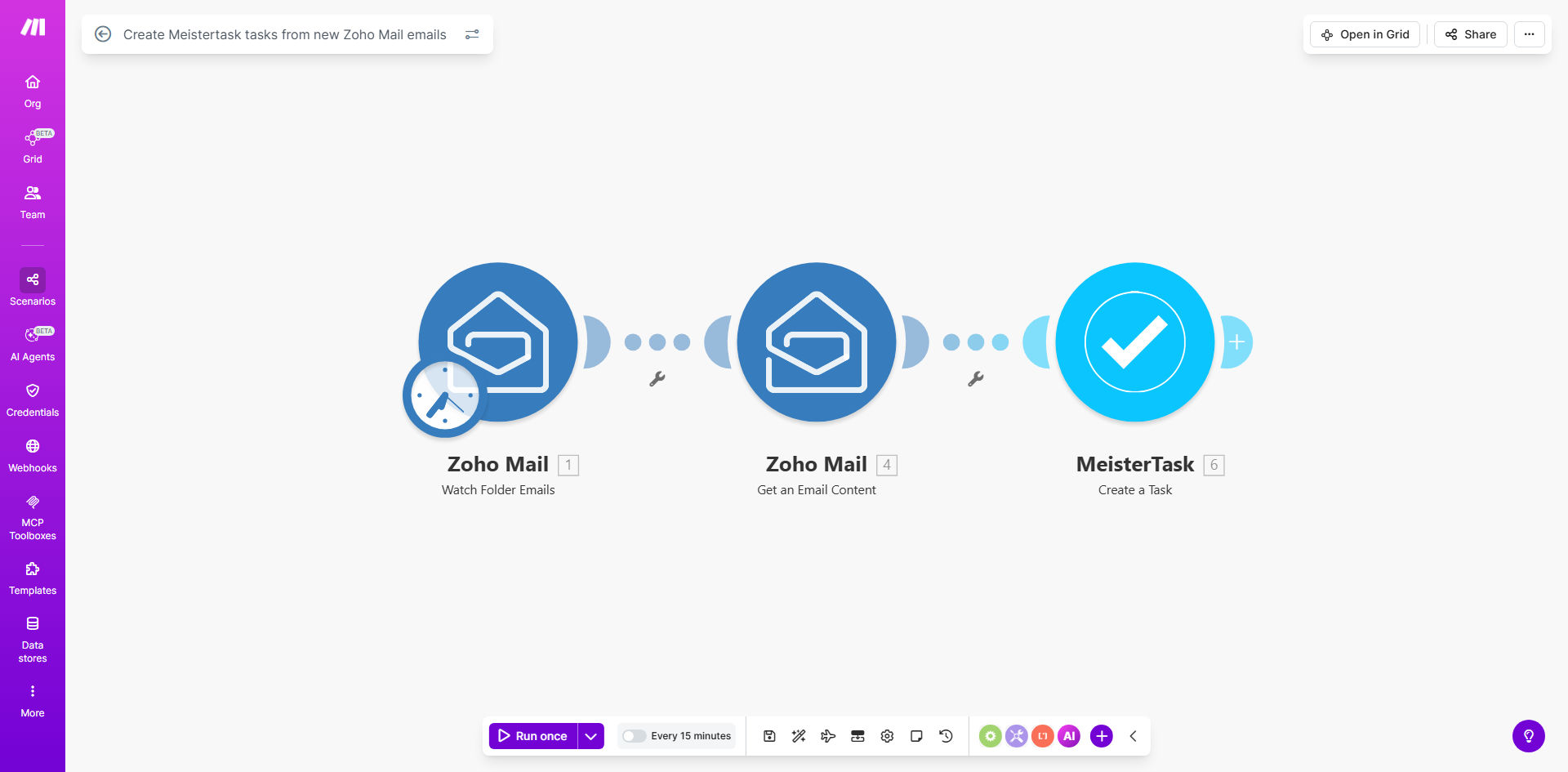
Make.com workflow diagram showing Zoho Mail to Meistertask integration

What This Workflow Does

This automation solves the common problem of action items getting lost in email threads. When important requests arrive in Zoho Mail, the system automatically converts them into properly structured Meistertask tasks with all relevant details. No more copying and pasting email content or forgetting to create follow-up items.

The workflow intelligently parses email content to extract task parameters like title, description, due dates, and assignees. It maintains context by including the original email thread in the task notes and can be configured to only process emails meeting specific criteria (like certain senders or subject keywords).

How It Works

1. New Email Trigger

The workflow monitors your specified Zoho Mail folder or label for new incoming messages. You can set filters to only process emails from certain senders, with specific keywords, or marked as important.

2. Email Content Analysis

Make.com parses the email subject and body to identify key task elements. The subject becomes the task name, the first meaningful paragraph becomes the description, and any @mentions or dates are extracted for assignment and deadlines.

3. Task Creation in Meistertask

The system creates a new task in your designated Meistertask project with all extracted details. The original email content is preserved in the task notes for reference, and any attachments are included if needed.

Pro tip: Use Zoho Mail labels to categorize incoming requests (e.g., "Urgent", "Client Request", "Internal") and configure the workflow to create tasks in different Meistertask projects based on these labels.

Who This Is For

This automation delivers the most value for:

  • Project managers handling multiple email requests daily
  • Support teams converting tickets into actionable items
  • Executives who need to delegate email requests quickly
  • Remote teams coordinating via email and task management
  • Any professional spending >1 hour/day organizing email action items

What You'll Need

  1. A Make.com account (free tier available)
  2. Zoho Mail account with API access
  3. Meistertask account with admin privileges
  4. Basic understanding of workflow automation concepts

Quick Setup Guide

  1. Install the template from Make.com's template library
  2. Connect your Zoho Mail account in the Make.com scenario
  3. Connect your Meistertask account and select the target project
  4. Configure your email filters (optional but recommended)
  5. Test with sample emails and adjust field mappings as needed
  6. Activate the workflow and monitor initial task creations

Key Benefits

Eliminate manual data entry: Save 2-3 hours per week previously spent copying information between email and task management systems.

Reduce missed action items: Automatic conversion ensures no important requests fall through the cracks in a busy inbox.

Standardize task creation: All tasks follow the same structure regardless of who creates them, improving team consistency.

Maintain email context: The original email thread stays attached to each task for full historical reference.

Scale delegation: Managers can quickly turn email requests into assigned tasks with deadlines in seconds.

Frequently Asked Questions

Common questions about email-to-task automation and integration

Automating email-to-task conversion saves 2-3 hours per week by eliminating manual data entry. It ensures no action items get lost in inbox clutter and creates immediate accountability by turning requests into trackable tasks with deadlines.

Teams using this automation report 30% faster response times to email requests because tasks are created the moment the email arrives, not when someone remembers to check their inbox.

Action-oriented emails like client requests, internal project updates, and vendor communications convert best. The system works particularly well for standardized requests that follow predictable formats, such as support tickets or project change requests.

For best results, train your team to use clear subject lines (e.g., "Action Required: Client Feedback on Draft") and structure emails with the key request in the first paragraph.

This Make.com workflow connects Zoho Mail's API to Meistertask's API, parsing email content to extract task details like title, description, due date, and assignee. The integration maintains context by including the original email thread in task notes.

The connection happens through Make.com's secure servers, which handle the authentication and data transformation between the two systems without storing your emails or tasks long-term.

Yes, you can set filters based on sender, subject keywords, labels, or specific folders. The workflow can be configured to only process emails marked as important or containing certain trigger phrases in the subject line.

Common filtering approaches include: Only emails from specific client domains, only emails with "[Task]" in the subject, or only emails assigned a particular label like "Urgent" in Zoho Mail.

The system typically extracts the subject line as task name, first paragraph as description, any dates mentioned as deadlines, and @mentions as assignees. You can customize these mappings to match your team's workflow.

Advanced configurations can also pull: Email sender as task creator, attachments as task files, priority levels from email labels, and custom fields from structured email templates.

Teams report 30% faster response times to email requests and 40% fewer missed action items. Managers gain visibility into workload distribution, and team members spend less time organizing their inboxes.

The automation creates psychological benefits too—team members feel more in control of their workload when action items are systematically captured rather than buried in email threads.

Absolutely. GrowwStacks specializes in building tailored email automation systems that match your specific business processes, team structure, and existing tools. We can create custom parsing rules, approval workflows, and priority scoring for your unique needs.

Our typical customizations include: Multi-step approval chains for certain requests, automatic task prioritization based on content analysis, integration with additional systems like your CRM, and specialized reporting on request patterns.

  • Free consultation to assess your workflow needs
  • 2-week implementation for most custom solutions
  • Ongoing optimization as your processes evolve

Need a Custom Email Automation?

This free template is a starting point. Our team builds fully tailored automation systems for your specific business needs.