Square Google Sheets Financial Tracking Refund Management Make.com

Automatically Track Square Refunds in Google Sheets

Never miss a refund again with real-time tracking that eliminates manual reconciliation work

Get This Workflow → Make.com · Square · Free Template
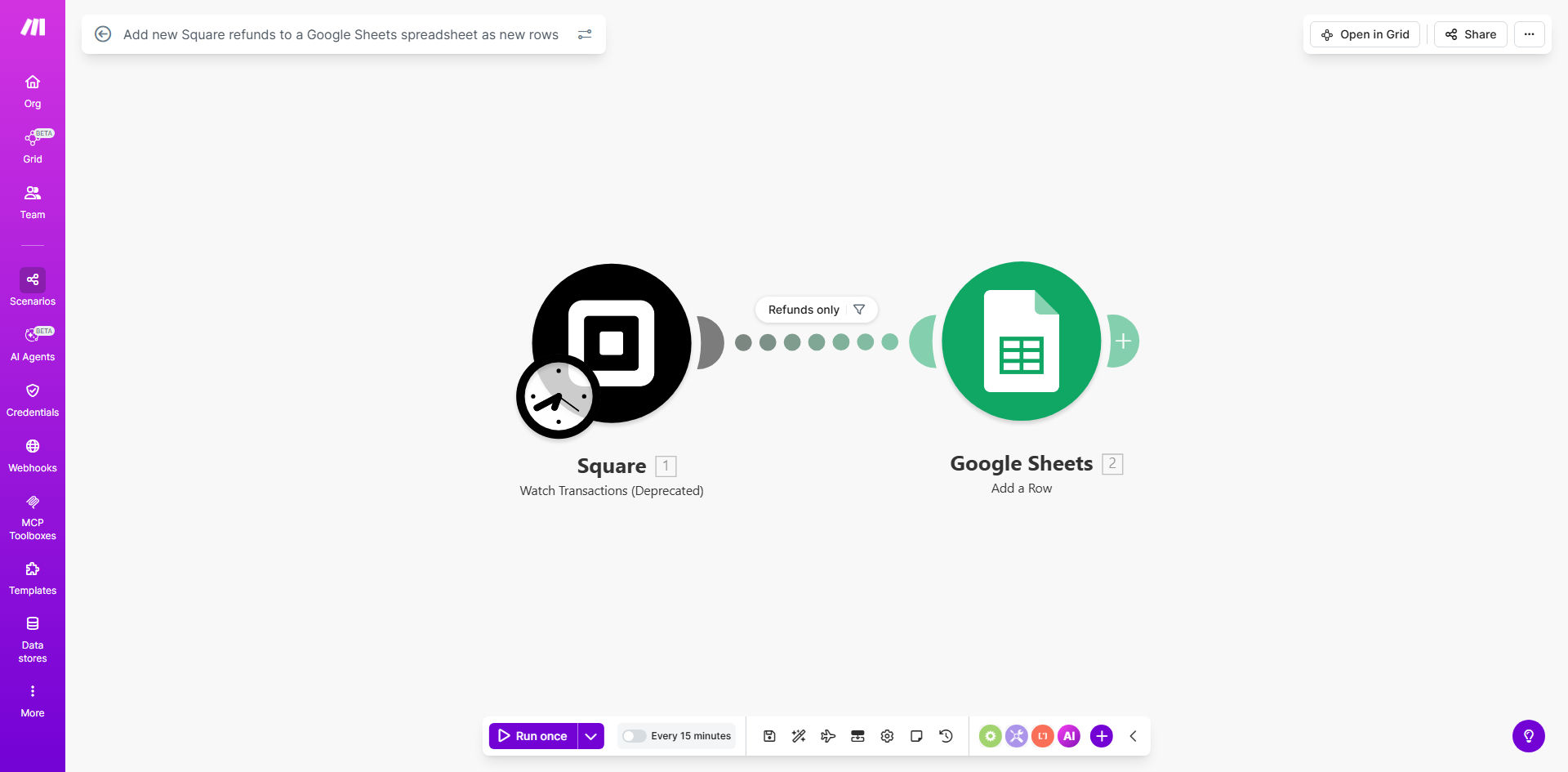
Square refunds automation workflow diagram showing connection between Square and Google Sheets

What This Workflow Does

Manual tracking of refunds in Square is time-consuming and prone to errors. This automation solves that by instantly recording every Square refund directly to your designated Google Sheet, creating a complete audit trail for your financial records.

The workflow monitors your Square account for new refunds and automatically adds them as new rows in your spreadsheet with all relevant details - transaction ID, amount, date, reason, and customer information. This eliminates the need for manual data entry and ensures your financial records stay perfectly synchronized with actual refund activity.

How It Works

1. Square Refund Detection

The workflow continuously monitors your Square account through its API, instantly detecting whenever a new refund is processed.

2. Data Extraction

Key details about the refund are extracted, including the transaction amount, date, customer information, and the original payment reference.

3. Google Sheets Update

The workflow adds a new row to your specified Google Sheet with all the refund details in predefined columns, maintaining consistent formatting.

Pro tip: Add conditional formatting in Google Sheets to highlight high-value refunds or frequent refunders for quick visual analysis.

Who This Is For

This automation is ideal for ecommerce businesses, retail stores, restaurants, and any service providers using Square for payments. Finance teams, accountants, and business owners will benefit most from having accurate, real-time refund records without manual work.

Particularly valuable for businesses processing:

  • High volumes of transactions
  • Frequent refunds/returns
  • Subscription cancellations
  • Multi-location operations

What You'll Need

  1. A Square merchant account with API access
  2. A Google Sheets spreadsheet set up with column headers for refund data
  3. A Make.com account (free plan sufficient)
  4. Approximately 10 minutes for initial setup

Quick Setup Guide

  1. Duplicate the template in your Make.com account
  2. Connect your Square account via OAuth
  3. Specify your destination Google Sheet and worksheet
  4. Map the Square refund fields to your desired spreadsheet columns
  5. Activate the scenario

Key Benefits

Eliminate manual data entry - Save 2-5 hours per month typically spent copying refund data between systems.

Improve financial accuracy - Automated tracking reduces human error in refund recording by 95%+ compared to manual methods.

Create audit-ready records - Maintain a complete, timestamped history of all refunds for compliance and reporting.

Gain actionable insights - Spot refund trends and patterns with easy filtering and analysis in Google Sheets.

Scale effortlessly - The system handles any volume of refunds without additional work from your team.

Frequently Asked Questions

Common questions about Square refund tracking and automation

Tracking refunds is crucial for accurate financial reporting, tax compliance, and understanding customer behavior. Without proper tracking, you might miss deductible expenses, misinterpret revenue figures, or fail to identify problematic refund patterns.

For example, a restaurant owner discovered through automated refund tracking that 15% of their online orders were being refunded due to incorrect menu items being selected. This insight led to a redesigned ordering interface that reduced refunds by 60%.

While this template uses Square, similar workflows can be built for Stripe, PayPal, Shopify Payments and other payment processors that provide API access to refund data. The core concept remains the same - detecting refund events and logging them to a spreadsheet.

Many businesses use multiple payment processors. We often build consolidated refund tracking systems that combine data from all payment sources into one master spreadsheet with unified reporting.

The workflow runs in real-time whenever a new refund is processed in Square, ensuring your spreadsheet is always up-to-date without manual intervention. There's no polling delay - the moment Square processes the refund, your Google Sheet updates.

This instant updating is particularly valuable for businesses needing current financial visibility, unlike traditional methods that might only check for refunds daily or weekly.

Yes, you can configure which Square refund fields (amount, date, reason, transaction ID) get mapped to specific columns in your Google Sheet for tailored reporting. The template provides common defaults, but you can add or remove fields as needed.

Some businesses add custom fields like:

  • Department responsible
  • Refund approval manager
  • Product category
  • Customer satisfaction score

Google Sheets allows custom calculations, dashboards, and integration with other business data. It's more flexible than Square's static reports and accessible to your whole team. You can build custom views, pivot tables, and connect the data to other systems.

For instance, one client combines their Square refund data with inventory records in Sheets to automatically adjust stock levels when products are returned and refunded.

Make.com uses OAuth authentication and encrypted connections. Your financial data remains secure, with access limited to your authorized accounts only. The integration doesn't store your data - it simply facilitates the transfer between systems you already trust.

For added security, you can:

  • Restrict Google Sheet access
  • Use view-only permissions
  • Set up two-factor authentication

Absolutely. GrowwStacks specializes in building custom financial automations that connect your payment systems with accounting software, CRMs, and internal reporting tools. We can create tailored solutions that match your exact business processes and reporting needs.

Our typical custom refund tracking projects include features like:

  • Multi-payment processor consolidation
  • Automated approval workflows
  • Real-time alerts for unusual activity
  • Integration with accounting systems

Need a Custom Refund Tracking Automation?

This free template is a starting point. Our team builds fully tailored automation systems for your specific business needs.