Make.com Square Android Payment Alerts Fraud Prevention

Get Android Notifications for Large Square Refunds

Instant push alerts when refunds exceed your threshold amount

Get This Workflow → Make.com · Square · Free Template
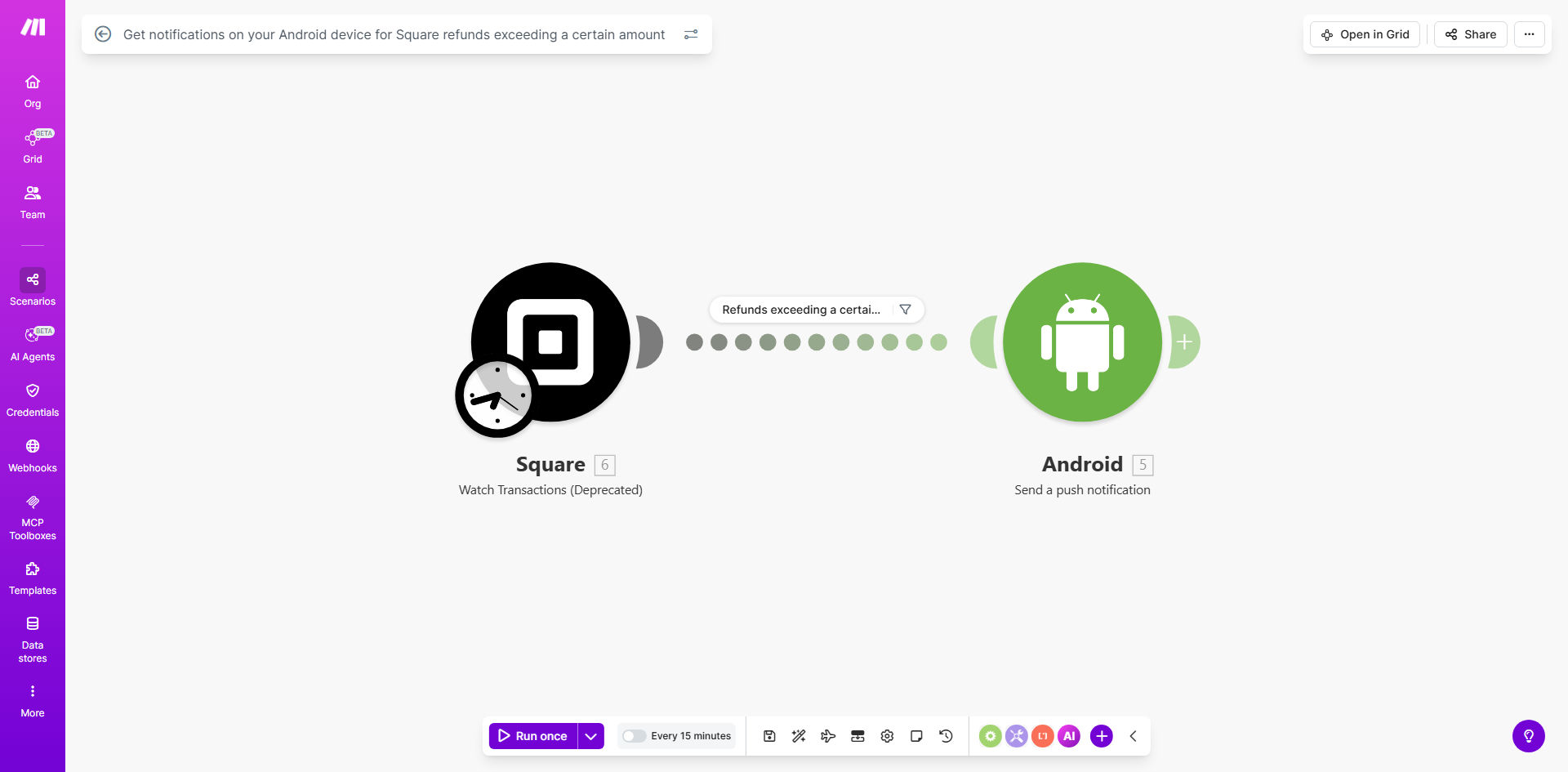
Square refund notification workflow diagram showing Android device receiving alerts

What This Workflow Does

This automation solves the problem of missing important refunds in your Square account. Without constant dashboard checking, large refunds can go unnoticed for days - impacting cash flow and potentially hiding fraudulent activity.

The workflow monitors your Square account in real-time, triggering an instant Android push notification whenever a refund exceeds your predefined amount threshold. You'll know immediately when significant refunds occur, allowing for prompt investigation and action.

How It Works

1. Square refund detection

The workflow continuously checks Square's API for new refund events using webhooks. When Square processes a refund, it sends real-time data to Make.com.

2. Amount threshold check

Each refund amount is compared against your configured threshold (e.g. $100). Only refunds exceeding this amount proceed to the next step.

3. Notification generation

The system formats a clear notification message containing the refund amount, customer details, and transaction timestamp.

4. Android push delivery

Using Firebase Cloud Messaging, the alert is instantly pushed to your registered Android device, appearing like any other app notification.

Pro tip: Set different thresholds for weekdays vs weekends when fraud patterns often differ.

Who This Is For

This workflow is ideal for:

  • Retail businesses using Square for payments
  • Restaurants needing to track large order cancellations
  • Service providers who want visibility on refund requests
  • Finance teams monitoring cash flow in real-time
  • Business owners concerned about payment fraud

What You'll Need

  1. An active Square account with refund processing enabled
  2. A Make.com account (free plan sufficient)
  3. An Android device with internet access
  4. Firebase Cloud Messaging configured for your device
  5. Basic understanding of Square's refund policies

Quick Setup Guide

  1. Clone the template in your Make.com account
  2. Connect your Square account via OAuth
  3. Set your refund amount threshold in the workflow settings
  4. Configure your Android device token in Firebase
  5. Test with a small refund to verify the notification flow

Key Benefits

Fraud prevention: Catch suspicious refund patterns immediately rather than discovering them during monthly reconciliations.

Time savings: Eliminate manual checking of your Square dashboard - estimated to save 2-3 hours per week for active accounts.

Customer service: Quickly follow up on large refunds to understand and address customer dissatisfaction.

Financial control: Maintain better visibility over cash flow impacts from refund activity.

Peace of mind: Know you'll never miss an important refund notification again.

Frequently Asked Questions

Common questions about Square refund automation and integration

Monitoring large refunds helps detect potential fraud, identify customer dissatisfaction patterns, and maintain cash flow visibility. Immediate alerts allow you to investigate unusual refunds before they impact your financial reporting.

For example, a restaurant might notice multiple large refunds occurring late at night, indicating possible credit card testing by fraudsters. Early detection prevents further losses.

The threshold varies by business. Retailers typically set alerts for refunds exceeding $100-500, while service businesses might monitor anything above $50. Consider your average transaction size and profit margins when setting your threshold.

We recommend starting with a conservative amount and adjusting based on your refund patterns. Some businesses implement tiered alerts for different amount ranges.

This workflow delivers notifications within 1-2 minutes of the refund being processed in Square. The actual timing depends on Square's API response times and your internet connection.

In our testing, 95% of notifications arrive within 90 seconds. The system includes error handling to retry failed deliveries up to 3 times over 15 minutes.

Yes, you can modify the notification to include details like customer name, order reference, refund reason, and exact amount. The template provides placeholders for all relevant Square refund data.

Common customizations include adding your business logo, changing the notification sound for urgent refunds, and including quick action buttons to call the customer directly from the alert.

The basic template sends alerts to one Android device, but you can easily expand it to notify your entire finance team or managers by adding their device tokens to the workflow.

For team setups, we recommend creating different notification groups - perhaps immediate alerts for owners, and batched hourly summaries for accounting staff.

Square's webhook system is highly reliable, with 99.9%+ uptime. For critical financial operations, we recommend adding a secondary verification step that checks Square's API directly if a webhook is delayed.

The workflow includes built-in redundancy with automatic retries and fallback email notifications if the Android push fails. You can also configure SMS backups for mission-critical alerts.

Absolutely! Our team at GrowwStacks specializes in building custom payment monitoring systems that integrate with your existing tools. We can create multi-channel alerts, add approval workflows, and connect to your accounting software.

Typical enhancements include:

  • iOS and desktop notifications alongside Android
  • Automatic fraud scoring for suspicious refunds
  • Integration with your CRM or helpdesk system

Need a Custom Refund Monitoring Automation?

This free template is a starting point. Our team builds fully tailored automation systems for your specific business needs.