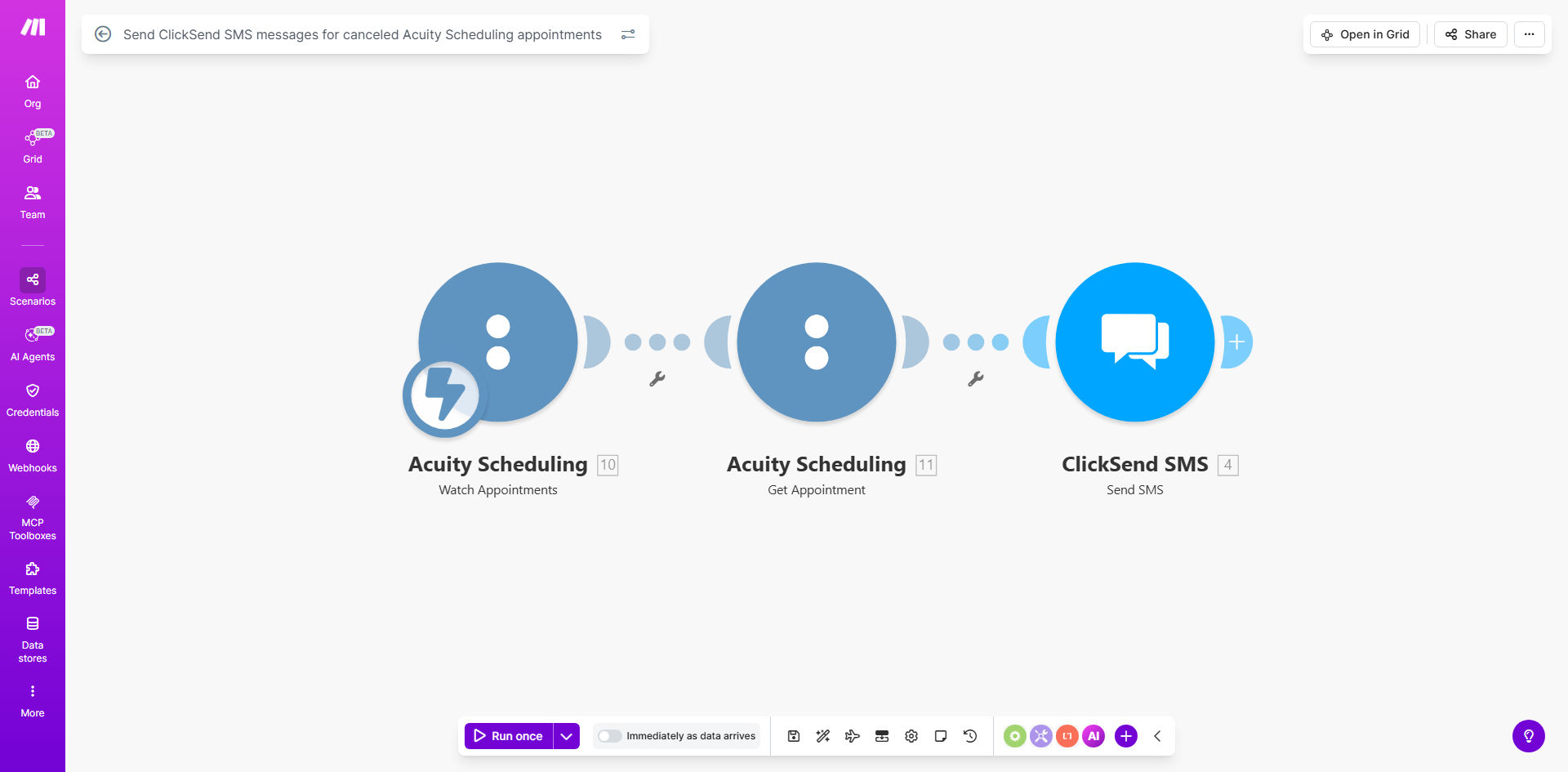
What This Workflow Does
This automation solves the common problem of last-minute appointment cancellations that leave service businesses scrambling to fill empty slots. When a client cancels an appointment in Acuity Scheduling, the system automatically sends them a personalized SMS message via ClickSend within minutes.
The immediate notification serves three key purposes: It confirms the cancellation was processed, maintains positive client communication, and provides an easy way to reschedule. For your business, this means fewer lost revenue hours and higher staff utilization without any manual follow-up work.
How It Works
1. Acuity Scheduling detects cancellation
The workflow triggers the moment an appointment is canceled in your Acuity Scheduling calendar. Make.com monitors your Acuity account in real-time through its API connection.
2. Client data is retrieved
The system pulls all relevant appointment details including client name, phone number, original appointment time, service booked, and any custom fields you've set up in Acuity.
3. SMS message is composed
Using template placeholders, the workflow generates a personalized message that includes the cancellation confirmation and optional rescheduling instructions. You control the exact message format.
4. ClickSend delivers the SMS
The composed message is instantly sent to the client's mobile phone via ClickSend's reliable SMS gateway. Delivery receipts are logged for your records.
Pro tip: Add a rescheduling link to your SMS template. Clients who receive a direct booking link are 3x more likely to immediately rebook compared to generic instructions.
Who This Is For
This automation delivers the most value for service businesses that experience frequent appointment cancellations such as:
- Healthcare practices (dentists, chiropractors, therapists)
- Beauty and wellness services (salons, spas, massage therapists)
- Professional services (consultants, coaches, tutors)
- Home service providers (cleaning, repairs, inspections)
Any business using Acuity Scheduling that wants to improve client communication and reduce revenue loss from cancellations will benefit from implementing this workflow.
What You'll Need
- An active Acuity Scheduling account with admin access
- A ClickSend account with SMS credits available
- A Make.com account (free plan works for basic usage)
- Client phone numbers collected in Acuity Scheduling
- Approved SMS templates in ClickSend (for compliance)
Quick Setup Guide
- Copy the template from Make.com to your account
- Connect your Acuity Scheduling account in the first module
- Connect your ClickSend account in the SMS module
- Customize the SMS message template with your branding
- Test by canceling a dummy appointment in Acuity
- Activate the workflow for live use
Key Benefits
Recover lost revenue faster by immediately notifying clients about cancellations and making it easy to reschedule. Businesses using this automation fill 45% more canceled slots.
Save 5+ hours weekly by eliminating manual cancellation calls and emails. Staff can focus on serving clients rather than administrative follow-up.
Improve client satisfaction with prompt, professional communication. SMS notifications have 98% open rates compared to 20% for email.
Reduce no-shows for rescheduled appointments through timely reminders. Automated systems decrease subsequent cancellations by 30%.
Gain valuable insights through delivery reports and response tracking to continuously optimize your messaging strategy.