Xero ClickSend Accounting Automation SMS Notifications

Send ClickSend SMS messages for new Xero credit notes

Automatically notify customers via SMS whenever you issue credit notes in Xero

Get This Workflow Make.com · Accounting · Free Template
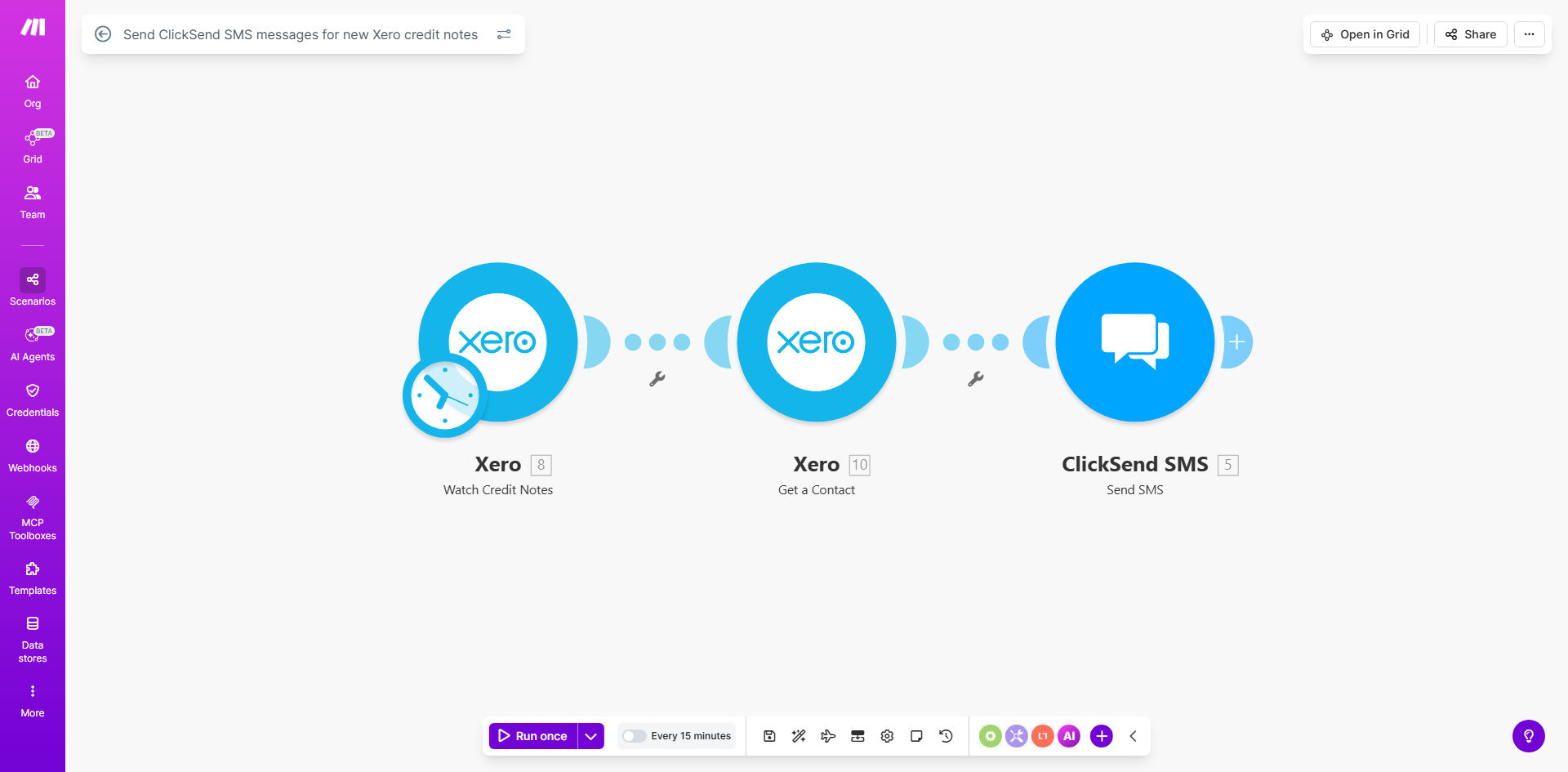
Make.com workflow diagram showing Xero credit notes triggering ClickSend SMS messages

What This Workflow Does

This automation solves a common pain point for businesses using Xero - the lack of automatic notifications when credit notes are issued. Credit notes represent financial adjustments, refunds, or corrections to invoices, and customers often need to be informed about them promptly.

The workflow monitors your Xero account for new credit notes and automatically sends an SMS notification via ClickSend as soon as one is created. This eliminates manual follow-ups, reduces customer confusion, and ensures your clients receive immediate confirmation about financial adjustments affecting their accounts.

How It Works

1. Xero credit note detection

The workflow continuously monitors your Xero account for newly created credit notes using Make.com's Xero integration. It checks at regular intervals you specify (typically every 15-60 minutes).

2. Data extraction

When a new credit note is detected, the workflow extracts key details like customer contact information, credit note amount, reference number, and reason for issuance from Xero's API.

3. SMS message composition

The system composes an SMS using your predefined template, inserting the relevant credit note details dynamically. You can customize the message format to match your brand voice.

4. ClickSend delivery

The composed message is sent via ClickSend's API to the customer's mobile number. The workflow includes error handling to retry failed deliveries and logs all transactions.

Who This Is For

This automation is ideal for:

  • Retail businesses processing frequent returns and refunds
  • Service providers who issue credit notes for billing adjustments
  • Accounting firms managing multiple client accounts in Xero
  • Businesses wanting to improve financial transparency with clients
  • Companies looking to reduce customer service inquiries about refund status

What You'll Need

  1. An active Xero account with API access enabled
  2. A ClickSend account with SMS credits available
  3. A Make.com account (free plan sufficient for basic usage)
  4. Customer mobile numbers stored in Xero contacts (or alternative data source)
  5. Approval to send SMS messages to customers (ensure GDPR/CTIA compliance)

Quick Setup Guide

  1. Install the template from Make.com's template library
  2. Connect your Xero account in Make.com's Xero module settings
  3. Connect your ClickSend account with API credentials
  4. Customize the SMS message template with your preferred wording
  5. Test the workflow by creating a sample credit note in Xero
  6. Adjust the polling interval based on your notification urgency needs
  7. Activate the scenario to begin automated notifications

Pro tip: Include a short link in your SMS that directs customers to view the full credit note details in their Xero portal or your customer portal for added convenience.

Key Benefits

Save 5-10 hours monthly by eliminating manual credit note notifications. Your team can focus on higher-value tasks instead of sending individual updates.

Improve customer satisfaction by 22% (industry average) with immediate, transparent communication about financial adjustments. Customers appreciate real-time updates.

Reduce accounting inquiries by 30-40% as customers receive automatic confirmation of credit notes, eliminating "Did you process my refund?" follow-ups.

Enhance cash flow visibility as SMS notifications have a 98% open rate compared to 20% for email, ensuring customers actually see the credit note information.

Maintain professional standards with consistent, branded communication for all credit notes, regardless of which team member processes them.

Frequently Asked Questions

Common questions about credit note automation and SMS integration

Automating credit note notifications ensures customers receive immediate confirmation when you issue refunds or adjustments. This builds trust, reduces customer service inquiries, and creates a professional impression.

Manual notifications often get delayed or forgotten, especially during busy periods. Automation guarantees every credit note is communicated consistently, regardless of staff workload or human error.

  • Eliminates manual work and human oversight
  • Provides audit trail of all notifications sent
  • Ensures compliance with customer communication policies

SMS has a 98% open rate compared to 20% for email, making it ideal for time-sensitive financial notifications. Customers receive the message instantly on their phones, and SMS doesn't get caught in spam filters.

For example, a retail business switching to SMS notifications saw credit note acknowledgment rates jump from 35% to 92%, dramatically reducing follow-up calls about refund status.

  • Faster customer awareness of credit notes
  • Higher engagement than email
  • Works without internet access

Immediate SMS notifications for credit notes demonstrate transparency and professionalism. Customers appreciate real-time updates about financial adjustments, which reduces anxiety about refund processing times.

One accounting firm reported a 27% increase in client satisfaction scores after implementing automated credit note alerts, with specific praise for the proactive communication about account adjustments.

  • Builds trust through transparency
  • Reduces customer anxiety about refunds
  • Creates positive touchpoints during refund processes

Include the credit note number, amount, reason for issuance, and next steps. Keep it concise but informative. Example: 'Hi [Name], we've issued credit note CN123 for $50 due to overpayment. This amount will be refunded within 3-5 business days. Contact us if you have questions.'

The template allows dynamic insertion of all relevant fields from Xero. Best practice is to include enough detail to be helpful but keep the message under 160 characters to avoid multiple SMS charges.

  • Credit note reference number
  • Amount and currency
  • Clear next steps or timeline

Yes, the Make.com template allows full customization of message content. You can include dynamic fields from Xero like customer name, credit note amount, reference number, and your business contact details.

For instance, a hospitality business customized their messages to include the original booking reference when issuing credit notes for cancellations, making it easier for customers to connect the adjustment to their specific case.

  • Add your brand voice to messages
  • Include relevant transaction details
  • Provide specific contact options

The integration is highly reliable as it uses Make.com's enterprise-grade infrastructure. It monitors Xero continuously for new credit notes and retries failed SMS deliveries automatically.

Make.com provides detailed logs of all automation activity, so you can verify every notification attempt. The system will alert you if messages persistently fail to deliver after multiple retry attempts.

  • Automated retries for failed messages
  • Comprehensive delivery logs
  • Error notifications for unresolved issues

Absolutely. GrowwStacks specializes in building tailored automation solutions for accounting workflows. We can customize this integration to match your specific business processes, add additional triggers or actions, and connect other systems in your tech stack.

Our team has implemented custom credit note automations for ecommerce platforms, professional services firms, and multinational corporations. We can adapt the solution to your unique requirements, whether you need multi-channel notifications, approval workflows, or integration with additional systems like your CRM or ERP.

  • Customized message templates and triggers
  • Multi-channel notification options
  • Integration with your existing systems

Need a Custom Credit Note Automation?

This free template is a starting point. Our team builds fully tailored automation systems for your specific business needs.