CRM Integration SMS Marketing Lead Management Make.com

Add new Insightly CRM leads to ClickSend

Automatically sync new leads from Insightly CRM to your ClickSend SMS marketing platform

Get This Workflow Make.com · CRM · Free Template
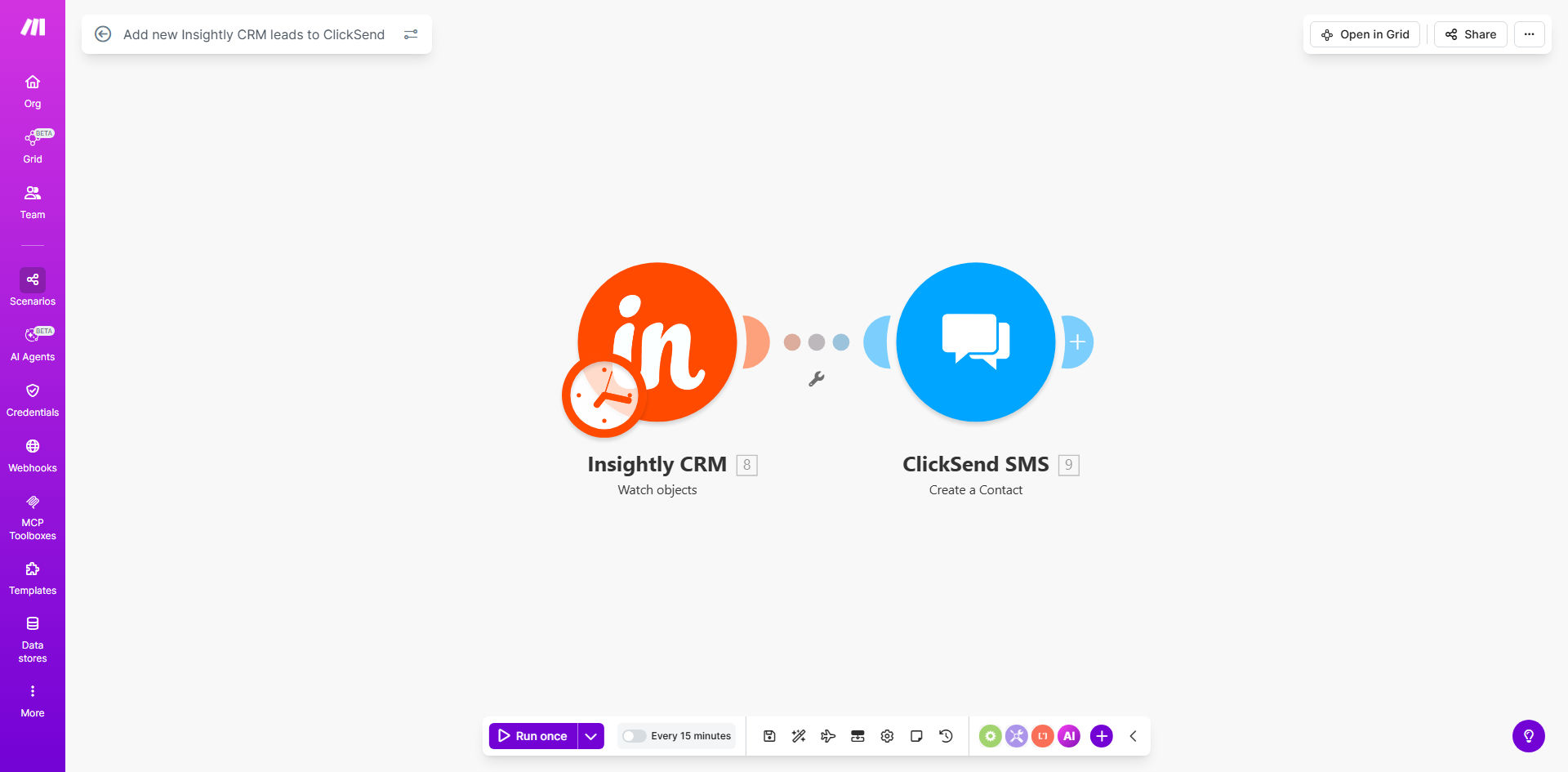
Insightly CRM to ClickSend integration workflow diagram

What This Workflow Does

This automation solves the common challenge of manually transferring new leads between your CRM and SMS marketing platform. Every time a sales lead is created in Insightly CRM, this Make.com workflow automatically creates a corresponding contact in ClickSend - your SMS marketing platform.

The integration eliminates duplicate data entry, reduces human error, and ensures your sales team can begin SMS outreach immediately after lead capture. No more copying and pasting contact details between systems or worrying about missed opportunities due to delayed follow-up.

How It Works

1. New lead detection

The workflow continuously monitors your Insightly CRM for newly created leads through real-time webhooks or scheduled checks.

2. Data extraction

When a new lead appears, the workflow extracts all relevant contact information including name, phone number, email address, and any custom fields you've configured.

3. Contact creation

The system then creates a new contact in ClickSend with all the extracted information, ready for immediate inclusion in your SMS marketing campaigns.

4. Confirmation

The workflow can optionally send a confirmation notification to your team or log the successful transfer for auditing purposes.

Who This Is For

This automation is ideal for:

  • Sales teams using Insightly for lead management
  • Marketing agencies running SMS campaigns for clients
  • Businesses that want to automate their sales follow-up process
  • Organizations looking to reduce manual data entry between systems
  • Teams wanting faster response times to new leads

What You'll Need

  1. An active Insightly CRM account
  2. A ClickSend account with SMS capabilities
  3. A Make.com account (free tier available)
  4. API access enabled for both Insightly and ClickSend
  5. Basic understanding of your lead data structure

Quick Setup Guide

  1. Install the template from Make.com
  2. Connect your Insightly CRM account
  3. Connect your ClickSend account
  4. Map the fields between systems (name, phone, email, etc.)
  5. Test with a sample lead to verify the connection
  6. Activate the workflow for live use

Key Benefits

Save 5-10 hours per week by eliminating manual lead transfers between your CRM and SMS platform.

Improve response times - new leads can receive SMS messages within minutes of entering your system.

Reduce data entry errors with automated field mapping that ensures consistent, accurate information.

Scale your outreach without adding staff - handle more leads with your existing team.

Gain visibility with automated logging of all lead transfers for reporting and analysis.

Frequently Asked Questions

Common questions about CRM to SMS automation and integration

Integrating Insightly CRM with ClickSend automates your lead management process, ensuring new contacts are immediately available for SMS marketing campaigns without manual data entry. This reduces errors and saves your team valuable time that can be spent on higher-value activities.

The integration creates a seamless flow from lead capture to engagement, allowing you to respond to potential customers faster than competitors still using manual processes. Studies show responding within 5 minutes increases conversion rates by up to 400%.

Sales teams, marketing agencies, and service businesses that rely on both CRM tracking and SMS outreach see the greatest benefits. Real estate agents, insurance providers, and ecommerce businesses particularly benefit from having leads automatically available for immediate SMS follow-up.

Any business with time-sensitive offers or high-value leads that require quick response will see improved results. The integration works particularly well for:

  • Appointment-based services
  • High-ticket sales processes
  • Limited-time offer promotions

Automated lead transfers enable faster response times. When a lead comes in through Insightly, they can receive a welcome SMS from ClickSend within minutes rather than waiting hours or days for manual processing. This immediate engagement significantly improves conversion rates.

Customers today expect quick responses - 50% of buyers choose the vendor that responds first. The automation ensures your team never misses an opportunity to make that critical first contact while the lead is still warm and engaged.

Typically contact names, phone numbers, email addresses, and any custom fields you configure are transferred. The workflow can be customized to include specific lead details like interest level, product preferences, or lead source for more personalized SMS messaging.

Common data points transferred include:

  • Contact information (name, phone, email)
  • Company details
  • Lead source/UTM parameters
  • Custom tags or categories

Yes, the workflow can be configured with conditions to only transfer qualified leads meeting specific criteria. Common filters include lead status, lead score, geographic location, or custom tags you've applied in Insightly.

This prevents your SMS lists from being cluttered with unqualified contacts. For example, you might only want to send SMS messages to:

  • Leads marked as "hot" or "qualified"
  • Contacts in specific geographic regions
  • Leads from certain acquisition channels

Modern automation platforms like Make.com provide enterprise-grade reliability with error handling and retry mechanisms. The workflow includes validation steps to ensure data integrity and can notify you of any transfer failures for manual review.

These integrations typically achieve 99.9%+ success rates when properly configured. Built-in features include:

  • Automatic retries for temporary failures
  • Data validation before transfer
  • Error notifications for manual intervention

Absolutely. GrowwStacks specializes in building tailored automation solutions that connect your specific CRM with SMS platforms. We can customize field mappings, add conditional logic, and integrate additional systems to create a complete automated lead management workflow.

Our team will work with you to understand your unique business processes and design an automation system that:

  • Matches your exact data structure
  • Includes your preferred validation rules
  • Integrates with your other business tools

Need a Custom CRM Automation?

This free template is a starting point. Our team builds fully tailored automation systems for your specific business needs.