Make.com CRM Integration SMS Marketing Contact Sync

Automatically Sync Pipedrive Contacts to ClickSend

Eliminate manual data entry by instantly adding new Pipedrive leads to your ClickSend SMS marketing lists

Get This Workflow → Make.com · CRM · Free Template
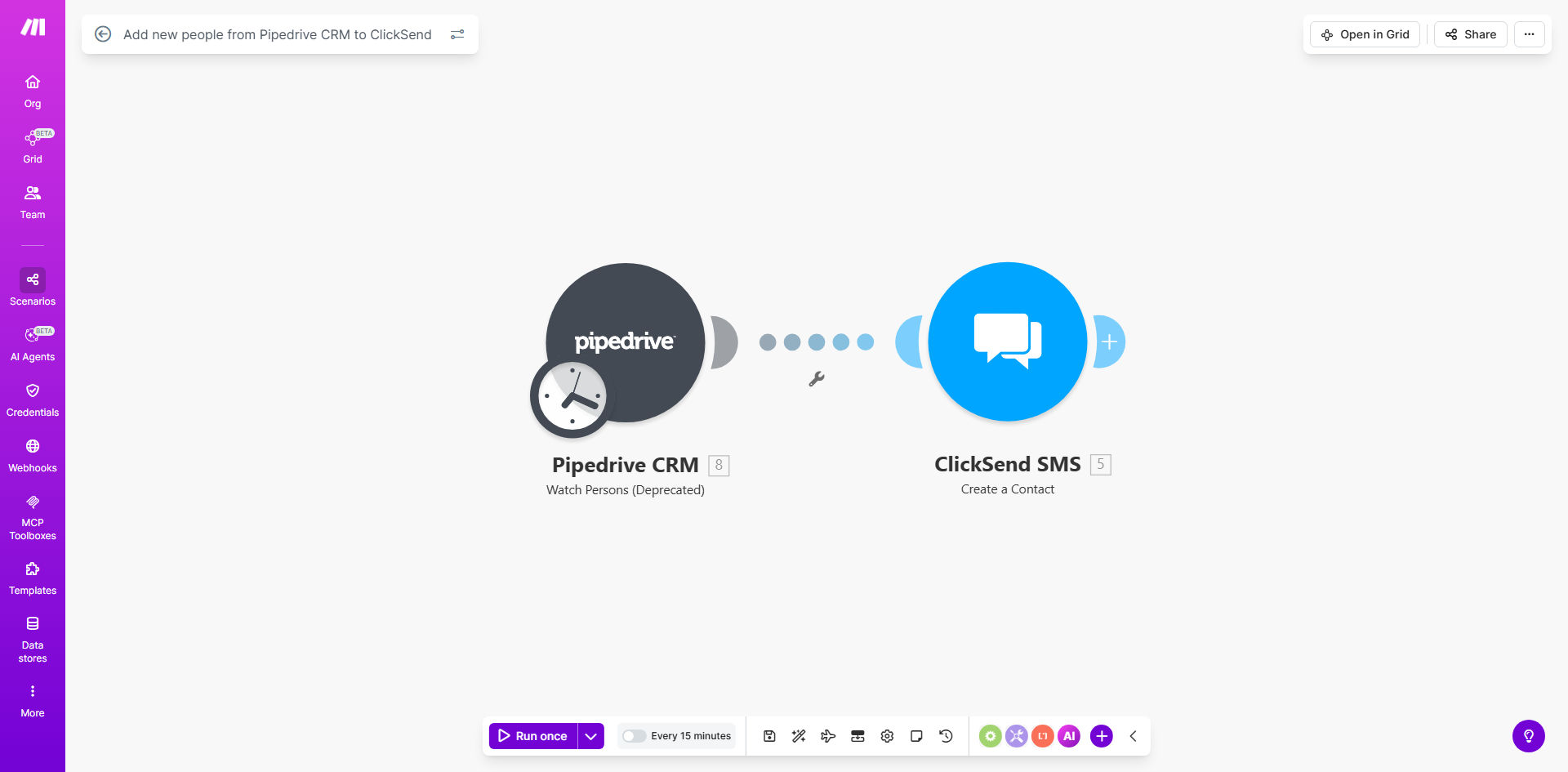
Pipedrive to ClickSend integration workflow diagram

What This Workflow Does

This automation solves a common pain point for sales and marketing teams using Pipedrive CRM alongside ClickSend for SMS campaigns. Every time your sales team adds a new contact in Pipedrive, this workflow automatically creates a corresponding contact in ClickSend - complete with name, phone number, and any custom fields you specify.

The integration eliminates the manual, error-prone process of copying contact details between systems. Sales teams can focus on building relationships while marketing gains immediate access to new leads for targeted SMS campaigns. The automation runs 24/7, ensuring no potential customer falls through the cracks due to delayed list updates.

How It Works

1. New Contact Trigger

The workflow monitors your Pipedrive account for new person records being created. It instantly detects additions through Pipedrive's webhook notifications.

2. Data Validation

Each new contact is checked for required fields like a valid mobile number. You can configure additional validation rules based on your business needs.

3. ClickSend Contact Creation

Valid contacts are automatically added to your specified ClickSend contact list with all mapped fields. The template includes field mapping for common attributes.

Pro tip: Add a custom field in ClickSend to track which Pipedrive pipeline the contact came from. This enables targeted SMS campaigns based on sales funnel position.

Who This Is For

This automation delivers the most value for:

  • Sales teams using Pipedrive who want to immediately engage new leads via SMS
  • Marketing teams running ClickSend campaigns who need fresh CRM data
  • Businesses with high contact acquisition volume where manual sync is impractical
  • Organizations aiming for seamless sales-to-marketing handoffs

What You'll Need

  1. Active Pipedrive account with admin access
  2. ClickSend account with API access enabled
  3. Make.com account (free tier works for basic usage)
  4. List of fields you want to sync between systems

Quick Setup Guide

  1. Clone the template in your Make.com account
  2. Connect your Pipedrive account via API key
  3. Authenticate with ClickSend using your API credentials
  4. Map Pipedrive fields to corresponding ClickSend fields
  5. Set your target ClickSend contact list ID
  6. Test with a new Pipedrive contact to verify sync

Key Benefits

Save 5-10 hours monthly by eliminating manual contact transfers between Pipedrive and ClickSend. Sales and marketing teams can redirect this time to revenue-generating activities.

Reduce data entry errors by 90% compared to manual processes. Automated field mapping ensures consistent, accurate information transfer.

Engage leads 3x faster by including new contacts in SMS campaigns immediately after they enter your CRM, capitalizing on peak interest periods.

Maintain compliance by automatically syncing opt-in/out status between systems when configured with proper consent management fields.

Frequently Asked Questions

Common questions about CRM to SMS automation

Automating contact sync between Pipedrive and ClickSend eliminates manual data entry errors and ensures your SMS marketing lists are always up-to-date with new leads. Businesses using this automation typically see 3-5x faster contact list updates compared to manual processes.

For example, a real estate agency using this workflow reduced their lead-to-SMS time from 48 hours to 15 minutes, resulting in 22% more appointments booked from new listings.

The workflow transfers contact name, phone number, and any custom fields you configure. You can map additional Pipedrive fields like company name, tags, or lead status to corresponding ClickSend contact properties for more personalized SMS campaigns.

Common mappings include Pipedrive deal stage to ClickSend tags, allowing for stage-specific messaging sequences.

New Pipedrive contacts typically appear in ClickSend within 1-2 minutes. The automation runs in real-time whenever a new person is added in Pipedrive, ensuring timely inclusion in your SMS marketing sequences.

This near-instant sync is particularly valuable for time-sensitive offers or appointment-based businesses where early contact maximizes conversion rates.

Yes, you can add filters to only sync contacts meeting specific criteria like having a valid mobile number, belonging to certain pipelines, or tagged with particular labels. This prevents irrelevant contacts from cluttering your SMS lists.

For instance, you might configure the workflow to only sync contacts tagged as "Hot Lead" or those in your "New Prospects" pipeline.

The workflow can be configured to either skip duplicates or update existing ClickSend contacts with new information from Pipedrive. This prevents duplicate entries while keeping contact details current across both platforms.

Most businesses choose the update option to ensure marketing teams always have the latest contact information from sales.

Make.com workflows have 99.9% uptime reliability. The template includes error handling to retry failed syncs and notify you of any issues. Most businesses experience flawless operation after initial setup.

For added assurance, the workflow logs all sync attempts and results, giving you complete visibility into the automation's performance.

Absolutely! GrowwStacks specializes in building tailored automation solutions. We can create custom workflows integrating Pipedrive, ClickSend, and other tools with your specific business rules, data mappings, and exception handling.

Our automation engineers will design a solution that fits your exact sales and marketing processes, including advanced features like conditional sync logic, multi-step verification, and bi-directional data flows.

  • Custom field mapping for your unique data structure
  • Advanced filtering based on your lead qualification criteria
  • Automated opt-in management for compliance

Need a Custom CRM Automation?

This free template is a starting point. Our team builds fully tailored automation systems for your specific business needs.