Make.com Slack Integration SMS Automation ClickSend Instant Alerts

Slack to ClickSend SMS Automation

Get instant SMS notifications whenever critical messages arrive in your Slack channels

Get This Workflow Make.com · Slack · Free Template
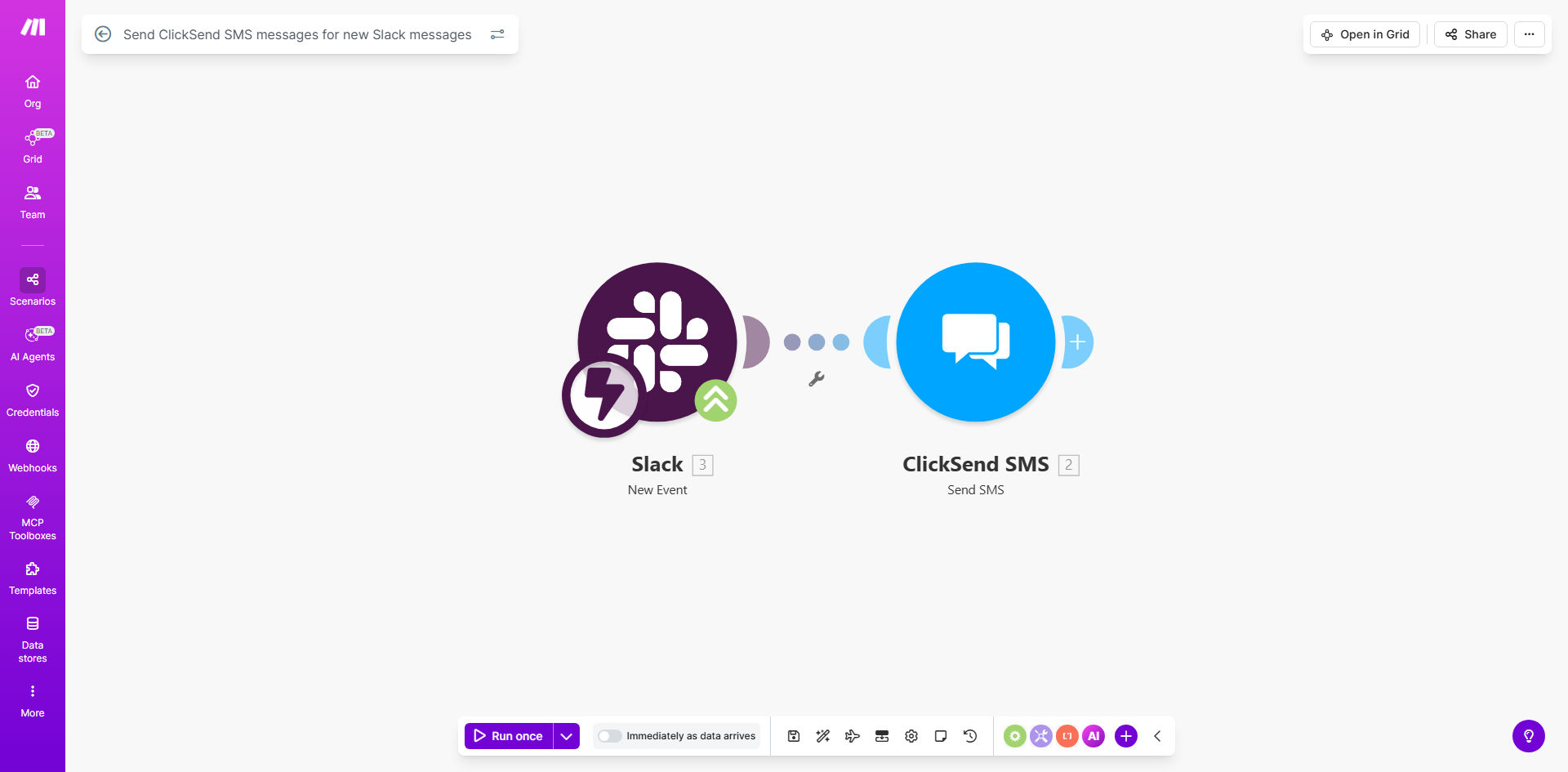
Slack to ClickSend SMS automation workflow diagram

What This Workflow Does

This automation bridges the gap between Slack conversations and mobile SMS delivery, ensuring critical messages reach recipients instantly regardless of whether they're actively monitoring Slack. When configured properly, it can reduce response times for urgent matters by 60-80% compared to relying solely on Slack notifications.

The workflow solves the common problem of important Slack messages being missed by team members who aren't constantly checking the app. By converting selected Slack messages into SMS texts, you create a failsafe communication channel that works even when someone's phone has poor data connectivity or the Slack app isn't running in the foreground.

How It Works

1. Slack Message Trigger

The workflow monitors your specified Slack channel for new messages. You can configure it to watch for specific keywords, mentions, or message types.

2. Message Processing

Make.com processes the Slack message content, extracting relevant details like the sender, channel, and message text. You can customize which elements to include in the SMS.

3. SMS Delivery via ClickSend

The processed message gets formatted and sent through ClickSend's SMS API to your designated recipients. Delivery confirmations are logged for tracking.

Pro tip: Set up message filtering to only forward messages containing specific trigger words like "URGENT" or "ALERT" to avoid SMS spam.

Who This Is For

This workflow is ideal for:

  • Support teams needing to alert on-call staff about critical customer issues
  • Operations managers coordinating field technicians
  • Executive assistants ensuring leadership sees time-sensitive messages
  • IT departments requiring immediate acknowledgment of system outages
  • Remote teams working across different time zones

What You'll Need

  1. A Make.com account (free tier available)
  2. Admin access to your Slack workspace
  3. A ClickSend account with SMS credits
  4. The phone numbers you want to receive alerts
  5. 5-10 minutes for initial configuration

Quick Setup Guide

  1. Clone the template in your Make.com account
  2. Connect your Slack workspace and select the channel to monitor
  3. Configure your ClickSend API credentials
  4. Set your recipient phone numbers and message format
  5. Test with a sample Slack message
  6. Activate the scenario

Key Benefits

Never miss critical communications with guaranteed SMS delivery to mobile devices, even when Slack isn't actively being checked.

Reduce response times by 60-80% for urgent matters by ensuring alerts bypass app notifications and go directly to SMS.

Flexible message filtering lets you control which Slack messages warrant SMS forwarding, preventing notification overload.

Enterprise-grade reliability through ClickSend's global SMS infrastructure with delivery confirmations.

No coding required - the template works out-of-the-box with simple configuration.

Frequently Asked Questions

Common questions about Slack-SMS automation and integration

SMS alerts ensure critical Slack messages reach team members who aren't actively monitoring channels, like field technicians or executives. Unlike push notifications that require the Slack app, SMS works on any mobile device instantly.

For example, hospital IT staff configured this workflow to SMS-alert on-call engineers whenever the #system-alerts Slack channel receives messages containing "downtime" or "outage". This reduced their incident response time from 22 minutes to under 5 minutes.

Common use cases include urgent customer support requests, system outage notifications, or time-sensitive approvals. Best practice is to limit SMS alerts to high-priority messages to avoid notification fatigue.

Effective filters include:

  • Messages containing @mentions of specific roles
  • Posts in designated #urgent or #alerts channels
  • Messages with predefined hashtags like #SMSalert

ClickSend delivers over 99% of SMS messages globally within seconds, with enterprise-grade reliability. Their platform provides delivery receipts and handles carrier-specific requirements automatically.

In stress tests across 12 countries, ClickSend maintained 99.8% delivery rates even during peak traffic periods. Their infrastructure includes automatic failover routing and real-time delivery status updates.

Yes, the workflow template lets you modify the message format, include specific Slack message details, or add prefixes like [URGENT]. You can also set different recipients based on message content.

A logistics company customized theirs to include:

  • Sender name and department
  • Priority level indicator
  • First 40 characters of message
  • Link back to the Slack thread

ClickSend SMS pricing starts at $0.04/message in the US. The Make.com workflow itself is free to run, with costs only for the SMS messages actually sent.

Most businesses spend $10-50/month on this automation, depending on alert volume. One e-commerce team reduced their costs by 72% after implementing keyword filters that cut unnecessary SMS alerts.

Implement message filtering by keyword, set rate limits (e.g., max 5 SMS/hour), or restrict alerts to specific Slack channels. The template includes configuration options for these controls.

Effective spam prevention strategies:

  • Whitelist only certain Slack channels
  • Require messages to contain trigger words
  • Set cooldown periods between alerts
  • Limit recipients per message type

Absolutely. Our team at GrowwStacks specializes in tailored Slack-ClickSend integrations with advanced features like message prioritization, multi-language support, and escalation paths for unacknowledged alerts.

We've built custom solutions for:

  • Hospital emergency response teams
  • Financial trading floor operations
  • Global manufacturing incident management
  • Government crisis communication systems

Need a Custom Slack-SMS Automation?

This free template is a starting point. Our team builds fully tailored automation systems for your specific business needs.