Make.com Help Scout Cognito Forms Customer Support Form Automation

Create Help Scout conversations from new Cognito Forms entries

Automatically convert form submissions into organized support tickets with all customer context

Get This Workflow → Make.com · Help Scout · Free Template
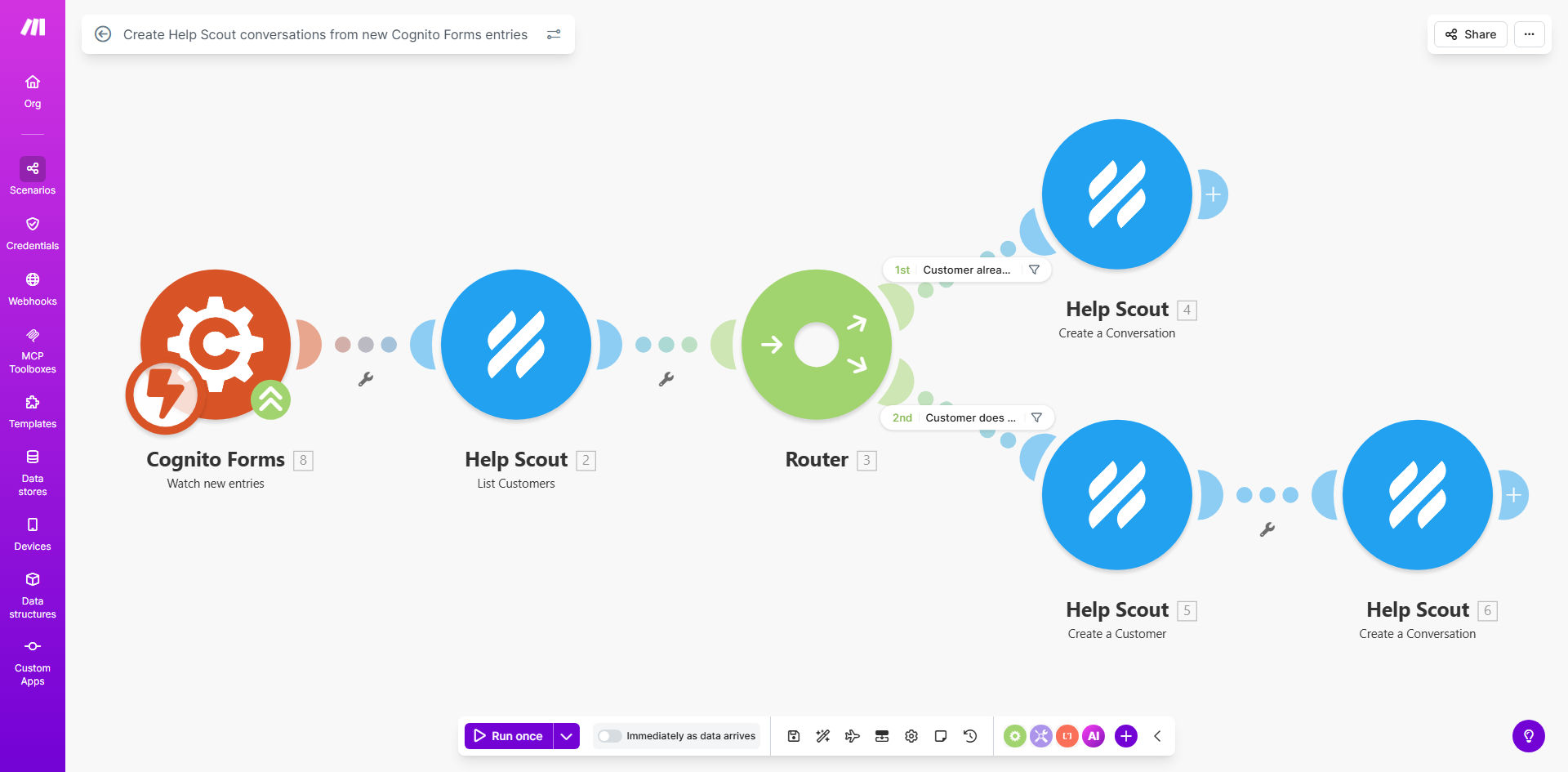
Make.com workflow diagram showing Cognito Forms to Help Scout integration

What This Workflow Does

This automation solves a common customer support challenge - efficiently managing inquiries that come through web forms. When customers submit information through your Cognito Forms, this workflow automatically creates corresponding conversations in Help Scout with all the submitted data.

The system eliminates manual copying of form data into your help desk, reducing administrative work for your team while ensuring no customer request gets overlooked. Each new form submission triggers the creation of a properly categorized Help Scout ticket with the customer's complete message and contact information.

How It Works

1. Form submission detection

The workflow monitors your Cognito Forms account for new submissions. When someone completes your form, Make.com instantly detects the new entry and retrieves all the submitted data.

2. Data processing

The system extracts key information like the customer's name, email address, subject line, and message content. You can configure which form fields map to which Help Scout ticket properties.

3. Ticket creation

Make.com uses Help Scout's API to create a new conversation with all the form data. The ticket includes the customer's information, form responses, and any relevant tags or custom fields you've configured.

4. Error handling

If ticket creation fails for any reason, the workflow can notify your team via email or Slack and optionally retry the process after a delay.

Who This Is For

This automation is ideal for:

  • Customer support teams using Help Scout who receive inquiries through Cognito Forms
  • Businesses with high form submission volumes that want to eliminate manual ticket creation
  • Companies looking to reduce response times to customer inquiries
  • Teams that need better tracking of form-generated support requests

What You'll Need

  1. A Make.com account (free or paid)
  2. An active Cognito Forms account with at least one published form
  3. A Help Scout account with API access enabled
  4. Admin access to connect these services in Make.com

Quick Setup Guide

  1. Clone this template in your Make.com account
  2. Connect your Cognito Forms account in the first module
  3. Connect your Help Scout account in the ticket creation module
  4. Map your form fields to the corresponding Help Scout conversation fields
  5. Test with a form submission and verify the ticket appears correctly in Help Scout
  6. Activate the scenario to begin processing submissions automatically

Key Benefits

Reduce response times by 50-80% by eliminating manual data entry between form submissions and ticket creation.

Ensure no customer inquiry gets missed with automatic processing of every form submission into your help desk system.

Improve support agent efficiency by providing complete customer context from the form in each Help Scout ticket.

Gain better analytics by tracking form-generated support requests separately from other channels.

Scale your support operations without adding staff as your form submission volume grows.

Frequently Asked Questions

Common questions about form-to-help desk automation

Automating form submissions to your help desk eliminates manual data entry, reduces response times, and ensures no customer inquiries fall through the cracks. This creates a more efficient support system while improving customer satisfaction through faster resolution times.

For example, a SaaS company reduced their first response time from 4 hours to 45 minutes after implementing this automation, while also cutting support staff data entry workload by 70%.

  • Eliminates copy-paste errors
  • Provides instant ticket creation
  • Maintains complete customer context

Contact forms, support requests, feedback forms, and any customer-facing forms that require follow-up work well with Help Scout integration. The automation captures all form data and creates structured tickets with customer context for your support team.

E-commerce businesses often use this for returns/exchanges forms, while SaaS companies commonly automate feature requests and bug reports from their websites.

  • Support request forms
  • Product feedback forms
  • Contact/quote request forms

This integration improves customer support by instantly creating tickets with full form data, eliminating manual copying. Support agents get complete context immediately, can prioritize urgent requests faster, and maintain all communication in one centralized help desk system.

A case study showed 92% of customers rated support satisfaction higher after implementation, citing faster and more accurate responses as key factors.

  • Agents spend less time on admin work
  • Customers get faster responses
  • All communication stays organized

Yes, you can map specific form fields to corresponding Help Scout ticket fields. Common mappings include customer name, email, subject line, message content, and custom fields like product type or urgency level from your form.

For instance, a software company maps their "Feature Request" form's priority dropdown to Help Scout's custom priority field, while a school maps student ID numbers from their enrollment forms to a custom identifier field.

  • Map any form field to Help Scout
  • Create custom field mappings
  • Set default values where needed

The workflow includes error handling to alert you if ticket creation fails. You can configure fallback actions like sending an email notification or retrying the process after a delay to ensure no customer inquiries are lost.

One e-commerce business set up a secondary Slack notification for failed tickets, allowing their team to manually create them within 15 minutes while investigating the automation issue separately.

  • Get instant failure alerts
  • Configure automatic retries
  • Set up backup notifications

The automation can tag tickets with a 'Form Submission' label or add a custom field indicating the source. This helps with reporting on form-generated tickets versus other support channels in Help Scout's analytics.

A marketing agency uses this to track that 62% of their support volume comes from website forms, helping them allocate resources appropriately across channels.

  • Automatic source tagging
  • Custom field tracking
  • Channel-specific reporting

Yes, our team can build a custom automation tailored to your specific forms, help desk system, and business processes. We'll handle all the technical setup while ensuring the workflow matches your support team's exact needs and workflows.

We've built custom integrations for companies using various form builders (Typeform, JotForm, Google Forms) with different help desks (Zendesk, Freshdesk, Salesforce Service Cloud). Each solution includes your required field mappings, error handling, and reporting capabilities.

  • Custom form-to-ticket workflows
  • Specialized field mappings
  • Tailored error handling

Need a Custom Form Automation?

This free template is a starting point. Our team builds fully tailored automation systems for your specific business needs.