Make.com Form Automation Help Scout Customer Support

Automate Wufoo Forms to Help Scout Conversations

Convert form submissions into support tickets automatically, saving hours of manual work

Get This Workflow → Make.com · Wufoo Integration · Free Template
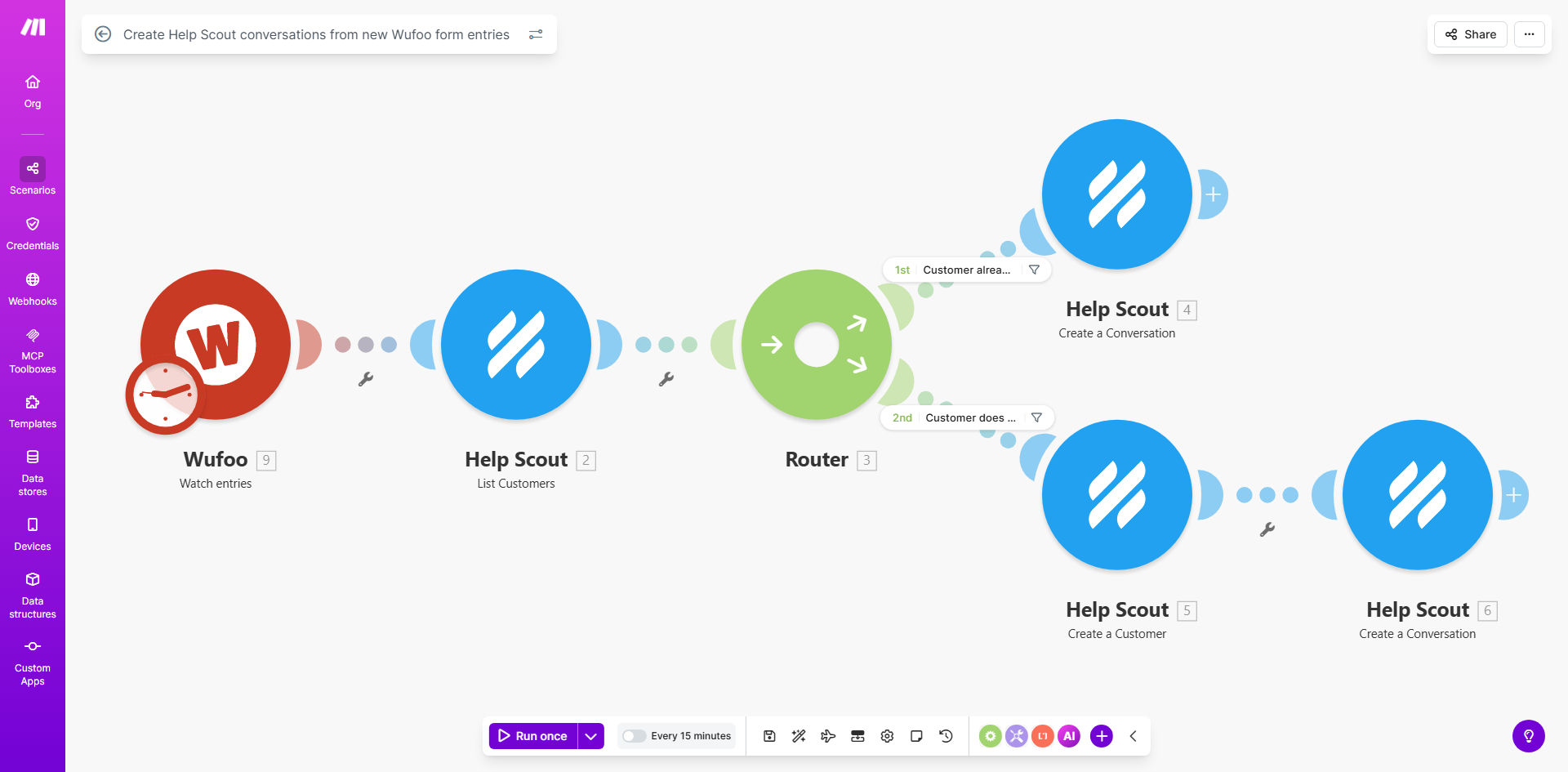
Wufoo to Help Scout automation workflow diagram

What This Workflow Does

This automation bridges the gap between your Wufoo forms and Help Scout support system. Every time someone submits your form, it instantly creates a new conversation in Help Scout with all the submission details. This eliminates the need for manual copying and pasting between systems, ensuring no submissions fall through the cracks.

The workflow can intelligently handle complex forms with multiple fields, file uploads, and conditional logic. It maps form responses to Help Scout's conversation fields intelligently, maintaining context for your support team needs to provide personalized responses.

How It Works

1. Trigger on new form submissions

The workflow monitors your Wufoo form for new entries using Make.com's instant trigger. As soon as someone submits the form, the automation starts processing.

2. Process form data

The system extracts all form fields, including text responses, multiple choice answers, and file uploads. It can perform basic data validation and formatting before forwarding to Help Scout.

3. Create Help Scout conversation

Using Help Scout's API, the workflow creates a new conversation with the form submitter's email as the customer, maps form fields to the conversation body, and can even apply tags or assign to specific mailboxes.

Pro tip: Use Wufoo's hidden fields to pass along metadata like UTM parameters or user IDs that Help Scout can use for better context.

Who This Is For

This workflow is ideal for:

  • Support teams handling high volumes of form submissions
  • Businesses using Wufoo for customer feedback or bug reports
  • Companies that want to centralize all customer interactions in Help Scout
  • Teams needing to track form submissions alongside other support channels

What You'll Need

  1. A Wufoo form with submissions you want to track
  2. A Help Scout account with API access
  3. A Make.com account (free tier works)
  4. Admin access to both systems

Quick Setup Guide

  1. Connect your Wufoo API key in Make.com
  2. Connect your Help Scout account
  3. Map Wufoo fields to Help Scout conversation properties
  4. Set up any filters or conditions for routing
  5. Test with a form submission

Key Benefits

Save 15-30 minutes per form response by eliminating manual data entry between systems.

Reduce response times since tickets are created instantly rather than waiting for manual processing.

Improve data accuracy by removing human errors in copying information.

Centralize customer interactions by bringing form submissions into your existing Help Scout workflow.

Scale support operations without adding overhead for form processing.

Frequently Asked Questions

Common questions about Wufoo and Help Scout automation

This automation eliminates manual data entry by instantly converting form submissions into support tickets, saving 15-30 minutes per form response.

For teams handling dozens of form submissions daily, this adds up to hours of saved time each week that can be redirected to actually helping customers rather than processing paperwork.

Make.com offers more advanced filtering and data transformation capabilities than Zapier, plus lower costs for high-volume form processing.

Unlike Zapier's linear workflows, Make.com allows complex branching logic, error handling, and data enrichment steps between the form submission and Help Scout creation.

The workflow includes error handling to alert your team of any failed submissions so you can follow up manually.

Common failures like API rate limits or invalid email addresses trigger notifications so your team never misses a form submission, even when the automation hits a snag.

Yes, the workflow can automatically apply tags, assign to specific team members, or route to mailboxes based on form responses.

For example, you could tag all "Urgent" requests from a priority field or route technical questions to your engineering team based on a dropdown selection.

The workflow can process file uploads from Wufoo and attach them to the corresponding Help Scout conversation automatically.

This includes common file types like PDFs, images, and documents - ensuring support agents have all submitted materials without needing to download and reattach manually.

Our team at GrowwStacks specializes in building tailored form-to-support automations with custom routing rules, data enrichment, and exception handling.

We can create workflows that integrate with your CRM, add internal notes based on customer history, or even trigger follow-up sequences - all while maintaining your existing Help Scout workflow.

  • Custom routing based on form responses
  • Data enrichment from your CRM or databases
  • Automated follow-up sequences

Need a Custom Wufoo-Help Scout Automation?

This free template is a starting point. Our team builds fully tailored automation systems for your specific business needs.