Make.com Resource Guru Microsoft 365 Automated Emails Project Management

Automate Resource Guru Booking Emails with Microsoft 365

Get instant, professional email notifications sent automatically every time a new booking is created in Resource Guru.

Get This Workflow → Make.com · Resource Guru · Free Template
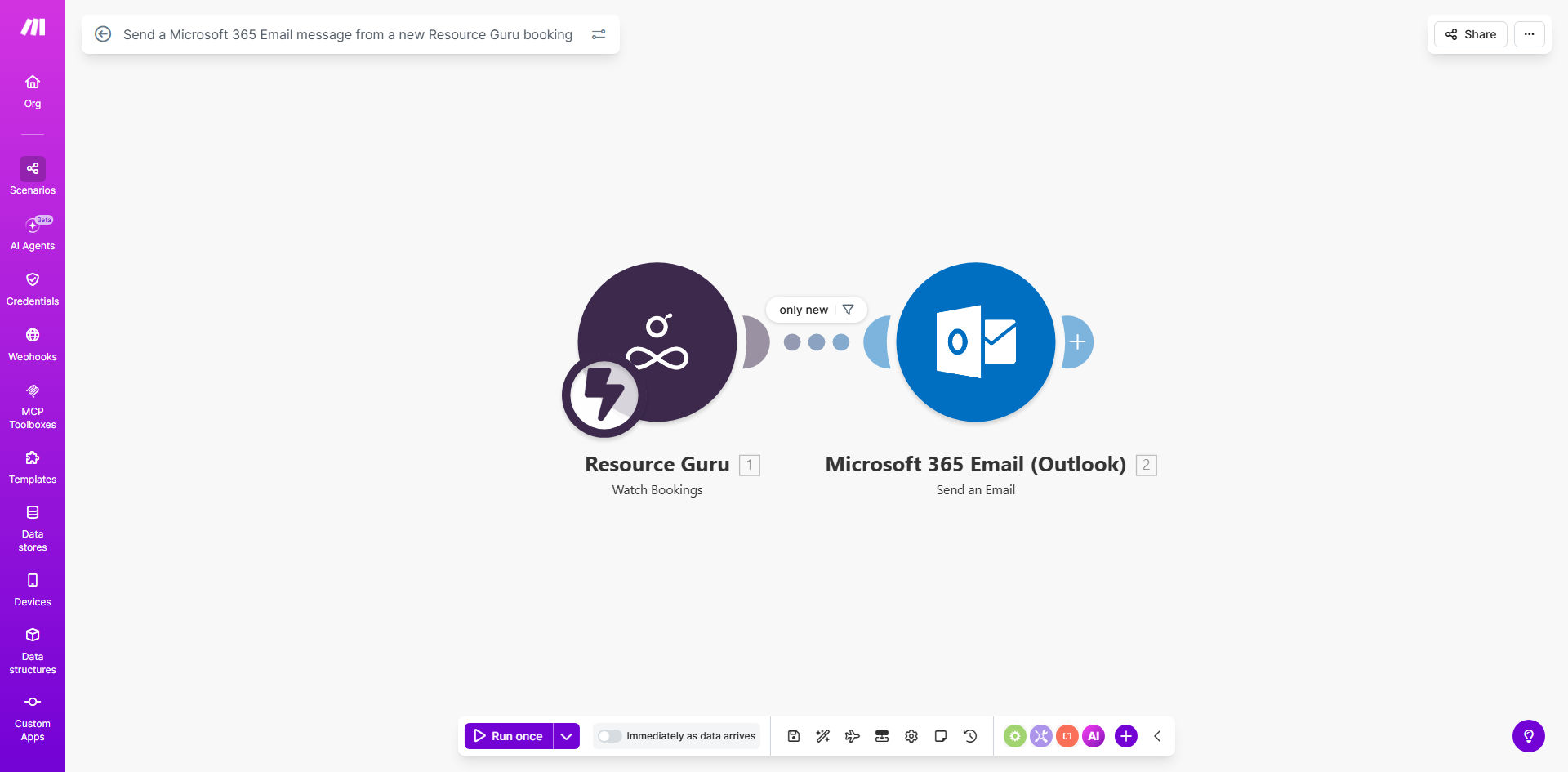
Make.com workflow diagram connecting Resource Guru to Microsoft 365 Email

What This Workflow Does

Managing project resources efficiently requires clear, timely communication. When a team member is booked on a project in Resource Guru, multiple stakeholders—project managers, clients, and the resources themselves—need to be notified immediately. Manually sending these emails is time-consuming, prone to errors, and often gets delayed in the hustle of daily operations.

This automation solves that problem by creating a seamless bridge between your resource scheduling and your communication platform. Every time a new booking is created in Resource Guru, this Make.com workflow triggers automatically. It captures all the relevant booking details—like the project name, resource person, dates, and notes—and uses them to compose and send a professional notification email directly from your Microsoft 365 account. This ensures everyone is on the same page instantly, without any manual intervention.

How It Works

The workflow operates on a simple trigger-action principle, transforming a booking event into a communication action.

Step 1: Monitoring Resource Guru

The scenario starts by watching your Resource Guru account for a specific event: the creation of a new booking. Make.com polls the Resource Guru API at regular intervals, instantly detecting when a new booking record appears.

Step 2: Gathering Booking Data

Once triggered, the workflow retrieves the complete set of data for that new booking. This includes the resource's name, the client or project they are booked for, the start and end dates, booked hours, and any custom fields or notes added during booking.

Pro tip: Use Resource Guru's custom fields to capture specific project codes or cost centers. The automation can include this data in the email, providing richer context for recipients.

Step 3: Composing & Sending the Email

The core data is then mapped to a pre-designed email template in Microsoft 365. You have full control to customize the subject line, email body, and recipient list. The email is sent directly from your official company email address via Microsoft 365, ensuring deliverability and maintaining brand consistency.

Who This Is For

This automation is a game-changer for any business that bills for time and manages shared resources across projects.

Creative & Marketing Agencies: Notify account managers and clients when a designer or copywriter is assigned to their project.

IT & Consulting Firms: Automatically inform project leads and engineers about their upcoming assignments and client engagements.

Professional Service Providers: Send confirmation emails to internal teams and external stakeholders when consultants or specialists are booked.

Project Managers & Operations Teams: Anyone tired of copying and pasting booking details into emails will save significant time and eliminate communication gaps.

What You'll Need

  1. A Make.com account (free tier available).
  2. A Resource Guru account with API access enabled.
  3. A Microsoft 365 or Office 365 account with sending permissions.
  4. The email addresses of who should receive notifications (e.g., project managers, resources, clients).
  5. A basic email template outlining the information you want to communicate.

Quick Setup Guide

You can have this automation running in under 15 minutes.

  1. Clone the Template: Click "Get This Workflow" to copy the template into your Make.com account.
  2. Connect Resource Guru: In the first module, authorize Make.com to access your Resource Guru account using your API credentials.
  3. Connect Microsoft 365: In the email module, authorize the connection to your Microsoft 365 account.
  4. Map Your Data: Review the email module. Ensure the fields from Resource Guru (like Resource Name, Project, Dates) are correctly placed in your email subject and body.
  5. Set Recipients: Define the "To," "CC," or "BCC" fields. You can use static emails or, for advanced use, pull email addresses from another connected app.
  6. Test & Activate: Create a test booking in Resource Guru. Turn the scenario on and verify that the email sends correctly. Once confirmed, your automation is live.

Key Benefits

Eliminate Manual Communication Tasks: Save 5-10 hours per week previously spent on typing, copying, and sending booking confirmation emails. This time can be redirected to higher-value project work.

Ensure 100% Notification Accuracy: Remove the risk of human error—forgetting to send an email, sending to the wrong person, or including incorrect booking details. Every booking triggers a perfect, consistent notification.

Improve Project Kick-off Speed: Stakeholders are informed the moment a resource is booked, allowing them to prepare and engage immediately. This can shave days off project start times.

Centralize Communication: Keep all booking-related communication within your professional Microsoft 365 ecosystem. This provides better tracking, searchability, and a unified thread for all project correspondence.

Enhance Professional Image: Automated, timely, and well-formatted emails sent from your company domain project an image of efficiency and organization, building greater trust with clients and team members.

Frequently Asked Questions

Common questions about resource booking automation and integration

Automating booking notifications eliminates manual email tasks, ensures immediate communication, and reduces scheduling conflicts. It saves project managers 5-10 hours per week and guarantees stakeholders are informed the moment a resource is booked, improving project coordination and client satisfaction.

For example, an agency can automatically notify both the assigned designer and the client account manager as soon as a booking is made, preventing any lag that could lead to misalignment or double-booking of that designer's time.

Connecting Resource Guru with Microsoft 365 centralizes project communication within your existing email ecosystem. It allows you to send branded, professional notifications directly from your company domain, track email delivery, and maintain a consistent communication thread for all project-related updates.

This integration turns email from a separate manual task into a seamless, automated extension of your resource management process. All correspondence is logged in your sent items, creating a clear audit trail for every resource assignment.

Yes, you can fully customize the email subject, body, and recipients. The automation can pull dynamic data from Resource Guru like project name, resource details, booking dates, and client information to create personalized, context-rich emails for each booking.

You are not limited to a generic message. Tailor the tone and information for different audiences—a detailed internal brief for the resource, and a client-friendly confirmation for external stakeholders—all from the same automated trigger.

  • Include project codes and budget references.
  • Add links to project documents or briefs.
  • Format dates and times to match company style.

Agencies, consulting firms, IT service providers, and any business with billable resources benefit most. It's ideal for teams managing multiple projects with shared personnel, where clear communication about resource allocation prevents double-booking and ensures project timelines are met.

Businesses that experience rapid growth or have remote teams find particular value, as automated communication becomes the reliable "central nervous system" for coordinating who is working on what, and when, without constant manual check-ins.

Automated communication demonstrates professionalism and organization. Clients receive instant confirmation when resources are assigned to their project, which builds trust. It reduces follow-up questions, provides clear points of contact, and creates an audit trail of resource commitments.

This proactive approach shows clients that their project is being actively managed. For instance, a client seeing an immediate email confirming that a senior developer has been booked for their sprint starting next week reinforces confidence in your operational efficiency.

Common mistakes include forgetting to send notifications, sending emails to wrong recipients, inconsistent email formatting, and delays that cause scheduling conflicts. Manual processes often lack tracking, making it difficult to prove when notifications were sent about resource assignments.

These errors lead to internal confusion, missed deadlines, and a perception of disorganization. Automation standardizes the process, ensuring every booking follows the same, reliable communication protocol every single time.

Absolutely. This workflow can be extended to update project management tools like Asana, create calendar invites, send SMS alerts, generate invoices based on booked hours, or trigger follow-up emails for booking modifications. It serves as a foundation for comprehensive resource orchestration.

Think of it as the first step in a fully automated project lifecycle. From the initial booking, you can trigger task creation, schedule meetings, and even initiate billing processes, all without manual data entry.

Yes, GrowwStacks specializes in building custom automation systems for resource management. We can integrate Resource Guru with your specific project tools, CRM, billing software, and communication channels to create a seamless workflow that matches your operational processes and scales with your business.

Our team will analyze your current workflow, identify bottlenecks, and design an automation solution that not only sends emails but also syncs data across your entire tech stack, providing a single source of truth for resource allocation and project status.

  • Integration with your CRM for client context.
  • Automated invoice creation in QuickBooks or Xero.
  • Custom dashboards for real-time resource reporting.

Need a Custom Resource Booking Automation?

This free template is a starting point. Our team builds fully tailored automation systems for your specific business needs.