Make.com Project Management Resource Scheduling Basecamp 3 Resource Guru

Automate Resource Guru Projects from Basecamp 3

Instantly create structured resource schedules the moment a new project is approved, eliminating manual setup and ensuring your team's capacity is always aligned with demand.

Get This Workflow → Make.com · · Free Template
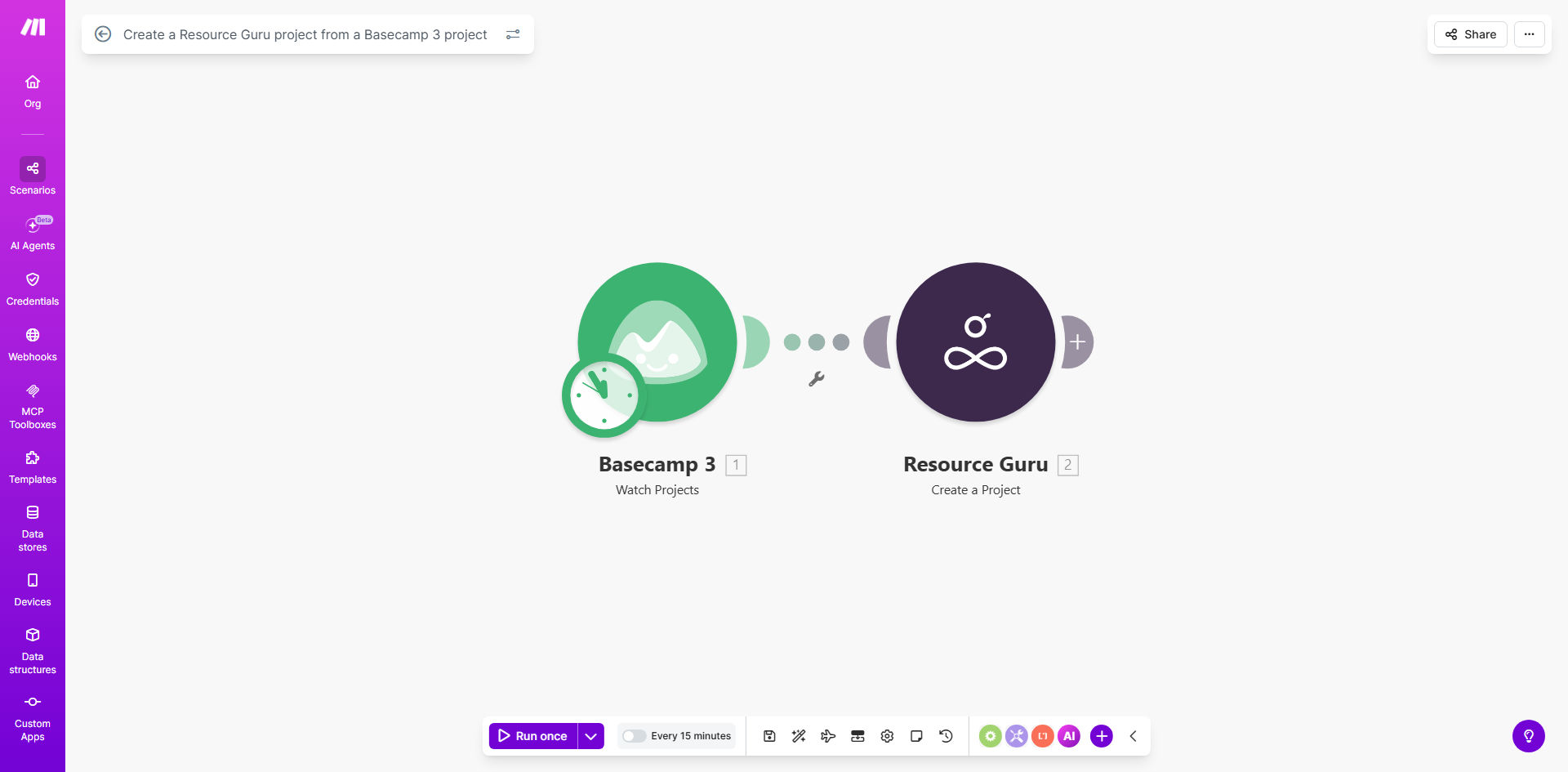
Visual diagram showing automation flow from Basecamp 3 creating a project in Resource Guru

What This Workflow Does

For agencies and professional service teams, the gap between winning a project and effectively scheduling your team to deliver it is where profit leaks and stress builds. A project gets the green light in Basecamp, but then someone must manually duplicate all that information into Resource Guru—a process that takes 15-30 minutes, is prone to errors, and often gets deprioritized. This delay means your most valuable assets—your people—aren't formally allocated, leading to overbooking, last-minute scrambles, and inaccurate forecasting.

This automation solves that by creating an instant, seamless bridge. The moment a project is created or marked as 'Active' in Basecamp 3, this workflow automatically generates a corresponding project in Resource Guru. It maps key fields like project name, client, dates, and manager, creating a ready-made container for detailed resource scheduling. This turns a multi-step, error-prone administrative task into a zero-touch background process, ensuring your resource plan is always a real-time reflection of your active project portfolio.

Pro tip: Use this automation to enforce a "no schedule, no start" policy. Configure it to only create the Resource Guru project when a Basecamp project reaches a specific status (like "Approved"). This guarantees resource planning is a formal gate before work commences.

How It Works

The workflow is a straightforward, reliable sequence that moves data on your behalf.

1. Monitor for New Basecamp Projects

The scenario watches your specified Basecamp 3 account for new projects or for updates to existing projects (like a status change to "Active"). It triggers instantly, ensuring no lag between project creation and resource setup.

2. Extract and Structure Key Project Data

It pulls the essential information needed for scheduling: the project name, description, start and due dates, the associated client/company from Basecamp, and the project manager. The automation can be tailored to include custom fields like project code, budget ID, or priority level.

3. Create the Corresponding Resource Guru Project

Using the structured data, the scenario logs into your Resource Guru account and creates a new project. It populates the project name, client, dates, and notes, effectively mirroring the Basecamp project shell. The new project is immediately visible to your resource manager for detailed team assignment.

4. (Optional) Notify the Team

The workflow can be extended to send a notification to a Slack channel, Microsoft Teams, or via email to the project manager and resource planner, confirming the project is now "schedulable." This closes the communication loop automatically.

Who This Is For

This automation delivers disproportionate value to businesses that sell time and expertise. It's ideal for digital agencies juggling multiple client projects, consulting firms managing client engagements, software development teams working in sprints, and internal IT or marketing departments with a project intake process. If your profitability depends on accurately aligning team capacity with project demand and you use Basecamp for project tracking with Resource Guru for scheduling, this bridge is essential.

What You'll Need

  1. A Make.com account (free tier sufficient for this workflow).
  2. An active Basecamp 3 account with admin or API access.
  3. An active Resource Guru account with administrator permissions.
  4. The project templates or structure in Resource Guru you wish to replicate (e.g., standard color codes, portfolios).

Quick Setup Guide

You can have this automation running in under 30 minutes.

  1. Clone the Template: Click "Get This Workflow" to copy the ready-made scenario into your Make.com account.
  2. Connect Your Apps: In the Make scenario, authorize the connections to your specific Basecamp 3 and Resource Guru accounts. This is a one-time, secure OAuth process.
  3. Configure the Trigger: Point the Basecamp module to the specific Basecamp account and choose whether to watch for "New Project" or "Updated Project" events.
  4. Map the Data Fields: Review the data mapping between Basecamp and Resource Guru. Adjust if your field names differ (e.g., map "Company" in Basecamp to "Client" in Resource Guru).
  5. Test with a Dummy Project: Create a test project in Basecamp (e.g., "TEST - Automation Setup") and run the scenario once to verify it creates the project correctly in Resource Guru.
  6. Activate & Monitor: Turn the scenario on. It will now run automatically. Check the scenario history for the first few executions to ensure smooth operation.

Key Benefits

Eliminates Repetitive Administrative Work: Save 15-30 minutes of manual copy-pasting per project. For a team starting 5 projects a week, that's over 5 hours saved monthly, time better spent on actual planning or client work.

Ensures Scheduling Fidelity: Guarantees that every active project has a corresponding resource plan. This prevents the all-too-common scenario where work begins but isn't reflected in the scheduling tool, causing overbookings and forecasting errors.

Accelerates Project Ramp-Up: The resource manager can begin assigning people and planning allocations the instant a project is approved, not after a manual data entry delay. This gets projects moving faster.

Creates a Single Source of Truth: Synchronizes the project's foundational metadata (name, client, dates) across systems, reducing errors and confusion. The project ID or name can serve as a cross-reference key.

Improves Operational Visibility: Provides leadership with confidence that the project pipeline in Basecamp directly correlates to the resource demand in Resource Guru, enabling more accurate capacity planning and business decisions.

Frequently Asked Questions

Common questions about project management and resource scheduling automation

You can automate resource scheduling by connecting a project management app like Basecamp 3 to a resource management tool like Resource Guru. When a new project is created, the automation instantly creates a corresponding project in the scheduling tool, pulling in key details like name, timeline, and client. This ensures your resource plan is always aligned with active projects without manual updates.

The automation acts as a real-time bridge. It listens for specific events in your project management tool and translates them into actions in your scheduling software. This eliminates the lag between project approval and resource allocation, a common bottleneck that leads to team overallocation and project delays.

Syncing Basecamp with Resource Guru eliminates double data entry and ensures resource availability is planned the moment a project is approved. Benefits include preventing overbooking, providing real-time visibility into team capacity for new work, and reducing the project setup time from 15-30 minutes to seconds. It creates a single source of truth for project scope and resource demand.

For example, an agency wins a new website build. The sales lead creates the project in Basecamp. Instantly, a project shell appears in Resource Guru with the client name and deadline. The resource manager can immediately start assigning designers and developers, confident that the project is officially in the pipeline and won't be forgotten during weekly planning.

Automate the transfer of core project metadata: project name, client/company name, start and end dates, budget codes, and project manager. This foundational data is enough to create a structured container in Resource Guru for detailed scheduling. Avoid automating every task initially; focus on the high-level project shell to ensure resources are allocated before detailed planning begins.

Think of it as creating the folder before filing the documents. The automation sets up the project with its basic identity. The resource manager then fills it with the specific tasks and assignments. This phased approach keeps the automation simple, reliable, and focused on the most critical path: securing team capacity.

Use conditional logic in your automation. For example, tag projects in Basecamp as 'Internal', 'Client', or 'Retainer'. The automation can then read this tag and create the Resource Guru project with a specific color code, assign it to a particular portfolio, or set a default billing rate. This maintains organizational structure automatically.

This means a high-priority client project can be flagged red and assigned to a 'Client Work' portfolio, while an internal R&D project is colored blue and placed in an 'Internal' portfolio. The automation applies these business rules consistently, saving managers from having to remember and manually apply them every time.

Yes, significantly. By creating the Resource Guru project immediately, all time logged against it is captured from day one, even in the planning phase. This prevents 'orphaned' time entries that later need reallocation. Accurate time tracking linked directly to the correct project ensures client invoices reflect all work, reducing revenue leakage and billing disputes.

Consider the pre-kickoff phase where strategy work happens. If the project isn't in the scheduling tool yet, that time might get logged to a generic code. Later, someone must manually reallocate those hours, a tedious and error-prone process. Automation ensures the project bucket exists from the very first minute of work.

The biggest mistake is not involving the resource manager in the design phase. Automation must reflect their actual scheduling workflow. Forcing them to adapt to a poorly designed automated project structure creates friction. Collaborate to map which Basecamp fields correspond to which Resource Guru fields to ensure the automated output is immediately usable.

Spend an hour with the person who does the scheduling. Walk through what information they need, in what format, and when they need it. A simple automation that delivers exactly what they require is far more valuable than a complex one that creates extra cleanup work. Their buy-in is critical for adoption and success.

Absolutely. GrowwStacks specializes in building tailored automation bridges between your project management and resource scheduling tools. We analyze your specific project lifecycle, team structure, and reporting needs to design a system that fits perfectly. This goes beyond simple syncing to include custom rules, approval steps, and integrations with your finance stack.

We can build automations that account for complex scenarios like multi-phase projects, conditional budgeting, or integrations with third-party tools like QuickBooks or Jira. The goal is to create a seamless operational backbone that saves you time, reduces errors, and provides the visibility you need to scale confidently.

  • Tailored to your specific project intake and approval process.
  • Includes error handling and notifications for failed items.
  • Can incorporate data validation and manager sign-off steps.

Need a Custom Project-to-Resource Automation?

This free template is a starting point. Our team builds fully tailored automation systems for your specific business needs.