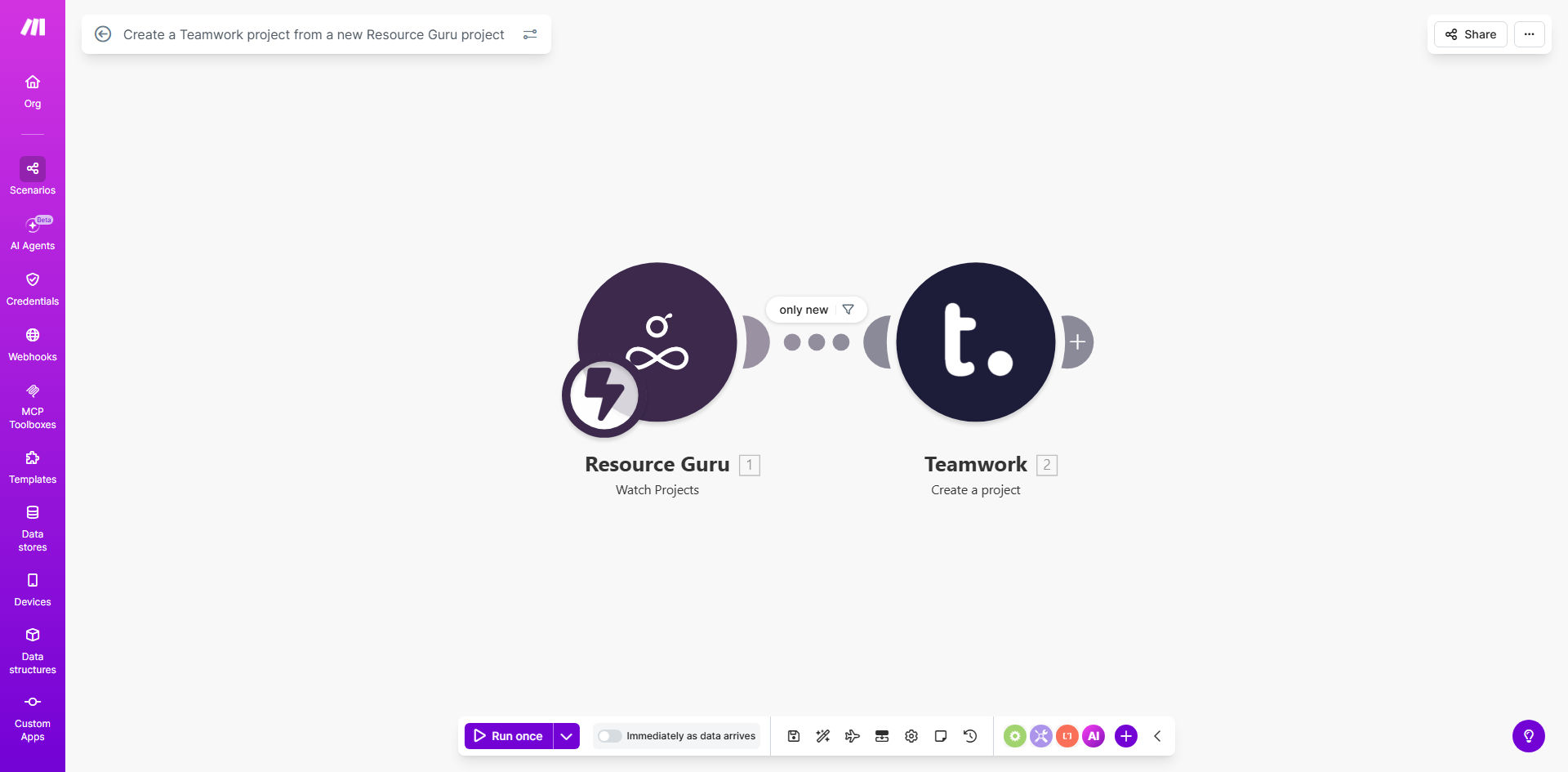
What This Workflow Does
For service-based businesses, agencies, and internal IT teams, the gap between planning and execution is where projects stumble. You schedule your team's time in a resource planning tool like Resource Guru, but then your project managers must manually recreate that plan in a project management tool like Teamwork. This double handling is not just tedious—it introduces errors, causes delays, and creates version control nightmares.
This automated workflow solves that by creating a seamless bridge between planning and doing. The moment a new project is created and staffed in Resource Guru, this Make.com scenario triggers. It captures all the essential project details—name, client, dates, assigned personnel—and uses them to automatically generate a fully-fledged project in Teamwork. This ensures your project delivery team has an actionable workspace ready to go, perfectly aligned with the resource plan, from the very first day.
The business value is clear: faster project mobilization, eliminated administrative waste, and guaranteed consistency between what was sold (and scheduled) and what is being delivered. It turns a multi-step, error-prone process into a reliable, hands-off operation.
How It Works
The automation acts as a intelligent connector, translating a resource booking into a project blueprint.
Step 1: Monitor New Resource Guru Projects
The workflow starts by watching for new projects in your Resource Guru account. Using Make.com's instant watch feature or scheduled checks, it detects the moment a project is created, capturing its unique ID and all associated data.
Step 2: Map and Prepare Project Data
Make.com then processes the incoming data. It extracts the core information needed for Teamwork: the project title, start and end dates, client name, and any custom fields or notes. This step often involves formatting dates and text to match Teamwork's expected structure.
Pro tip: Use this mapping step to enrich the data. You can append the client name to the project title or set the project owner in Teamwork based on the primary resource assigned in Resource Guru.
Step 3: Create the Teamwork Project
With the data prepared, the workflow makes an API call to Teamwork to create a new project. It passes all the mapped details, setting up the project with the correct name, dates, and privacy settings. You can configure it to use a specific project template in Teamwork for consistency.
Step 4: Add Team Members and Initial Tasks
Optionally, the automation can go further. It can add the team members assigned in Resource Guru to the new Teamwork project and even create initial task lists or milestones based on the project's scope or type, making it truly "ready-to-work."
Who This Is For
This automation delivers outsized value for organizations where billable hours, client projects, and team utilization are critical to profitability.
Digital Marketing & Creative Agencies: Streamline the handoff from the sales/resource manager who books the project to the account and delivery teams who execute it.
IT Consultancies & Software Development Shops: Ensure development sprints and client projects are instantly reflected in the team's task management tool, keeping technical leads and developers in sync.
Professional Service Firms (Legal, Accounting): Connect matter planning with matter management, ensuring all associates have access to the correct case or audit file as soon as it's scheduled.
Internal Project Management Offices (PMOs): Enforce process consistency. Every approved project that gets resources automatically gets a standardized project space, improving governance and reporting.
What You'll Need
- A Make.com account (Free or paid plan).
- An active Resource Guru account with API access enabled (typically available in paid plans).
- An active Teamwork account with administrator or owner permissions to create projects via API.
- API keys or OAuth connections for both Resource Guru and Teamwork, ready to be configured in Make.com.
- A clear understanding of which project fields in Resource Guru (e.g., custom fields for client ID) should map to which fields in Teamwork.
Quick Setup Guide
Follow these steps to deploy this automation in under 30 minutes.
- Clone the Template: Click "Get This Workflow" to copy the scenario to your Make.com account.
- Connect Your Apps: In the Make.com scenario, authorize the connections to your Resource Guru and Teamwork accounts using OAuth or API keys.
- Configure the Trigger: Set the Resource Guru module to watch the specific "Projects" resource or the correct portfolio/account.
- Map the Data Fields: Review the data mapping between the "Create a project" module in Teamwork and the data coming from Resource Guru. Adjust field mappings to fit your project naming conventions.
- Test with a Dummy Project: Create a test project in Resource Guru and run the scenario once to verify a project is created correctly in Teamwork.
- Activate & Monitor: Turn on the scenario schedule and monitor the operations log for the first few projects to ensure smooth running.
Key Benefits
Save 15–30 minutes of manual setup per project. Multiply this by the number of projects you initiate monthly to see the direct time savings for project managers and coordinators.
Eliminate data entry errors and version drift. Automated data transfer ensures the project in Teamwork exactly matches the plan in Resource Guru, removing typos and forgotten details.
Accelerate project kickoff by at least one business day. Teams can start working on tasks immediately because their project workspace is ready the moment the project is booked, improving client satisfaction.
Improve resource visibility and accountability. By linking the resource plan directly to the task list, managers and team members have a unified view of who is doing what and when, improving forecasting and accountability.
Enforce standardized project setup. Every project follows the same automated creation rules, ensuring consistency in how projects are structured, tagged, and reported on across the organization.