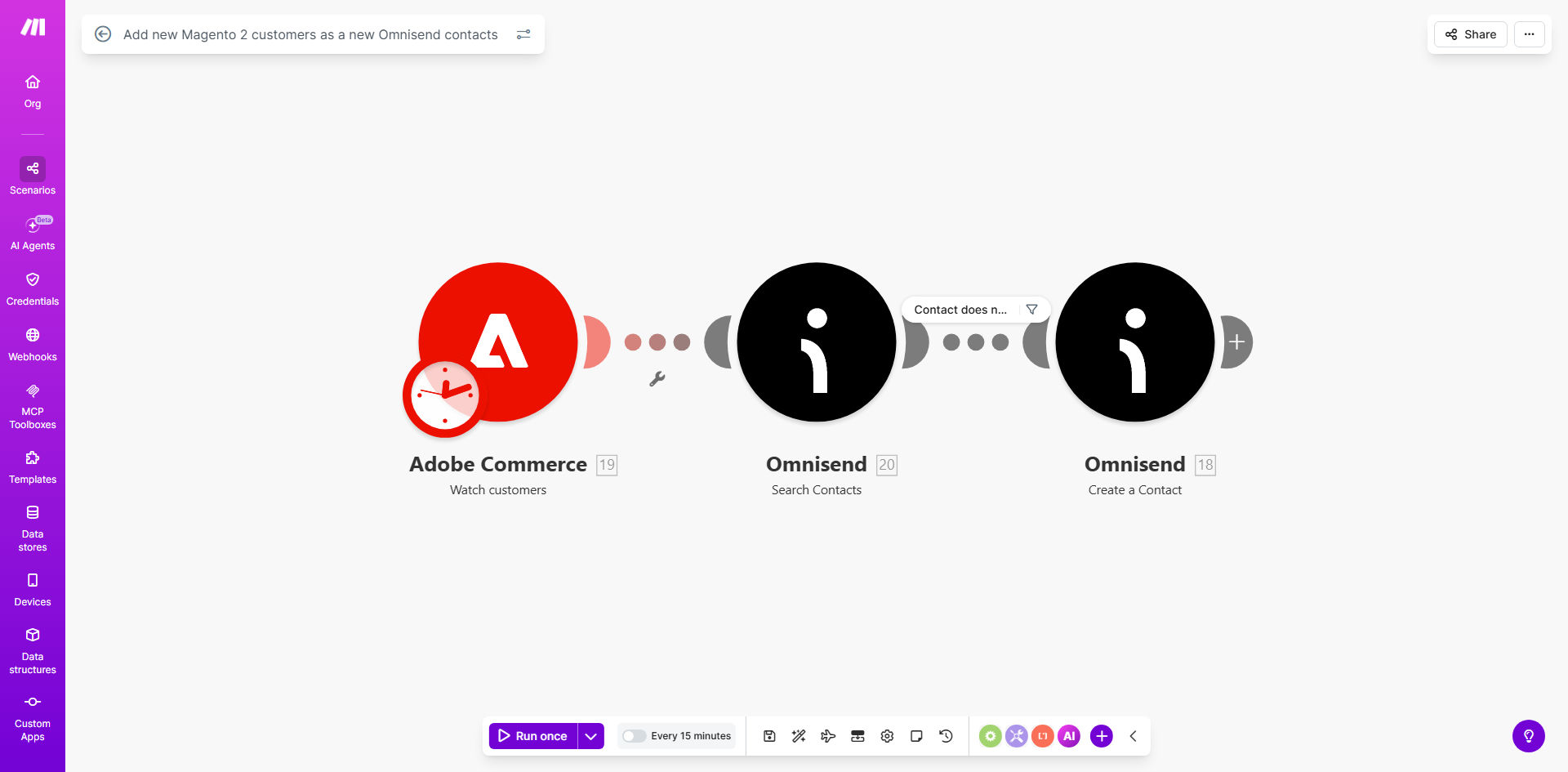
What This Workflow Does
For e‑commerce businesses using Magento 2, capturing a new customer is just the first step. The real value comes from engaging them immediately through personalized email marketing. However, manually copying customer details from Magento into your email platform like Omnisend is slow, error‑prone, and often delayed. This means missed opportunities to send welcome emails, promotional offers, or tailored content right after a purchase.
This automation solves that problem completely. It acts as a seamless bridge between your store and your marketing engine. Every time a customer registers or completes a purchase on your Magento 2 site, their contact information—name, email, and other relevant data—is instantly and automatically added as a new contact in your Omnisend account. This ensures your marketing list is always current, enabling timely, automated campaigns that can significantly increase customer retention and sales.
Beyond simple contact creation, this workflow establishes a foundational integration for a data‑driven marketing strategy. It eliminates administrative overhead, ensures data accuracy, and allows you to focus on crafting effective campaigns rather than managing lists.
How It Works
Step 1: Magento 2 Triggers the Automation
The workflow starts when a new customer is created in your Magento 2 store. This can happen via a registration form, a checkout completion, or an admin import. Make.com monitors this event, typically using a webhook or scheduled check, and immediately captures the new customer's data.
Step 2: Data is Processed and Prepared
Make.com receives the customer object from Magento, which includes fields like email address, first name, last name, and potentially custom attributes like customer group or location. The automation can filter, format, or enrich this data—for example, combining first and last name into a full name field suitable for Omnisend.
Pro tip: You can add logic here to segment customers. For instance, if the customer belongs to a "VIP" group in Magento, you can add a specific tag in Omnisend to trigger a different welcome series.
Step 3: Contact is Created in Omnisend
The formatted customer data is sent to Omnisend via its API. The automation uses the "Create a contact" action, populating the Omnisend contact list with the new subscriber. This step can also map Magento fields to custom Omnisend fields, allowing for richer segmentation later.
Step 4: Confirmation and Error Handling
The workflow confirms the contact was successfully added to Omnisend. If an error occurs—like a duplicate email or API issue—Make.com can trigger an alert to your team or attempt a retry, ensuring reliability. This closed‑loop process guarantees no customer is left out of your marketing funnel.
Who This Is For
This automation is ideal for any business running an e‑commerce store on Magento 2 and using Omnisend for email and SMS marketing. It's particularly valuable for:
- Marketing Managers who want to eliminate manual list updates and ensure immediate campaign enrollment for new customers.
- E‑commerce Store Owners looking to increase customer engagement and repeat purchases through automated, timely communication.
- Operations Teams burdened with manual data transfer between systems, seeking to save hours per week and reduce errors.
- Growing Businesses where customer acquisition is scaling, and manual processes are becoming unsustainable.
If you believe that a new customer should receive a welcome email within minutes of their first visit, this workflow is for you.
What You'll Need
- A live Magento 2 store with customer registration functionality.
- An active Omnisend account with API access enabled.
- A Make.com account (free or paid) to build and run the automation.
- The API credentials or webhook setup details for both Magento 2 and Omnisend.
- A clear understanding of which customer fields from Magento (e.g., email, name, phone) you want to sync to Omnisend.
Quick Setup Guide
Follow these steps to deploy this automation using the provided template:
- Clone the Template: Click "Get This Workflow" to open the template on Make.com and create a copy in your own account.
- Connect Magento 2: In the Make.com scenario, set up the Magento 2 module. You'll need to provide your store URL and API authentication details to establish the connection.
- Connect Omnisend: Similarly, add and authenticate the Omnisend module using your Omnisend API key.
- Map the Data: Review the data mapping between the modules. Ensure the fields from Magento (like
customer.email) are correctly mapped to the corresponding fields in Omnisend's "Create a contact" action. - Test and Activate: Run a test by simulating a new customer creation in Magento or using a manual trigger. Verify that a contact appears in your Omnisend list. Once confirmed, activate the scenario to run automatically.
Pro tip: Start by syncing only basic fields (email and name). Once the core flow works, you can enhance it to sync additional data like purchase history or customer tags for advanced segmentation.
Key Benefits
Save 5‑10 hours per month on manual list management. Eliminate the tedious task of exporting customer lists from Magento and importing them into Omnisend. The automation handles it instantly, freeing your team for strategic work.
Improve customer engagement rates by 20‑30%. By adding customers to Omnisend immediately, they can be enrolled in automated welcome series, post‑purchase follow‑ups, and promotional campaigns right away, significantly increasing open and click‑through rates.
Ensure 100% data accuracy and eliminate human error. Manual copying leads to mistakes like wrong emails or missing names. Automated sync transfers data precisely as stored in Magento, keeping your marketing lists clean and effective.
Enable real‑time segmentation for personalized marketing. With customers flowing into Omnisend instantly, you can use their data (e.g., first‑time buyer, high‑value customer) to trigger different, highly relevant automation workflows, boosting conversion.
Scale your marketing efforts seamlessly with customer growth. As your store acquires more customers, the automation scales effortlessly, handling hundreds or thousands of syncs without additional manual effort or cost.