Make.com WooCommerce Omnisend Email Marketing E-commerce

Automatically Sync WooCommerce Customers to Omnisend

Capture every new customer instantly for targeted email marketing, abandoned cart flows, and increased sales—no manual work required.

Get This Workflow → Make.com · WooCommerce · Free Template
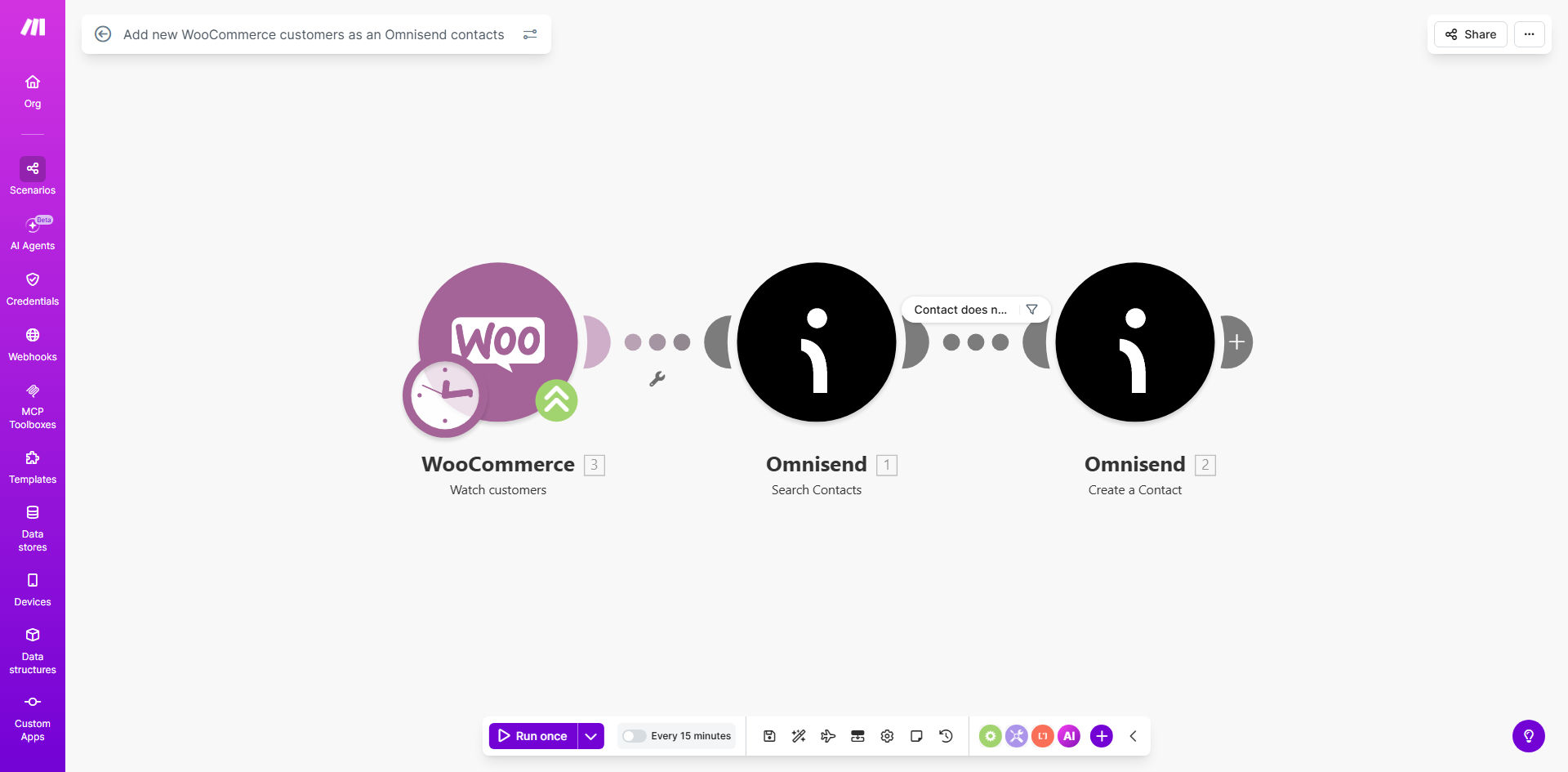
Make.com automation diagram syncing WooCommerce customers to Omnisend contact list

What This Workflow Does

For e-commerce store owners, a major marketing gap occurs between a customer making a purchase and being added to your email marketing list. Manually exporting new customers from WooCommerce and importing them into Omnisend is slow, error-prone, and means missed opportunities for immediate engagement like welcome emails or post-purchase follow-ups.

This automated workflow solves that by creating a seamless, real-time bridge between your store and your marketing platform. Every time a new customer account is created in WooCommerce—whether from a purchase, account registration, or checkout—Make.com instantly captures their details and adds them as a contact in your Omnisend audience. This ensures your marketing list is always accurate and growing automatically with your business.

How It Works

The automation acts as a smart connector, listening for events in WooCommerce and taking precise action in Omnisend.

Step 1: Trigger on New Customer

The workflow is triggered the moment a new customer is created in your WooCommerce store. Make.com watches for this event in real-time.

Step 2: Gather Customer Data

Make.com retrieves the new customer's information, such as their name, email address, and any other available details from the WooCommerce order or account.

Pro tip: You can configure the module to only add customers who have opted-in for marketing, ensuring GDPR compliance and a more engaged list.

Step 3: Create Omnisend Contact

The workflow then uses Omnisend's API to create a new contact in your specified audience list. You can map WooCommerce fields directly to Omnisend contact properties.

Step 4: Add Tags for Segmentation (Optional)

As a final step, you can configure the automation to add specific tags in Omnisend based on the customer's data—like "First-Time Buyer" or "Product X Customer"—enabling powerful segmentation from day one.

Who This Is For

This automation is essential for any business using WooCommerce and Omnisend that wants to scale its marketing efficiently.

E-commerce Store Owners: Who need to build their email list automatically to drive repeat purchases and customer loyalty.

Marketing Managers: Who waste time on manual list management and want to ensure timely, triggered email campaigns.

Small Business Teams: With limited resources who can't afford to let new customer data slip through the cracks.

Agencies: Managing client stores who need a reliable, set-and-forget solution for client marketing infrastructure.

What You'll Need

  1. A live WooCommerce store with customer accounts enabled.
  2. An active Omnisend account with an audience/list ready to receive contacts.
  3. A Make.com account (free tier available).
  4. API connection details for both WooCommerce (Consumer Key & Secret) and Omnisend (API Key).

Quick Setup Guide

  1. Get the Template: Click "Get This Workflow" to copy the template into your Make.com account.
  2. Connect WooCommerce: In the first module, authenticate your WooCommerce store by entering your store URL and API credentials.
  3. Connect Omnisend: In the Omnisend module, authenticate using your Omnisend API key found in your account settings.
  4. Map the Data: Ensure fields like email, first name, and last name are correctly mapped from WooCommerce to the corresponding Omnisend contact fields.
  5. Test & Activate: Create a test customer in WooCommerce to trigger the flow, verify the contact appears in Omnisend, and then turn the scenario on.

Pro tip: Start by adding a filter after the WooCommerce trigger to only process customers from specific countries or who have spent over a certain amount, making your initial list more targeted.

Key Benefits

Eliminate 5-10 hours of manual work per month previously spent on exporting and importing CSV files between platforms. Your team can focus on strategy instead of data entry.

Improve email campaign performance by 20-40% by ensuring new customers receive timely welcome series and onboarding emails immediately after their first purchase, when engagement is highest.

Gain 100% accurate list growth with zero missed customers due to human error or forgetfulness. Every new buyer is automatically captured for future marketing.

Enable advanced segmentation from day one by tagging customers in Omnisend based on their first purchase, allowing for hyper-personalized follow-up campaigns that drive repeat sales.

Scale your marketing efforts seamlessly as your store grows. The automation handles 10 or 10,000 new customers with the same reliability, without any additional effort from you.

Frequently Asked Questions

Common questions about WooCommerce and Omnisend automation and integration

Automatically syncing customers to Omnisend ensures your email marketing list is always up-to-date, capturing every new buyer instantly. This eliminates manual data entry errors and delays, allowing you to send welcome emails, abandoned cart reminders, and promotions immediately, which can increase customer lifetime value by up to 30%.

Without automation, there's a lag where new customers aren't being marketed to, and busy teams often forget to update lists regularly. This seamless connection turns every sale into a marketing opportunity.

Typically, the automation transfers key customer data like name, email address, and sometimes phone number and order history. This data allows Omnisend to segment your audience for targeted campaigns, such as sending product recommendations based on past purchases or location-based offers.

You have full control over what data is sent. You can choose to send only basic contact info or include custom WooCommerce fields like the customer's first purchased product category for more advanced segmentation.

  • Core data: Email, First Name, Last Name.
  • Optional data: Phone, Order Count, Total Spent.
  • Enables personalized welcome and follow-up sequences.

Yes, once customers are in Omnisend, you can create powerful segments based on data from WooCommerce, like total spend, product categories purchased, or order frequency. This lets you send hyper-personalized emails, such as loyalty rewards for high-value customers or re-engagement offers for those who haven't bought in a while.

The automation can even add specific tags during the sync process. For example, you could tag a customer as "High-Ticket Buyer" if their first order is over a certain amount, triggering a special email series.

Automation saves 5-10 hours per week by eliminating the need to manually export customer lists from WooCommerce and import them into Omnisend. It also ensures real-time list updates, so your marketing team can focus on strategy and creative campaigns instead of repetitive administrative tasks.

This time saving compounds as your store grows. Manually handling hundreds of new customers a week is unsustainable, but an automated workflow scales effortlessly with your sales volume.

Make.com provides a reliable, no-code connection that works 24/7 without manual intervention. It can handle complex logic, like only adding customers who opt-in for marketing, or adding tags in Omnisend based on the customer's first purchased product. This flexibility helps you build sophisticated, automated marketing funnels.

Unlike a simple plugin, Make.com allows you to add conditional logic and connect to other apps in the future, like adding the customer to a Slack channel for your team or creating a task in your project management tool.

Absolutely. You can configure the automation to add specific tags or place customers into different lists in Omnisend based on their initial order. For example, a customer buying a digital product could be added to a 'Digital Buyers' list and receive a specific onboarding email series, while a physical goods buyer gets shipping updates.

This level of personalization from the first touchpoint significantly increases engagement and conversion rates for follow-up campaigns, making your marketing feel tailored and relevant.

Yes, GrowwStacks specializes in building custom automations that connect WooCommerce and Omnisend based on your unique business rules. We can set up advanced workflows for segmentation, post-purchase sequences, or integrate additional apps like your CRM or loyalty platform to create a complete marketing engine.

Our team handles the technical setup, testing, and documentation, so you get a reliable system tailored to your goals. We can build automations that react to specific product purchases, customer lifetime value, or even combine data from multiple sources for unparalleled targeting.

  • Tailored segmentation logic.
  • Integration with your CRM or helpdesk.
  • Ongoing support and optimization.

Need a Custom WooCommerce & Omnisend Automation?

This free template is a starting point. Our team builds fully tailored automation systems for your specific business needs.