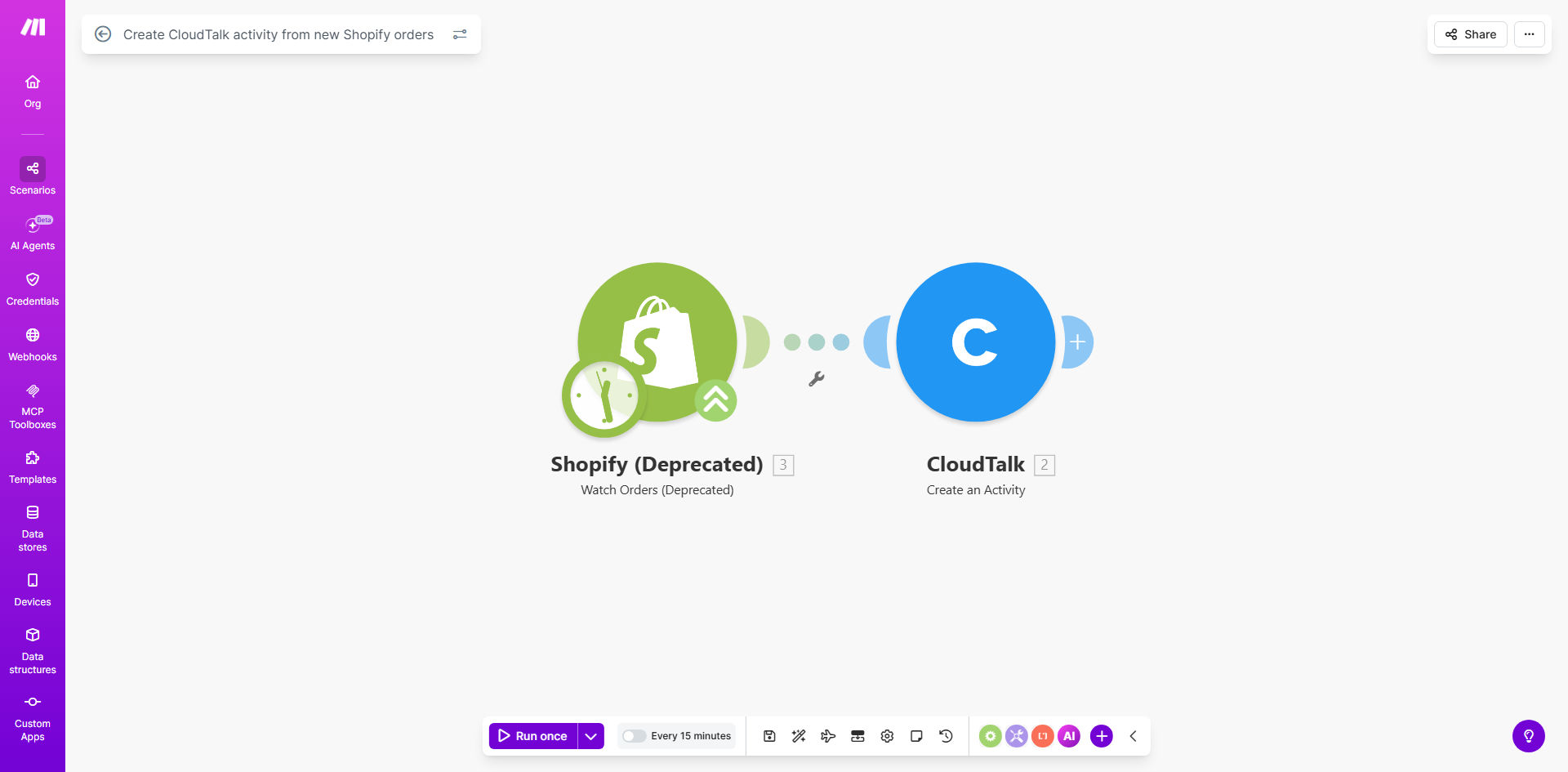
What This Workflow Does
For e-commerce businesses, a sale isn't the end of the customer journey—it's the beginning of the relationship. The critical window for post-purchase engagement, whether for a thank-you call, upsell opportunity, or support check-in, is often lost because sales teams lack immediate, organized visibility into new orders. Manually transferring order details from Shopify to your calling platform (CloudTalk) is slow, error-prone, and scales poorly.
This automation solves that by creating a seamless bridge between your store and your sales team. Every time a new order is placed in Shopify, this Make.com workflow triggers instantly. It captures the full order details—customer name, contact info, items purchased, and order value—and automatically creates a corresponding activity in CloudTalk. This activity is assigned to the relevant salesperson or team, complete with all the context they need to make a informed, timely, and personalized follow-up call.
The result is a closed-loop system where no customer falls through the cracks. Your team operates from a single source of truth, response times drop dramatically, and you can consistently deliver a premium post-purchase experience that drives repeat business and positive reviews.
How It Works
The workflow is an elegant, three-step process that runs silently in the background, turning a new order notification into an actionable sales task.
Step 1: Monitor for New Shopify Orders
The workflow starts with a Shopify module set to watch for the "Order Created" event. The moment a customer completes checkout, Make.com receives a webhook with the entire order payload. This trigger is real-time, ensuring there's zero delay between the sale and the next step.
Step 2: Parse and Structure the Order Data
Make.com then processes the incoming data. It extracts key fields like the order ID, customer email and phone number, total price, line items, and shipping address. This step can also include simple routing logic—for instance, you could filter to only process orders above a certain value or from new customers.
Pro tip: Use this step to enrich the data. You could add a step to look up the customer's previous order history from Shopify and include that in the notes for the sales activity, providing even deeper context.
Step 3: Create the Activity in CloudTalk
Finally, the workflow uses the CloudTalk module to create a new "Activity." It maps the Shopify data to the correct fields in CloudTalk: the customer's name and phone number become the contact, the order details populate the notes, and you can even set a due date (e.g., "Follow up in 24 hours"). The activity is saved against the correct contact in CloudTalk, ready for your team to act on.
Who This Is For
This automation delivers immense value for any business using Shopify that has a sales or customer service team making outbound calls. It's perfect for DTC (Direct-to-Consumer) brands that want to implement a high-touch post-purchase strategy to boost loyalty. High-ticket item sellers (e.g., furniture, electronics, B2B equipment) benefit greatly, as a personal call can reduce buyer's remorse and increase satisfaction.
It's also ideal for subscription box companies wanting to welcome new subscribers personally, and customer support teams that need instant order context when a customer calls in with a question. If your business model relies on building relationships after the sale, this workflow is your essential tool.
What You'll Need
- A Make.com account (Free plan or higher).
- A live Shopify store with admin access to generate API credentials.
- An active CloudTalk account with permissions to create activities via API.
- The customer's phone number field populated in your Shopify orders (critical for CloudTalk to log the activity against the right contact).
Quick Setup Guide
You can have this automation running in under 30 minutes. Follow these steps after clicking "Get This Workflow."
- Clone the Template: Click the link to open the template in your Make.com account and create a new scenario from it.
- Connect Shopify: In the first module, authorize Make.com to access your Shopify store. You'll need your Shopify store URL and a private app API key.
- Connect CloudTalk: In the CloudTalk module, authorize with your CloudTalk API credentials (found in your CloudTalk settings under API & Integrations).
- Map Data Fields (Optional): Review the data mapping between Shopify and CloudTalk. Ensure the phone number field from Shopify is correctly mapped to the phone field in CloudTalk for reliable contact matching.
- Test & Activate: Run a test by creating a test order in Shopify. Check that a corresponding activity appears in your CloudTalk account. Once confirmed, activate the scenario. It will now run automatically for every new order.
Key Benefits
Eliminate Manual Data Entry: Save your sales team 5-10 minutes per order previously spent copying and pasting information between tabs. This time adds up to hours saved per week, which can be redirected towards actually selling and building relationships.
100% Follow-Up Coverage: Guarantee that every single new order is logged as a sales activity. This removes human error and forgetfulness, ensuring no potential upsell, cross-sell, or customer service opportunity is ever missed due to a lack of visibility.
Improve Call Quality & Personalization: Sales reps call with full context—they know the customer's name, what they bought, and how much they spent. This leads to more relevant, confident, and effective conversations that customers appreciate, directly boosting customer lifetime value (LTV).
Accurate Sales Activity Analytics: With every follow-up task logged in CloudTalk, managers gain clear visibility into team performance. You can measure call volume, outcomes, and rep productivity based on actual order data, enabling data-driven coaching and process improvements.
Scalable Post-Purchase Experience: This automation allows you to maintain a personal, high-touch customer experience even as your order volume grows into the hundreds or thousands per month. It's the system that lets you scale your service quality alongside your sales.