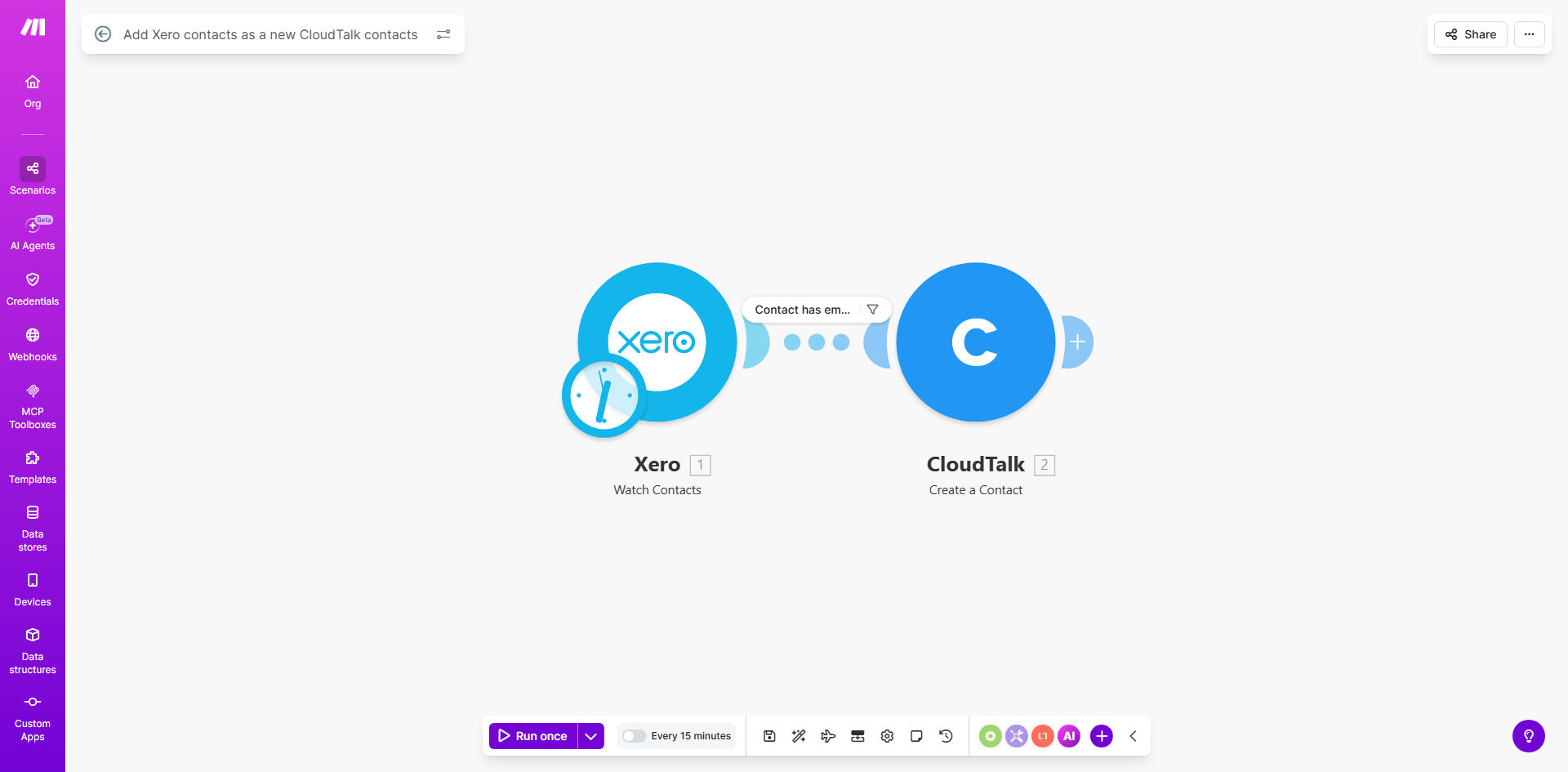
What This Workflow Does
For growing businesses, a disconnect between finance and sales systems is a common bottleneck. Your accounting team adds a new customer or lead into Xero, but your sales team using CloudTalk remains unaware, missing timely outreach opportunities. This manual gap leads to delayed follow-ups, inconsistent data, and wasted administrative hours spent on exporting and importing contact lists.
This automated workflow solves that by creating a seamless, real-time bridge between Xero and CloudTalk. Whenever a new contact is created in Xero (and meets your criteria, like having an email address), the automation instantly triggers. It collects the contact's details and creates a corresponding new contact entry in your CloudTalk account. This ensures your sales team has immediate access to call new leads or customers, straight from their familiar calling interface, without ever leaving their workflow.
Pro tip: Use this automation not just for new customers, but also for new suppliers or partners added in Xero, ensuring your business development team can proactively manage all key relationships.
How It Works
The automation follows a simple yet powerful sequence, ensuring reliability and data accuracy.
Step 1: Monitor Xero for New Contacts
The workflow starts by watching your Xero account for the "Create Contact" event. This is a passive trigger that waits for new data without needing to poll constantly, making it efficient and immediate.
Step 2: Filter and Validate Contact Data
Not every new Xero entry needs to be a CloudTalk contact. This step applies your business rules—for example, checking if the contact has a valid email address or belongs to the "Customer" account type. This filtering prevents irrelevant contacts from cluttering your sales CRM.
Step 3: Format Data for CloudTalk
The data from Xero is then mapped to the specific fields required by CloudTalk's API. This includes the contact's name, email, phone number, and company. You can customize this mapping to include custom notes or tags for better sales context.
Step 4: Create the Contact in CloudTalk
The formatted data is sent securely to CloudTalk via its API, creating a new contact in your specified list or with specific tags. The workflow can be set to add notes indicating the contact originated from Xero for easy tracking.
Step 5: Handle Errors and Log Results
If the sync fails (e.g., duplicate contact, API error), the workflow can send an alert to your team via email or Slack and log the issue for review, ensuring no contact falls through the cracks silently.
Who This Is For
This automation is ideal for any business that uses Xero for accounting/finance and CloudTalk for sales calls and customer communication. It's particularly valuable for:
- Sales-Driven SMBs: Companies where the sales team needs to act quickly on new leads or customer inquiries logged by finance.
- Accountants & Bookkeepers: Firms managing client books in Xero who want to provide added value by ensuring client sales teams have updated contact info.
- E-commerce Businesses: Where new customer orders in Xero should trigger immediate post-sale support or upsell calls.
- B2B Service Providers: Where new supplier or partner contacts in accounting need to be engaged by the business development team.
What You'll Need
To set up this integration successfully, ensure you have the following:
- An active Xero account with administrative access to generate API credentials.
- An active CloudTalk account with permissions to create and manage contacts via API.
- A Make.com account (free tier available) to host and run the automation scenario.
- A clear understanding of which Xero contact types (e.g., Customers, Suppliers) you want to sync.
- Basic field mapping plan (e.g., which Xero field corresponds to CloudTalk's "Phone" field).
Quick Setup Guide
Follow these steps to deploy your automated contact sync:
- Get the Template: Click "Get This Workflow" to copy the template into your Make.com account.
- Connect Xero: In the first module, authenticate your Xero account using OAuth. Select the specific Xero organization you want to monitor.
- Connect CloudTalk: In the CloudTalk module, authenticate with your API key or OAuth credentials from your CloudTalk settings.
- Set Your Filter: Configure the router or filter module to only process contacts that have an email address or match your desired account type.
- Map the Fields: Ensure the data from Xero (like 'Name', 'EmailAddress') is correctly mapped to the required CloudTalk contact fields.
- Test and Activate: Run a test by creating a dummy contact in Xero. Check if it appears correctly in CloudTalk. Once verified, turn the scenario ON.
Key Benefits
Eliminate 2-5 hours of weekly manual data entry by automating the transfer of contact information between your finance and sales platforms. Your team no longer needs to export, format, and import CSV files.
Accelerate sales response time by over 90% by giving your sales team instant access to new leads and customers the moment they enter your system, enabling same-day outreach that dramatically improves conversion rates.
Ensure 100% data consistency and accuracy between departments, removing the risk of human error from manual typing and ensuring everyone works from a single source of truth.
Scale your operations seamlessly without adding administrative overhead. Whether you add 10 or 100 new contacts a day, the automation handles the sync effortlessly.
Improve customer experience through faster, more informed follow-ups. Sales reps can call new contacts with full context from Xero data, leading to more personalized and effective conversations.