What This Workflow Does
For sales teams using CloudTalk for phone calls and Copper for CRM, a critical gap often exists: manual call logging. After a productive conversation, reps must switch contexts, open Copper, find the contact, and manually type notes, duration, and outcome. This process is not only time-consuming but prone to errors and omissions, leading to incomplete customer histories and missed follow-up opportunities.
This automation bridges that gap seamlessly. It acts as a digital assistant that listens for completed calls in CloudTalk and instantly creates a corresponding, detailed activity in the correct contact's record within Copper. The result is a perfectly synchronized system where your CRM always reflects the latest customer interaction, without any manual effort from your team.
How It Works
The workflow is a straightforward, reliable pipeline that moves data from your telephony system to your CRM the moment a call ends.
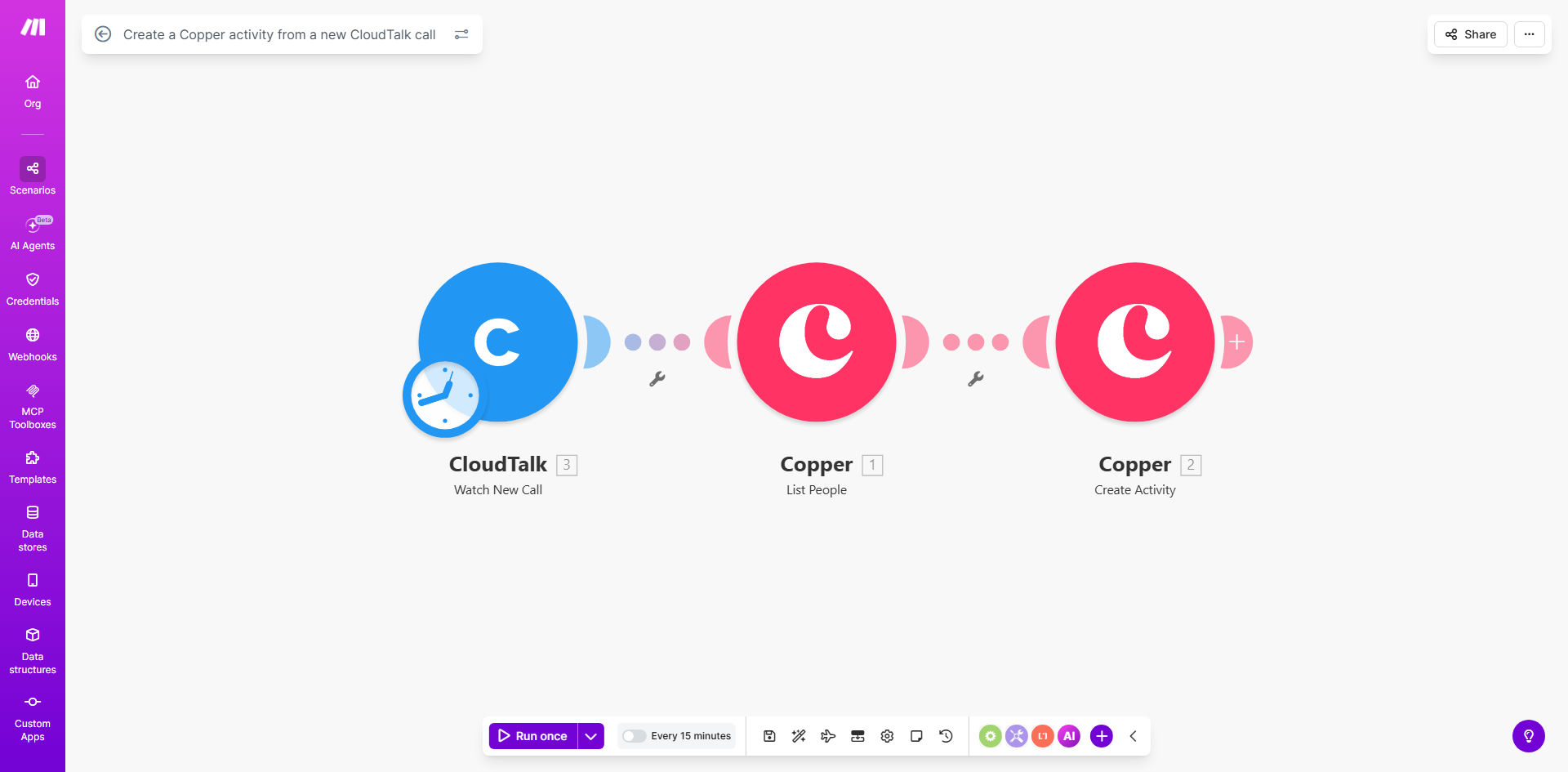
Step 1: Trigger on New CloudTalk Call
The automation is initiated by the "Call Finished" event in CloudTalk. Make.com watches for this trigger, capturing the call's payload which includes essential data like the caller's phone number, call duration, timestamps, direction (inbound/outbound), and any notes or tags added by the agent during the call.
Step 2: Find the Matching Contact in Copper
Using the phone number or contact details from the call, the workflow searches your Copper database for the corresponding Person record. This step is crucial—it ensures the activity is logged against the right contact. The template assumes the contact already exists, creating a clean, linked activity history.
Step 3: Create a Detailed Activity in Copper
Finally, the automation creates a new "Activity" in the found Copper person's record. It populates fields like the activity type (e.g., "Call"), a descriptive note summarizing the call, the date and time, duration, and any custom fields you wish to map. This creates a complete audit trail directly within the sales pipeline.
Pro tip: Use CloudTalk's tagging feature during calls (e.g., "Interested", "Demo Scheduled", "Callback Needed"). The automation can pass these tags to Copper, allowing you to trigger further automated actions based on call outcome, like sending a follow-up email or creating a task.
Who This Is For
This automation is a game-changer for sales teams, customer success managers, and support agents who rely on phone communication and use Copper CRM. It's ideal for businesses that make a high volume of calls and need to maintain impeccable records for compliance, coaching, or personalized customer engagement. Agencies managing client communications or real estate teams tracking lead calls will find immense value in this seamless sync.
What You'll Need
- A Make.com account (free tier available).
- An active CloudTalk account with admin access to generate an API key.
- A Copper CRM account with API access enabled.
- Existing contacts in Copper that correspond to the phone numbers calling in or being called from CloudTalk.
Quick Setup Guide
You can have this automation running in under 15 minutes.
- Clone the template: Click "Get This Workflow" to copy the scenario to your Make.com account.
- Connect your apps: Authorize Make.com to access both your CloudTalk and Copper accounts using API keys or OAuth.
- Map the data: Review the module settings to ensure key fields like phone number and call notes are correctly mapped from CloudTalk to the Copper activity fields.
- Test with a real call: Make a test call in CloudTalk, let it finish, and verify that a new activity appears in the corresponding Copper contact record.
- Activate: Turn the scenario on. It will now run automatically for every completed call.
Key Benefits
Eliminate 100% of manual call logging. Reps gain back 5-10 minutes per call, which can add up to hundreds of hours per year for a team, time better spent on selling or servicing customers.
Achieve 100% CRM accuracy. No more forgotten calls or sparse notes. Every interaction is captured instantly and consistently, building a rich, reliable customer history that anyone on the team can leverage.
Accelerate sales follow-up. With call details logged in real-time, the next step—whether it's sending a quote, scheduling a demo, or a follow-up call—can happen minutes after the conversation ends, significantly increasing conversion rates.
Gain actionable insights. Accurate call data in Copper enables powerful reporting on call volumes, outcomes, and rep performance, providing managers with the data needed for effective coaching and strategy.
Improve customer experience. When any team member can see a complete history of calls, they can provide context-aware, personalized service, making customers feel known and valued.