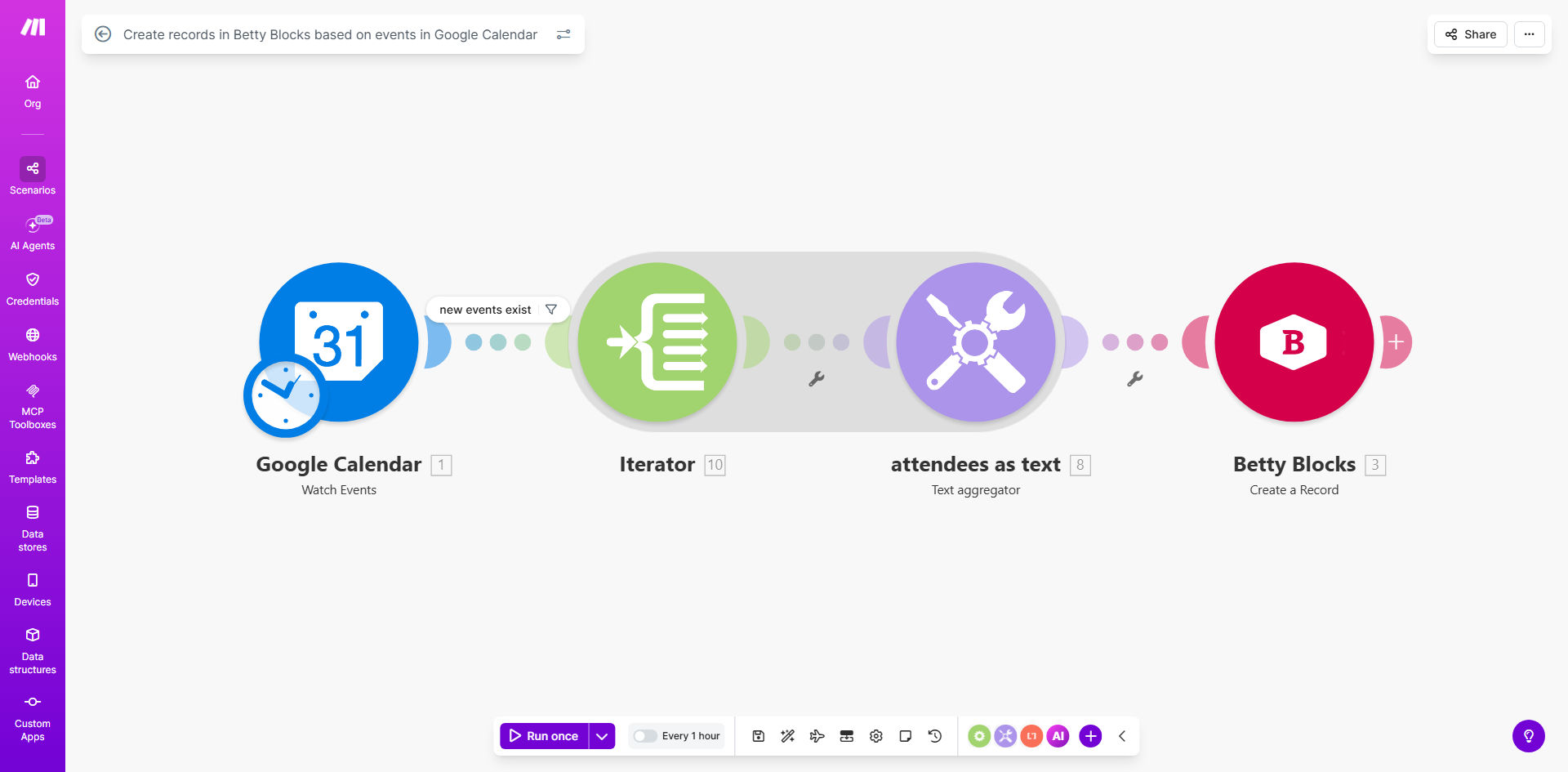
What This Workflow Does
Businesses that rely on meetings—client consultations, project syncs, team stand-ups—often struggle to capture the valuable data generated in those interactions. Manually transferring details from Google Calendar into a database like Betty Blocks is tedious, error-prone, and creates data silos. This disconnect means you can't easily report on meeting trends, automate follow-ups, or connect calendar activity to other business processes.
This automation solves that by creating a live bridge between Google Calendar and Betty Blocks. Whenever a new event is created or starts in your calendar, this workflow automatically captures all relevant details—who, what, when—and creates a corresponding, structured record in your Betty Blocks application. This transforms your calendar from a simple scheduling tool into a powerful data source that feeds your custom business software.
How It Works
The workflow runs on a schedule (default: hourly) to check for new activity, ensuring your Betty Blocks database is always up-to-date.
Step 1: Monitor Google Calendar for New Events
The automation is triggered by the "Watch Events" module in Make.com, which polls your specified Google Calendar for new events that have started. It captures the event in real-time as it begins.
Step 2: Extract and Structure the Event Data
The workflow parses the raw calendar event and extracts the key properties needed for your database: the event creator, the list of attendees, the start and end times, the meeting summary/title, and its status (e.g., "confirmed").
Step 3: Create a Record in Betty Blocks
Using the Betty Blocks API module, the workflow takes the structured data and creates a new record in your specified Betty Blocks data model. Each piece of calendar information is mapped to its corresponding property field in Betty Blocks, building a complete, queryable record of the meeting.
Pro tip: Use the "Status" field from Google Calendar to filter records in Betty Blocks. For instance, you could build a view that only shows records for "cancelled" meetings to analyze scheduling conflicts.
Who This Is For
This automation is ideal for any business using Betty Blocks to build custom applications and Google Calendar for scheduling. It's particularly valuable for:
- Consulting Firms & Agencies: Automatically log client meetings into a client portal or project management app built in Betty Blocks.
- HR & Recruitment Teams: Sync interview schedules directly into a candidate tracking system.
- Project Managers: Capture project planning and sync meetings into a project timeline database.
- Executive Assistants: Automate the creation of records for board meetings, including attendees and minutes preparation tasks.
- Coaches & Service Providers: Turn every booked session into a client history record for follow-up and service tracking.
What You'll Need
- A Make.com account (free tier available).
- A Google Cloud Project with the Calendar API enabled and OAuth 2.0 credentials to connect your Google Calendar.
- A Betty Blocks account with an existing application and data model.
- Your Betty Blocks data model must include properties to receive the calendar data. The template expects properties like: Creator (Text), Attendees (Long Text), Meeting Start (Date time), Meeting End (Date time), Summary (Text), Status (Text).
- Your Betty Blocks API Token for authentication.
Quick Setup Guide
- Get the Template: Click "Get This Workflow" to copy the template to your Make.com account.
- Connect Google Calendar: In the first module, authenticate Make.com with your Google account and select the specific calendar to watch.
- Connect Betty Blocks: In the "Create a Record" module, add your Betty Blocks API token, select your application, and choose the correct data model (e.g., "Meetings" or "Calendar Events").
- Map the Data Fields: Ensure the data from Google Calendar (creator, attendees, etc.) is correctly mapped to the corresponding property names in your Betty Blocks data model. Double-check date/time formats.
- Set the Schedule: The scenario is set to run every hour. You can adjust this interval in the scheduler module to run more or less frequently based on your needs.
- Test & Activate: Run the scenario once manually to test. Create a test event in your Google Calendar, then check if a corresponding record appears in Betty Blocks. Once confirmed, activate the scenario to run automatically.
Key Benefits
Eliminate Manual Data Entry: Save 5-15 minutes per meeting. For a team with 20 meetings a week, that's over 80 hours of recovered productivity annually, allowing staff to focus on strategic work instead of administrative copying and pasting.
Create a Single Source of Truth: Bring calendar data into your central Betty Blocks application, breaking down information silos. This enables unified reporting on meeting frequency, participant engagement, and time allocation across projects or clients.
Trigger Powerful Downstream Automations: Each new record in Betty Blocks can now act as a trigger for countless other workflows. Automatically assign follow-up tasks, send satisfaction surveys, update project statuses, or notify team members—all based on the simple act of a meeting starting.
Improve Data Accuracy & Compliance: Automated sync removes human error from data transfer. You maintain a precise, auditable log of all meetings, including attendees and timestamps, which is valuable for client billing, compliance, and internal reporting.
Scale Your Operations Seamlessly: As your team grows and meeting volume increases, this automation scales effortlessly. There's no additional manual work required, ensuring your database remains complete and actionable regardless of how busy you get.