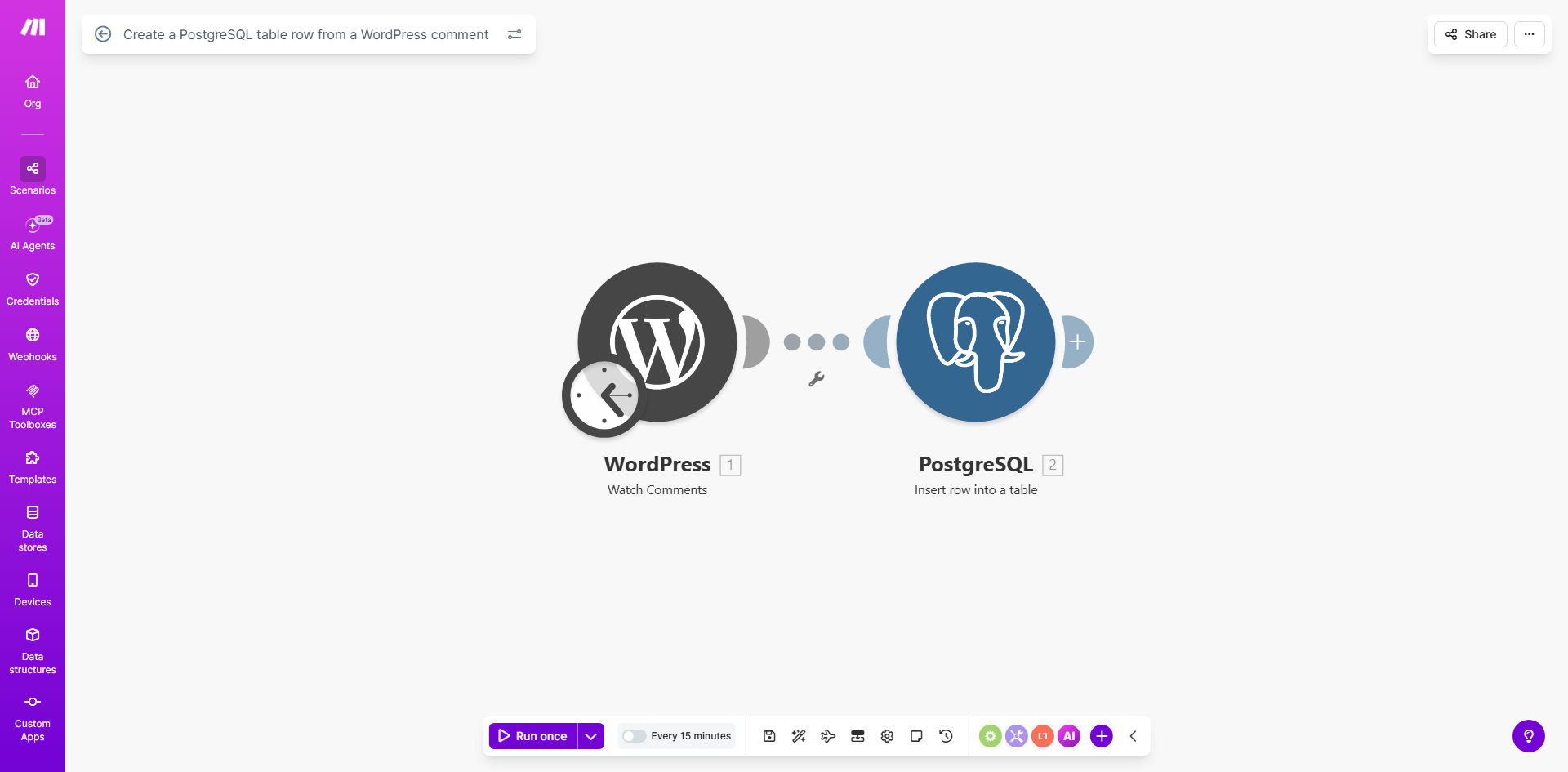
What This Workflow Does
For content-driven businesses, blogs, and community sites, user comments are a goldmine of feedback, engagement data, and customer insight. However, this valuable data is often trapped inside your WordPress database, making it difficult to analyze, back up securely, or connect with other business tools.
This automation solves that problem. Every time a new comment is posted on your WordPress site—whether it's approved automatically or after moderation—this workflow instantly captures it and creates a corresponding row in your PostgreSQL database. It transforms unstructured comment data into a structured, queryable format, turning user interactions into actionable business intelligence.
Beyond simple backup, this process creates a centralized truth for all user-generated content. Marketing teams can analyze sentiment, product teams can gather feature requests, and community managers can identify top contributors—all without touching the live WordPress site or risking performance issues from complex queries.
How It Works
The workflow acts as a real-time bridge between your website and your data warehouse. It's event-driven, efficient, and requires zero manual intervention once set up.
Step 1: Trigger on New Comment
The workflow is initiated by the WordPress module in Make.com, which watches for new comments. It can be configured to trigger on all comments or only approved ones, ensuring your PostgreSQL table stays clean and relevant.
Step 2: Extract & Structure Comment Data
The workflow parses the incoming comment, capturing key fields like the comment author's name, email, website, the comment content itself, the associated post ID, the publication date, and the comment's status (approved, pending, spam).
Pro tip: You can easily add data transformation steps here, such as calculating the comment length, extracting hashtags or mentions, or even performing initial sentiment analysis using a simple text filter before the data is stored.
Step 3: Insert Row into PostgreSQL
The structured data is then sent to the PostgreSQL module. The workflow maps each piece of comment information to a corresponding column in your designated database table. A successful insert confirms the data has been securely logged.
Step 4: (Optional) Logging & Error Handling
For reliability, the workflow can include steps to log each sync operation or send an alert if an insert fails—for example, if the database is temporarily unavailable. This ensures you have visibility into the automation's health.
Who This Is For
This template is ideal for any business or individual who values their website's user engagement data. Bloggers and Content Creators can track which topics generate the most discussion. Marketing Agencies managing client sites can provide added value by centralizing comment analytics. SaaS Companies with help articles or blogs can connect user questions to their support or product teams. Community Managers can identify and reward active participants based on structured data from PostgreSQL queries.
What You'll Need
- A WordPress website with comments enabled.
- A PostgreSQL database instance (from providers like AWS RDS, Google Cloud SQL, DigitalOcean, or a managed service).
- A Make.com account (free tier available).
- WordPress Application Password (for API access, created in your WordPress admin under Users).
- PostgreSQL connection details (host, port, database name, username, and password).
- A pre-created table in your PostgreSQL database with columns to match the comment data you wish to store (e.g., id, author, email, content, post_id, date).
Quick Setup Guide
You can have this automation running in under 20 minutes.
- Clone the Template: Click "Get This Workflow" and duplicate the scenario into your Make.com account.
- Configure WordPress: In the first module, add your WordPress site URL and the generated application password to establish the connection.
- Connect PostgreSQL: In the database module, input your PostgreSQL host, database name, username, and password. Test the connection.
- Map the Data: Ensure the fields from the WordPress comment (author, content, etc.) are correctly mapped to the column names in your PostgreSQL table.
- Set the Schedule: The WordPress module can poll for new comments at a set interval (e.g., every 15 minutes) or use a webhook for instant triggers if supported.
- Test & Activate: Run the scenario once manually by posting a test comment. Verify the row appears in your PostgreSQL table, then turn the scenario on.
Key Benefits
Eliminate Manual Data Entry & Reduce Risk: Automatically backing up every comment saves countless hours and completely removes the risk of human error or data loss from WordPress issues, server failures, or accidental deletion.
Unlock Advanced, Performance-Safe Analytics: Run complex SQL queries, joins, and aggregations on your comment data in PostgreSQL without putting any load on your live WordPress site. Analyze trends over years of data in seconds.
Create a Centralized Customer Intelligence Hub: PostgreSQL becomes a unified repository. You can join comment data with email lists, purchase history (from other integrations), or support tickets to build a 360-degree view of your audience.
Ensure Compliance and Data Portability: Having user-generated content in your own database simplifies compliance with data requests (like GDPR right to access) and makes migrating platforms or performing audits straightforward.
Build a Foundation for Future Automation: Once comments are in PostgreSQL, you can trigger countless other actions: welcome emails to new commenters, Slack alerts for comments containing specific keywords, or automatic scoring of community engagement.