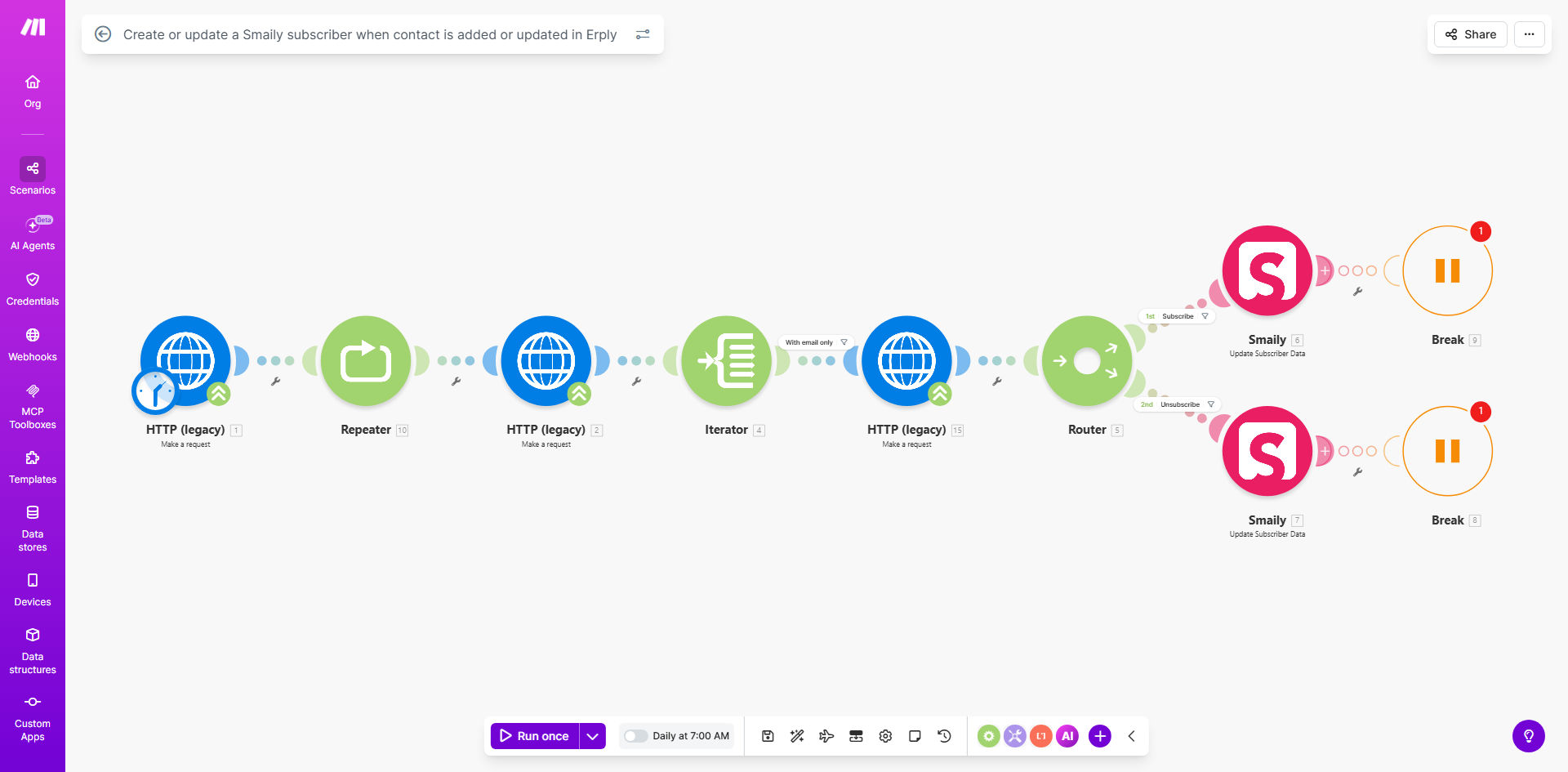
What This Workflow Does
For retail and e-commerce businesses using Erply as their point-of-sale system, customer data is constantly being created and updated. However, this valuable information often remains siloed, disconnected from marketing tools like Smaily. Manually exporting CSV files from Erply and importing them into Smaily is a tedious, error-prone process that wastes valuable time and leads to outdated marketing lists.
This automated workflow solves that problem by creating a real-time bridge between Erply and Smaily. Whenever a new customer is added or an existing customer's details change in Erply, the system automatically checks if they exist in Smaily. If they do, it updates their subscriber profile with the latest information. If they don't, it creates a new subscriber. This ensures your email marketing audience is always accurate, complete, and ready for targeted campaigns.
The result is a seamless flow of customer data from your sales system to your marketing platform, enabling timely welcome emails, personalized promotions based on purchase history, and consistent communication that drives repeat business—all without lifting a finger.
How It Works
The automation follows a logical sequence to ensure data integrity and efficiency.
Step 1: Monitor Erply for Contact Changes
The workflow starts with a Make.com module that watches your Erply account for specific events. It can be triggered by the creation of a new contact or any update to an existing contact's information, such as email address, phone number, or name changes.
Step 2: Extract and Format Contact Data
Once a trigger is detected, the workflow extracts the relevant contact fields from Erply. This typically includes the customer's first name, last name, email address, phone number, and any custom fields you wish to sync. The data is then formatted to match Smaily's expected input structure.
Pro tip: Use Erply's "Customer Group" or "Type" field to segment contacts in Smaily automatically. For example, sync "Wholesale" customers to a different list than "Retail" customers for tailored messaging.
Step 3: Check for Existing Subscriber in Smaily
Before creating a new entry, the workflow queries your Smaily account using the contact's email address as a unique identifier. This search determines whether the person is already on your list.
Step 4: Create or Update the Subscriber
Based on the search result, the workflow takes one of two actions. If the email is not found, it creates a new subscriber in your designated Smaily list. If the email is found, it updates the existing subscriber's information with the new data from Erply, ensuring their profile is current.
Step 5: Handle Errors and Log Results
The final step involves error handling. If the sync fails (e.g., due to an invalid email format), the workflow can send you a notification or log the issue for review. Successful operations are also recorded, giving you visibility into the automation's activity.
Who This Is For
This automation is ideal for any business that uses Erply for sales and Smaily for email marketing. It's particularly valuable for:
- Retail Stores & Boutiques: To automatically add in-store customers to their email loyalty program.
- E-commerce Merchants: To ensure online customer data from Erply's e-commerce module flows directly into marketing campaigns.
- Multi-location Businesses: To centralize customer data from all Erply registers into a single, updated Smaily master list.
- Marketing Managers: Who are tired of requesting manual customer exports from the sales team and need real-time list accuracy.
- Businesses Scaling Their Operations: Where manual data entry between systems is becoming a bottleneck to growth.
What You'll Need
To implement this workflow, you will need the following prerequisites:
- An active Erply account with API access enabled.
- An active Smaily account with API credentials.
- A Make.com account (free tier is sufficient to start).
- Basic understanding of which Erply contact fields (name, email, phone, custom fields) you want to sync.
- Decide which Smaily list you want to sync contacts into.
Quick Setup Guide
Follow these steps to get your automation running in under 15 minutes:
- Clone the Template: Click the "Get This Workflow" button above to open the template in your Make.com account and create a copy.
- Connect Erply: In the first module, click to add your Erply connection. You'll need your Erply API key, client code, and username.
- Connect Smaily: In the Smaily modules, add your connection using your Smaily subdomain, username, and API password.
- Map Your Fields: Review the data mapping between Erply and Smaily. Ensure fields like 'email' and 'name' are correctly aligned.
- Choose Your List: Specify the exact Smaily list ID where new subscribers should be added.
- Test the Flow: Turn on the scenario and create or update a test contact in Erply. Verify it appears correctly in your Smaily account.
- Go Live: Once testing is successful, your automation is ready to run 24/7.
Key Benefits
Save 5-10 hours per month on manual data entry. Eliminate the repetitive task of exporting, formatting, and importing contact lists between systems. Your team can focus on strategic marketing instead of administrative work.
Improve email campaign performance with 100% accurate lists. By syncing in real-time, you ensure every new customer is added to your list immediately, enabling timely welcome sequences that boost engagement and conversion rates.
Enhance customer profiles with rich data. Sync more than just email addresses. Bring over phone numbers, purchase history tags from Erply, and customer types to create highly segmented and personalized email campaigns in Smaily.
Eliminate human error and data decay. Automated sync removes typos, forgotten updates, and outdated entries that plague manual processes, ensuring your marketing communications reach the right person every time.
Scale your marketing efforts seamlessly. As your business grows and you add more customers in Erply, your Smaily list grows automatically without any additional effort, future-proofing your marketing operations.